

TL;DR
A good kids song is short, repetitive and easy to sing back after one listen: a simple melody, a chorus that comes round again and again, and a few concrete words a small child already knows. If you can put the child's own name in it, even better. The quickest way to make a kids song is the kids song generator: the Prompt box opens with a name song for a four-year-old called Milo, and six "Start from a vibe" tiles each play a finished example and copy its exact prompt into the box. Swap in your own child, topic or routine, press Generate Music for Free, and about a minute later you have two original kids songs. One run costs 10 credits, and new accounts in many countries get 16 free credits on sign-up.
In this guide
- What makes a kids song work
- Step by step with the kids song generator
- How to write a kids song prompt of your own
- Six kinds of kids songs with proven prompts
- Common kids song mistakes
- Choosing a model
- After the song is made
- FAQ
- Final take
What makes a kids song work
Kids songs look simple, and that is the point. Every part of a kids song is there to help a small child join in, and each part is a phrase you can put in a prompt:
- One clear job. A kids song is usually for something: learning to count, brushing teeth, falling asleep, remembering the planets, or just hearing your own name. Say what the song is for and the rest follows.
- Repetition. The chorus comes back often and changes little. Simple words a preschooler can sing along to or easy chorus to memorize tells the generator to keep it tight.
- The child's name. Nothing gets a toddler's attention like hearing their own name sung. Put it in the prompt and ask for it in the chorus.
- Friendly instruments. Ukulele, glockenspiel, xylophone, marimba, acoustic guitar, handclaps. They sound bright without being loud.
- A warm voice, and maybe a choir. Bright friendly female vocal with a children's choir joining the chorus or call-and-response between a teacher voice and a children's choir gives kids a part to sing.
- The right tempo. Counting and learning songs need to be slow enough to count along; lullabies want a slow 6/8 rocking feel; animal songs can be joyful and loud.
The preset on the page puts it all in one line: A cheerful kids song for a four-year-old boy named Milo, his name sung in the chorus, bouncy ukulele, glockenspiel and handclaps, bright friendly female vocal with a children's choir joining the chorus, simple words a preschooler can sing along to. Change Milo and four-year-old boy, and you have a kids song with your own child's name in it.
Step by step with the kids song generator
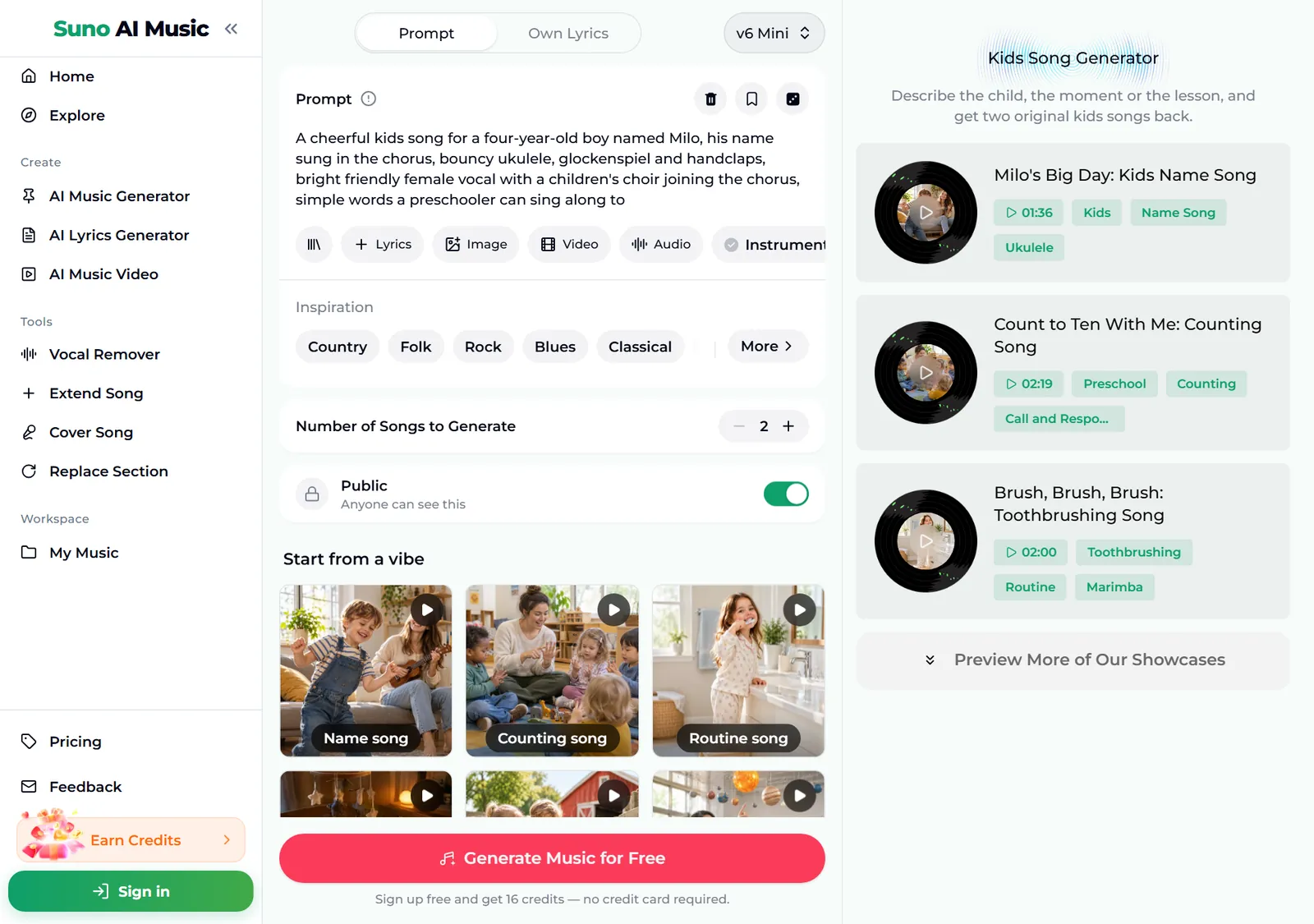
- Open the kids song generator. It is the same studio as the main AI music generator, set up for kids songs. The Prompt tab is selected, the box holds the Milo name song recipe, and Instrumental is off, so the song comes back sung.
- Look over the form. Under the box are chips for your library, + Lyrics, a reference Image, Video and Audio, and Instrumental. Below sit an Inspiration row of genre chips, Number of Songs to Generate (2 by default) and the Public switch.
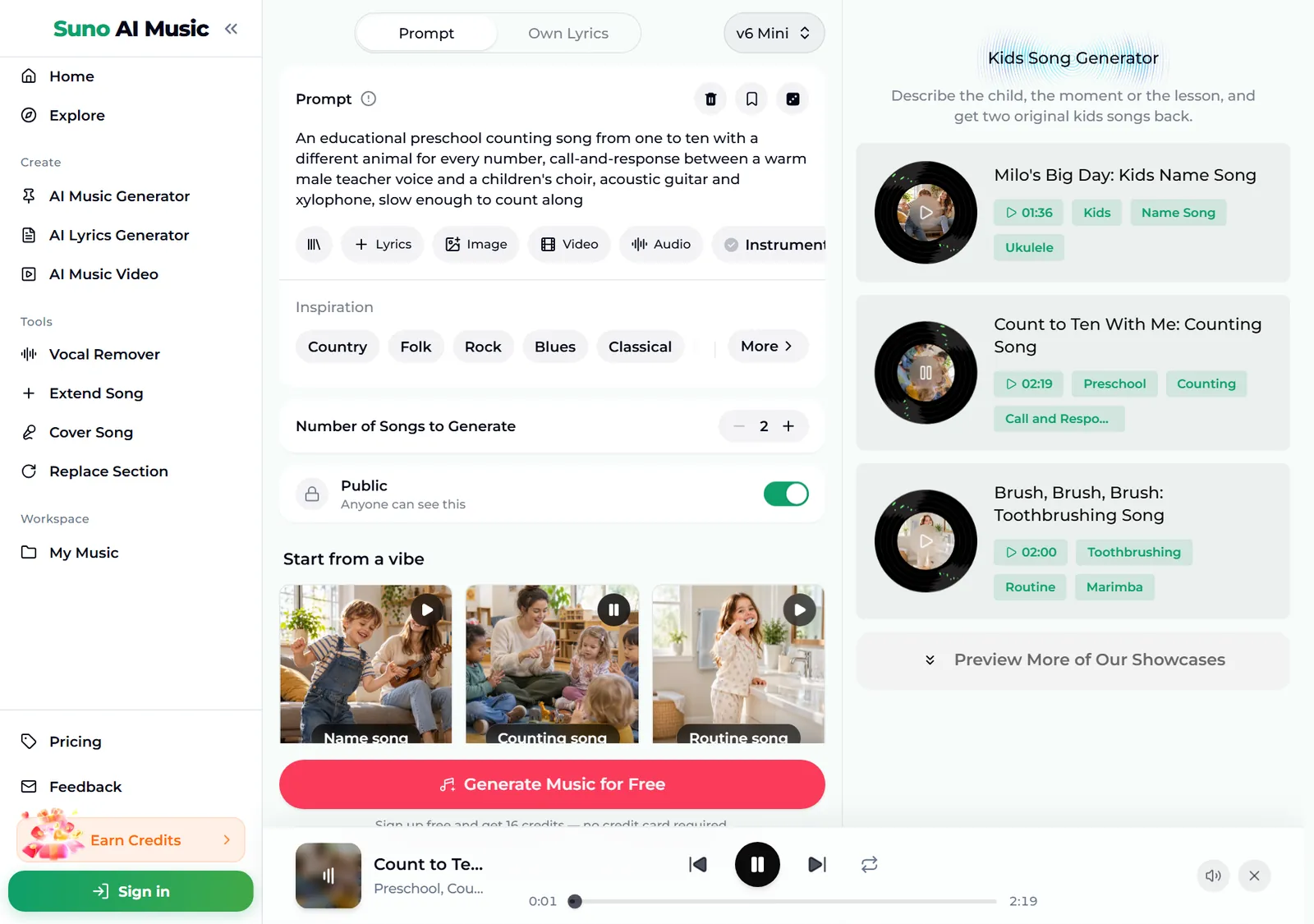
- Play a vibe before you spend anything. Tap a tile under Start from a vibe. One tap plays that tile's example in the player bar and copies its prompt into the Prompt box. Below, we tapped Counting song: the tile shows a pause icon, the Prompt box now holds a preschool counting song from one to ten, and the player bar plays "Count to Ten With Me", 2:19 long.
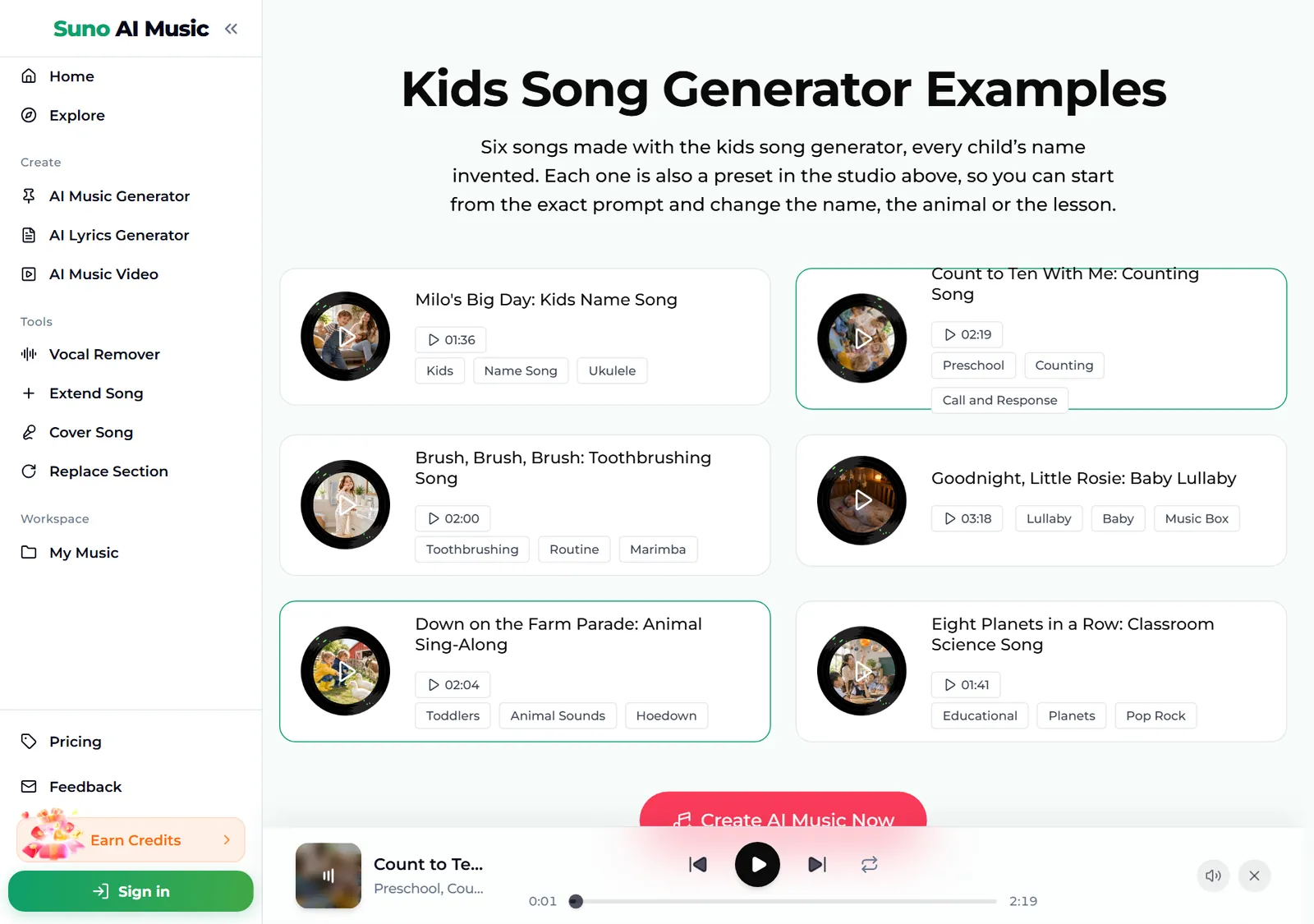
- Browse all six examples. Further down, the Kids Song Generator Examples section lists every track with its length and tags: a name song, a counting song, a toothbrushing song, a lullaby, a farm animal sing-along and a planets song. Each card is also a preset in the studio above.
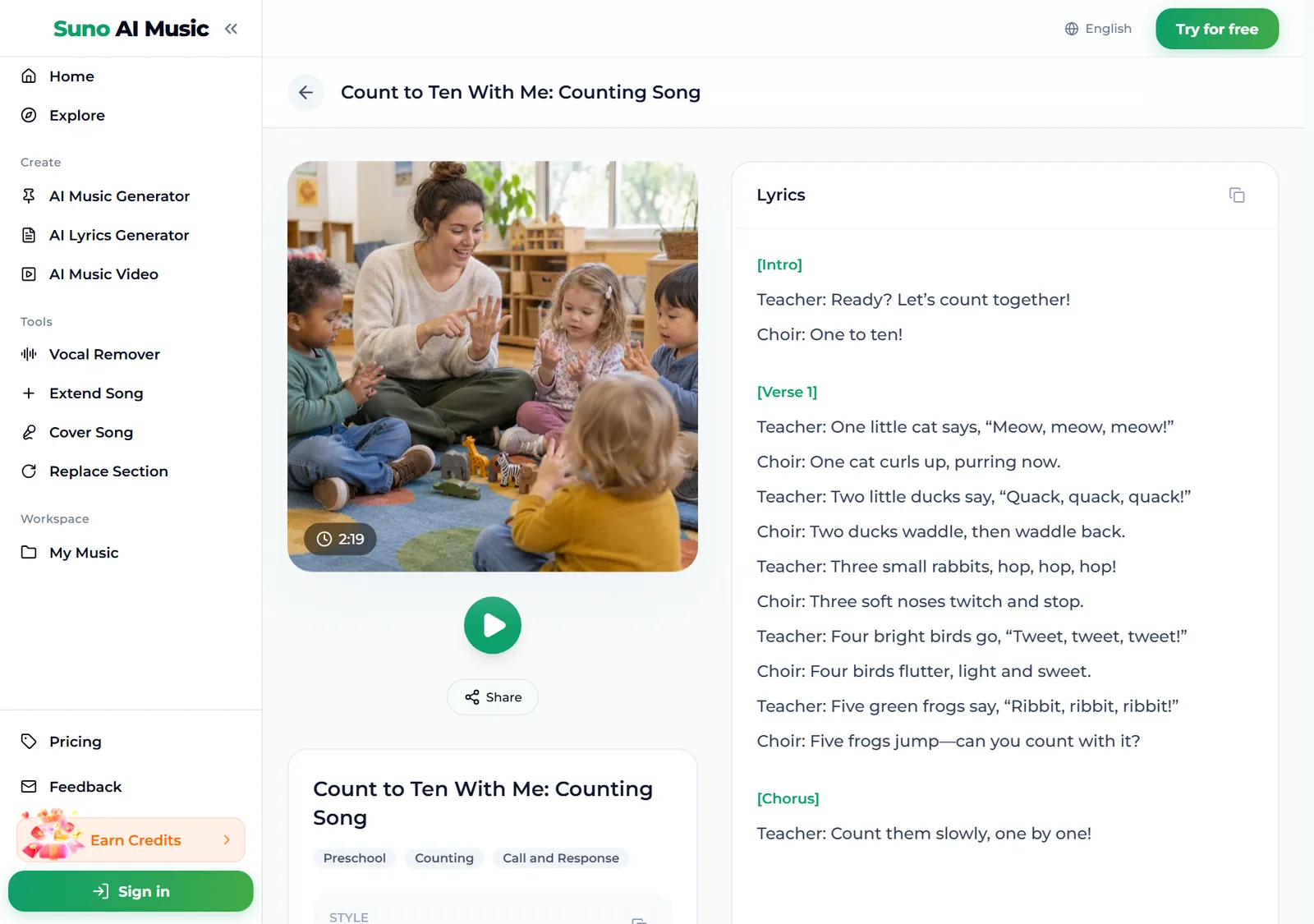
- Open an example to read the lyrics. Each track has its own page, for example Count to Ten With Me, with the cover, a play button, Share, its tags and the full lyrics. You can see the call-and-response structure: the teacher sings a line, the choir answers, and every number gets an animal.
- Press Generate Music for Free. Logged out, the button asks you to sign up first. A run takes about a minute and returns two kids songs, new music in the style of the prompt rather than copies of the example.
How to write a kids song prompt of your own
The presets make a decent kids song in one tap. To make a kids song that fits your child or class, swap in your details and change one thing per run.
- Start with the purpose. Name song, counting song, toothbrushing routine song, lullaby, classroom science song. That first phrase sets the whole shape.
- Name the child and the age. A four-year-old boy named Milo or a baby girl named Rosie. The age tells the generator how simple the words should be.
- Give it a list. Learning kids songs work best with a list the song walks through: one to ten with a different animal for every number, top teeth, bottom teeth, front and back, the eight planets in order from the sun.
- Pick two or three friendly instruments. Ukulele and glockenspiel, music box and fingerpicked guitar, banjo and fiddle.
- Give the kids a part. Kids choir doing the animal noises, kids shouting each planet name, call-and-response. A part to shout is what turns listening into singing.
- Set the tempo and mood. Slow enough to count along, calm and sleepy, joyful and loud.
For exact words, write the lyrics yourself in the Own Lyrics tab, for example a song with your class rules, your family's bedtime order or a phonics list from this week's lesson.
Six kinds of kids songs with proven prompts
These are the six tiles on the kids song generator, with the exact prompt each one fills in. Every example was generated on v6 from that prompt, so you can hear each kids song before you make your own.
| Vibe | What it is | Prompt |
|---|---|---|
| Name song | Child's name in the chorus, 1:36 example | A cheerful kids song for a four-year-old boy named Milo, his name sung in the chorus, bouncy ukulele, glockenspiel and handclaps, bright friendly female vocal with a children's choir joining the chorus, simple words a preschooler can sing along to |
| Counting song | One to ten with animals, 2:19 example | An educational preschool counting song from one to ten with a different animal for every number, call-and-response between a warm male teacher voice and a children's choir, acoustic guitar and xylophone, slow enough to count along |
| Routine song | Two-minute toothbrushing, 2:00 example | A two-minute toothbrushing routine song for kids, top teeth, bottom teeth, front and back, playful upbeat pop with marimba and claps, cheerful female vocal, a counting bridge, ends with a big sparkly smile |
| Lullaby | Music box for a baby, 3:18 example | A gentle lullaby for a baby girl named Rosie, soft whispery female vocal, music box, fingerpicked acoustic guitar and warm strings, slow 6/8 rocking feel, stars and the moon keeping watch, calm and sleepy |
| Animal sing-along | Farm hoedown for toddlers, 2:04 example | A silly farm animal sing-along for toddlers, every verse a new animal and its sound, cows, ducks, pigs and sheep, banjo and fiddle hoedown, kids choir doing the animal noises, joyful and loud |
| Classroom science | The eight planets, 1:41 example | An upbeat classroom science song that names the eight planets in order from the sun, catchy pop rock for elementary school students, clear male vocal, kids shouting each planet name, easy chorus to memorize |
Two extra recipes of our own, untested, if you want to go beyond the six:
- Clean-up song (untested): a bouncy clean-up time song for a preschool class, toys in the box, books on the shelf, shoes by the door, upbeat ukulele and claps, cheerful female vocal, short repeated chorus
- Alphabet song with a twist (untested): a funky alphabet song for kindergarten, one word for every letter, A for apple to Z for zebra, playful bass and drums, kids choir echoing each letter
For a birthday, the AI birthday song generator puts the child's name in a party song; for the holidays, a personalized Christmas song makes a gift of it.
Common kids song mistakes
- Too many words. Adults write verses; a kids song lives on its chorus. If the result is wordy, ask for simple words and a short repeated chorus.
- No purpose. "A song for kids" gives you something generic. "A song to make tooth brushing last two minutes" gives you something you will actually use every night.
- Too fast. A counting kids song that races past the numbers teaches nothing. Ask for slow enough to count along or slow and clear.
- Asking for a famous nursery rhyme. The generator writes new music rather than covering existing songs. Describe the feel instead, a gentle traditional-sounding lullaby or a clapping game song.
- Skipping the read-through. The songs are written to be child-friendly, but read the lyrics in your library before you play a kids song to a class.
- Judging from one take. Each run returns two kids songs. Children have strong opinions; let them vote.
Choosing a model
The model picker sits at the top right of the form.
- v6 Mini is the free tier, described as "Fast drafts, high volume". It is a good place to try names, topics and instruments.
- v6 is "Most powerful, for any song". All six example tracks were made on v6, with clearer words and a better choir. It needs a paid plan.
- v6 Wild is "Best for experimental ideas", also on paid plans, for things like a space-themed lullaby with synth pads.
Every run costs the same 10 credits for two songs, whichever model you pick. Plans and credit packs cover everything after the free sign-up credits.
After the song is made
- Make it longer. Extend Song adds another verse, useful when a routine song needs to fill exactly two minutes.
- Fix one line. Replace Section rewrites a single part, for example a verse with a word your toddler cannot say yet.
- Make a sing-along track. The vocal remover splits the song into vocals and instrumental, so the class can sing the words themselves.
- Turn a poem into a song. If you already have the words, lyrics to song sets them to music.
- Download it. Kids songs download as MP3 with any plan or credit pack; pricing lists what each one includes.
FAQ
How do you make a kids song with AI?
Describe what the song is for, who it is for and how it should sound in the kids song generator, for example a name song for a four-year-old named Milo with ukulele and a children's choir, or tap a vibe tile to start from a proven prompt. Press Generate and you get two original songs in about a minute.
Can the song say my child's name?
Yes. Put the name in the description and ask for it in the chorus. Spell an unusual name the way it is said so the singer pronounces it right.
Can teachers use it for lessons?
Yes. Describe the topic and give the song a list to walk through, such as the planets, the days of the week or the steps of hand washing. Ask for an easy chorus to memorize and kids shouting the key words.
Can it make a lullaby?
Yes. Ask for a soft vocal, a music box or fingerpicked guitar, a slow 6/8 rocking feel and calm and sleepy, or start from the Lullaby tile.
Can I use the kids songs on a YouTube channel?
Songs made on the Standard plan and above, 2,500+ credit packs and Team plans carry a commercial licence. Songs made with sign-up credits, on the Starter plan or with a Mini credit pack are for personal use only.
Can I make a version without vocals?
Yes. Switch on Instrumental for music with no singing, or use the vocal remover on a finished song to get a sing-along track.
Final take
A kids song is the simplest kind of song to describe: one purpose, a repeated chorus, friendly instruments and words a child already knows, plus their name if you can. Start from a vibe on the kids song generator, swap in your child, your class or your routine, and change one detail per run until the kids song is the one they ask for again.