
TL;DR
A theme song has a few seconds to tell the audience what show they are watching or listening to, and it plays every single episode. That is why the good ones are short, say the show's name early, and match the tone of the show: funky for a comedy podcast, punchy for a gaming channel, warm and goofy for a family sitcom. The quickest way to make a theme song is the theme song generator: the Prompt box opens with a podcast intro recipe for a show called The Weekly Fix, and six "Start from a vibe" tiles each play a finished example and copy its exact prompt into the box. Swap in your show's name and sound, press Generate Music for Free, and about a minute later you have two original themes. One run costs 10 credits, and new accounts in many countries get 16 free credits on sign-up.
In this guide
- What makes a theme song work
- Step by step with the theme song generator
- How to write a theme song prompt of your own
- Six theme song styles with proven prompts
- Common theme song mistakes
- Choosing a model
- Intros, outros and stings that match
- FAQ
- Final take
What makes a theme song work
Think of the TV themes you still remember. Almost all of them do the same few things, and each one is a phrase you can put in a prompt:
- The name, early. A catchy sung hook that says the show name in the first ten seconds. If the audience only hears five seconds, they should still hear the name.
- A tone that matches the show. A true crime podcast and a kids' channel need very different openings. Say what kind of show it is: weekly comedy podcast, gaming creator, 90s family sitcom, Saturday morning cartoon.
- A signature sound. Horn stabs, a saxophone, a whistle, a synth lead. One instrument the audience connects with your show is worth more than a busy mix.
- Short and loopable. Intros are often five to thirty seconds. Ask for made for a short intro or loops cleanly for a countdown screen.
- Vocals or not. A sung hook makes the name stick. A theme with no vocals sits under your voice when you start talking.
- A family of cues. Many shows use an intro, an outro and a short sting from the same theme. Keep the genre and instruments the same and they sound like one show.
The preset on the page puts it in one line: A short upbeat theme song for a weekly comedy podcast called The Weekly Fix, funky bass and drums, horn stabs, a catchy sung hook that says the show name in the first ten seconds, fun and confident. Change the name and the type of show, and you already have a working theme song prompt.
Step by step with the theme song generator
- Open the theme song generator. It is the same studio as the main AI music generator, set up for shows and channels. The Prompt tab is selected, the box holds The Weekly Fix podcast recipe, and Instrumental is off, so the theme comes back with a sung hook.
- Look over the form. Under the box are chips for your library, + Lyrics, a reference Image, Video and Audio, and Instrumental. Below sit an Inspiration row of genre chips, Number of Songs to Generate (2 by default) and the Public switch.
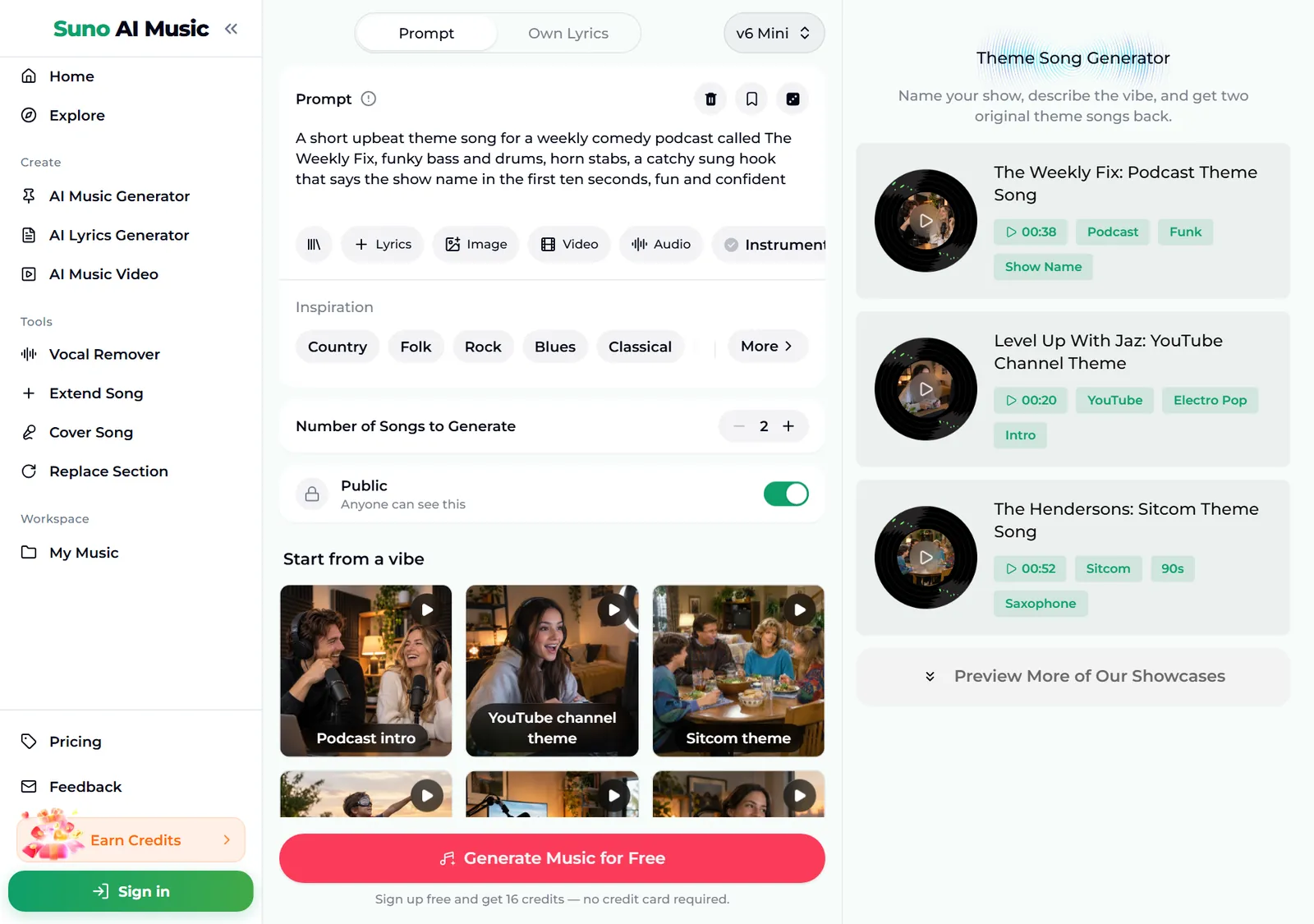
- Play a vibe before you spend anything. Tap a tile under Start from a vibe. One tap plays that tile's example in the player bar and copies its prompt into the Prompt box. Below, we tapped YouTube channel theme: the tile shows a pause icon, the Prompt box now holds the gaming channel recipe, and the player bar plays "Level Up With Jaz", just 20 seconds long.
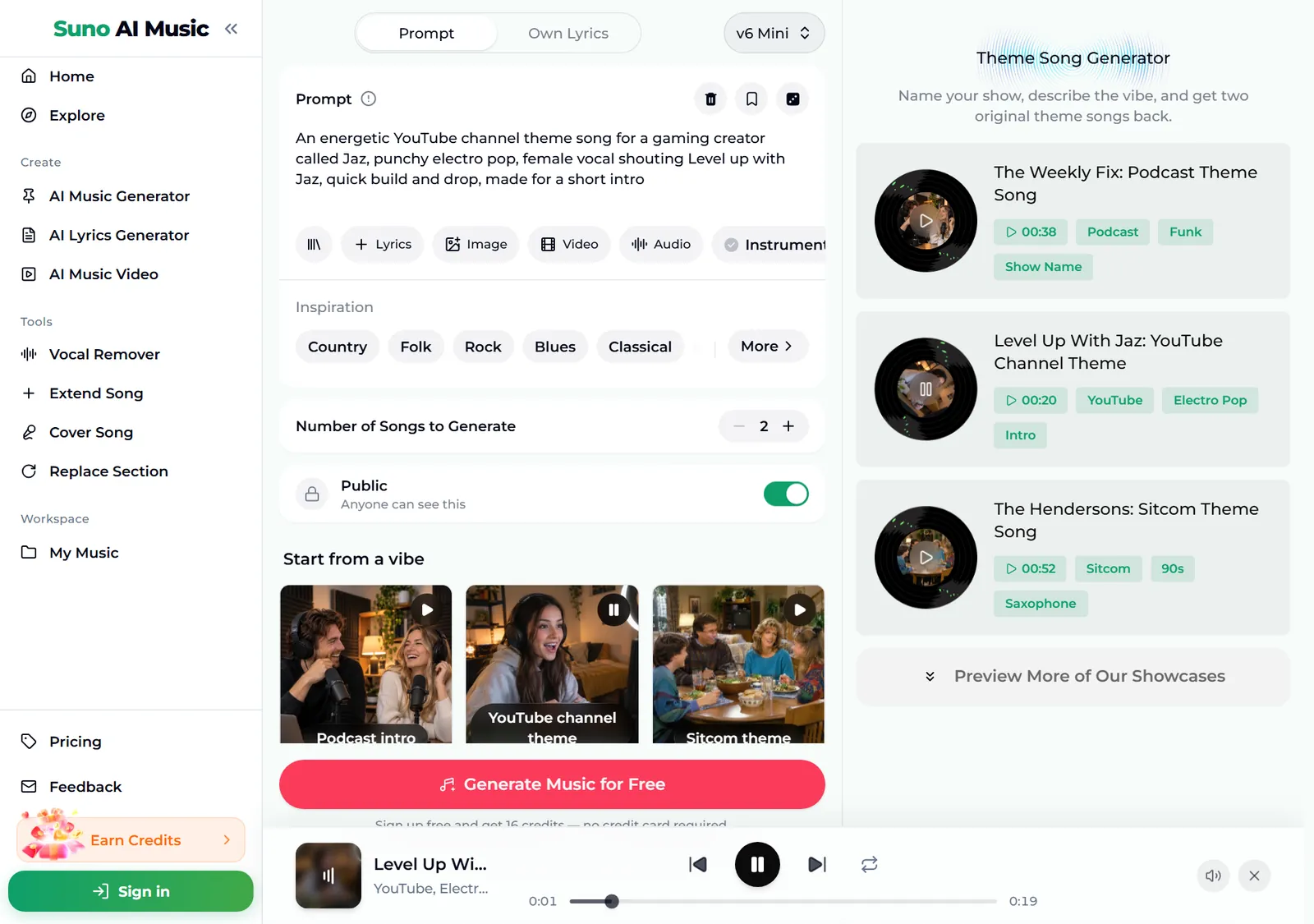
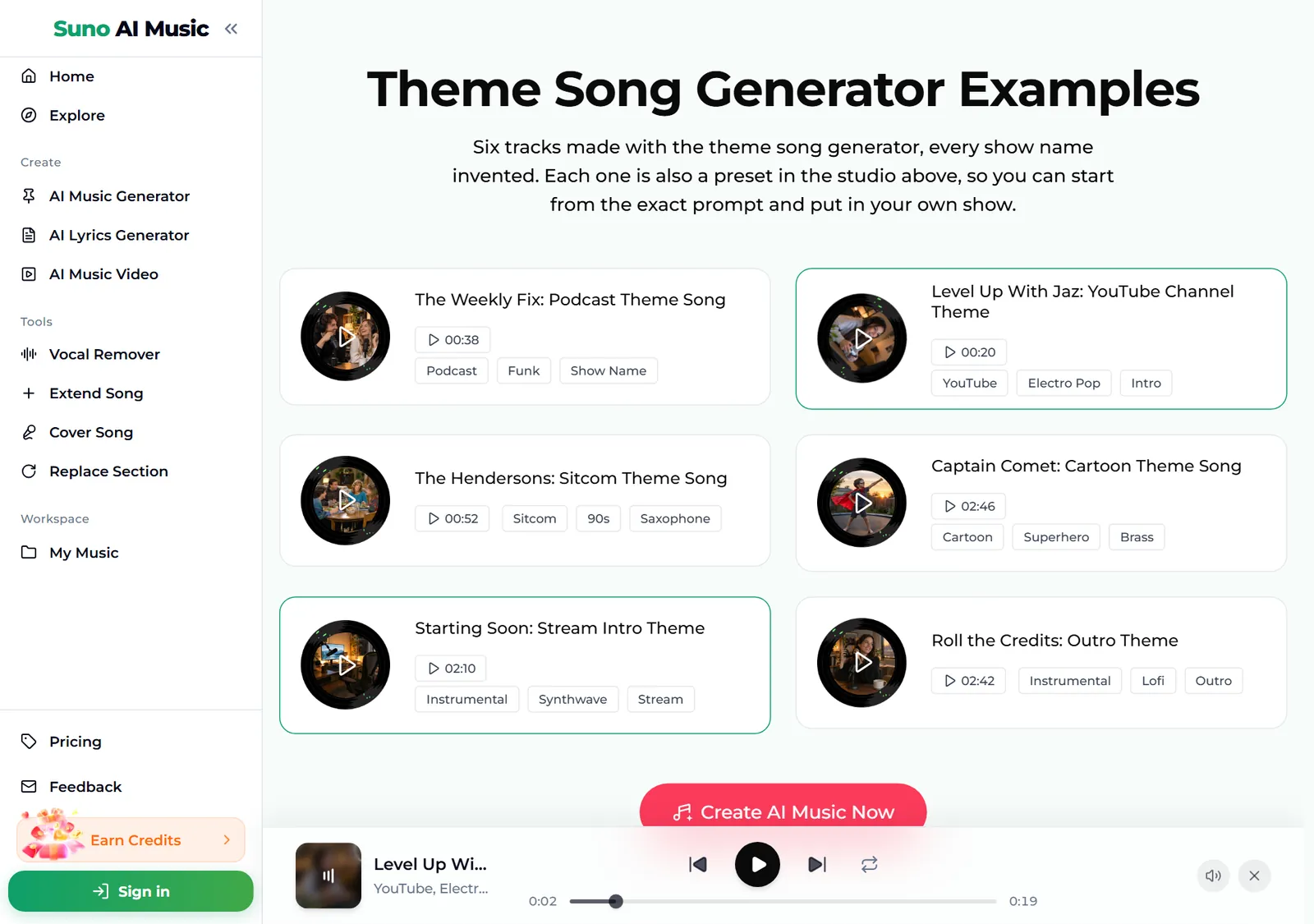
- Browse all six examples. Further down, the Theme Song Generator Examples section lists every track with its length and tags. Every show name is invented, and each card is also a preset in the studio above.
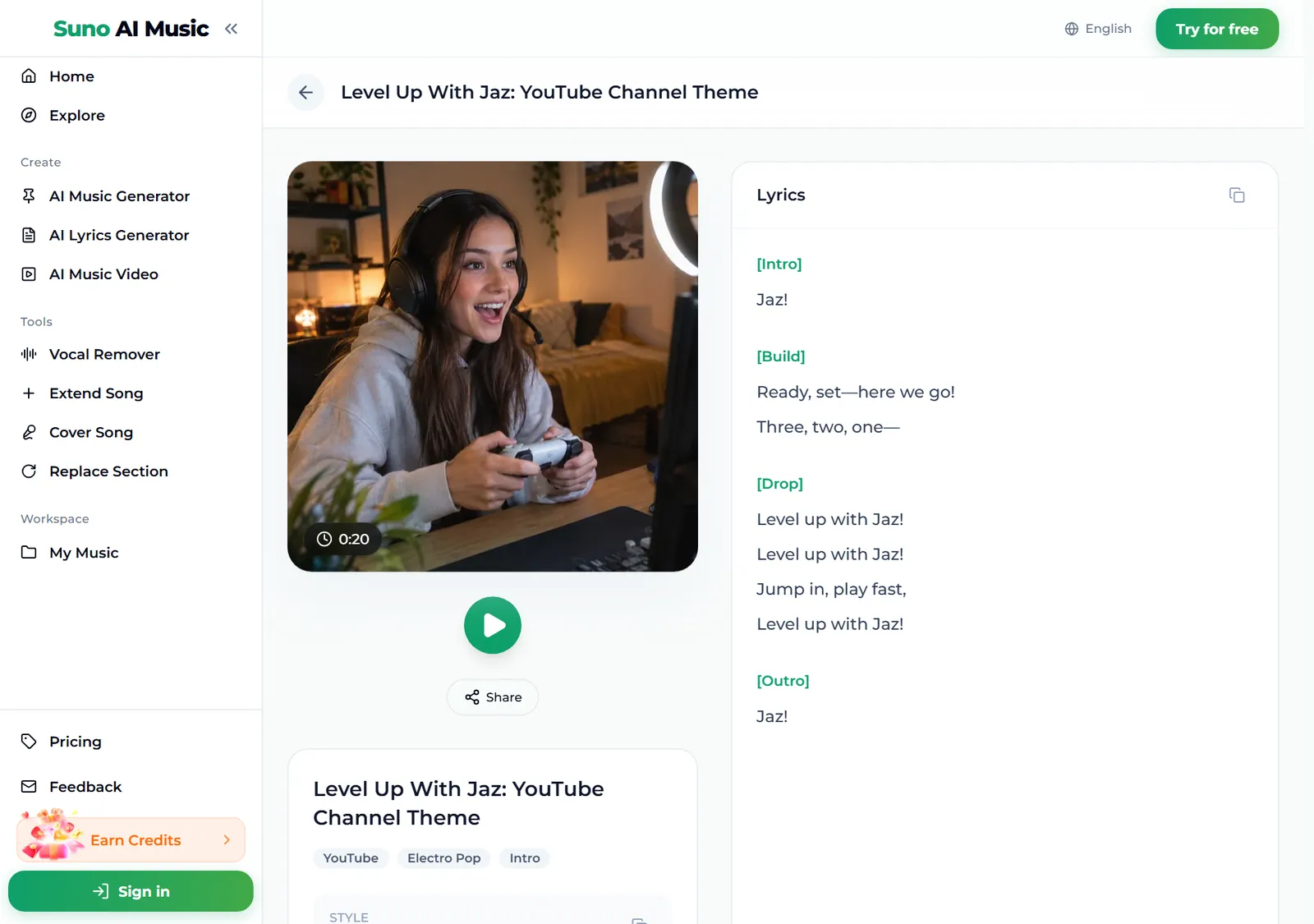
- Open an example to read the lyrics. Each track has its own page, for example Level Up With Jaz, with the cover, a play button, Share, its tags and the lyrics. A good intro theme can be almost nothing: "Jaz!", a three-two-one build, and "Level up with Jaz!" on the drop.
- Press Generate Music for Free. Logged out, the button asks you to sign up first. A run takes about a minute and returns two themes, new music in the style of the prompt rather than copies of the example. Lengths vary by take: some come back under a minute, others run two to three minutes, and you use the opening as your intro.
How to write a theme song prompt of your own
The presets give you a working theme song in one tap. To make one that sounds like your show, swap in your details and change one thing per run.
- Name the show and the format. A cooking podcast called Second Helpings, a travel vlog called Wrong Turn, a Twitch stream called Late Shift.
- Say who the audience is. Kids, gamers, true crime fans, small business owners. It changes the whole tone.
- Pick one signature sound. Horn stabs, whistling, warm acoustic guitar, synthwave lead, brass fanfare.
- Put the name in the hook, and say when. A sung hook with the name in the first five seconds is the most useful phrase in a theme song prompt.
- Ask for the length you need. Made for a short intro, quick build and drop, or loops cleanly for a waiting screen.
- Decide on vocals. For a theme you will talk over, switch on Instrumental or write no vocals.
A theme song prompt like a short upbeat theme for a cooking podcast called Second Helpings, warm acoustic guitar, whistling and a sung hook with the name in the first five seconds works far better than "intro music".
Six theme song styles with proven prompts
These are the six tiles on the theme song generator, with the exact prompt each one fills in. Every example was generated on v6 from that prompt, so you can hear each theme song before you make your own.
| Vibe | What it is | Prompt |
|---|---|---|
| Podcast intro | Funk with the show name, 0:38 example | A short upbeat theme song for a weekly comedy podcast called The Weekly Fix, funky bass and drums, horn stabs, a catchy sung hook that says the show name in the first ten seconds, fun and confident |
| YouTube channel theme | Electro pop intro, 0:20 example | An energetic YouTube channel theme song for a gaming creator called Jaz, punchy electro pop, female vocal shouting Level up with Jaz, quick build and drop, made for a short intro |
| Sitcom theme | 90s family sitcom, 0:52 example | A cheesy 90s family sitcom theme song about the Henderson family, upbeat male vocal, saxophone, clapping and bright piano, warm and goofy, everybody's home for dinner |
| Cartoon theme | Saturday morning superhero, 2:46 example | A heroic Saturday morning cartoon theme song for a superhero called Captain Comet, brass fanfare, kids choir singing the name, driving rock drums, big and fun |
| Stream intro | Synthwave, no vocals, 2:10 example | stream starting soon theme, no vocals, synthwave groove with warm analog bass, gated drums and a bright lead melody, builds anticipation, loops cleanly for a countdown screen |
| Outro | Lofi, no vocals, 2:42 example | outro theme music, no vocals, mellow lofi hip hop with warm keys, soft vinyl crackle and a gentle bass line, relaxed and friendly for the end of a podcast or video |
Two extra recipes of our own, untested, if you want to go beyond the six:
- True crime (untested): a dark, tense theme for a true crime podcast called Cold Files, no vocals, low piano ostinato, ticking percussion and a cello swell, ends on an unresolved note
- Wrestling entrance (untested): a loud wrestling entrance theme for a backyard wrestler called The Mailman, crunchy guitar riff from the first second, crowd chant of his name, pyro hit on the downbeat
For very short brand sounds, the jingle maker is built for five-second hooks; for music to sit under a whole episode, try the AI background music generator.
Common theme song mistakes
- A slow start. If nothing happens for eight seconds, the audience skips. Ask for the hook or a hit at the very beginning.
- No show name. A theme without the name is just music. Put the name in the prompt and in the hook.
- The wrong tone. A bubbly pop theme on a serious interview show feels off. Describe the show, not just a genre.
- Asking for a famous TV theme. The generator writes new music, not copies. Describe the era and the feel instead: a 90s family sitcom theme with saxophone and clapping.
- Vocals under your voice. If you talk over the theme, a sung hook will fight you. Use an instrumental for anything you speak over.
- Judging from one take. Each run returns two themes. Short intros differ a lot from take to take, so listen to both.
Choosing a model
The model picker sits at the top right of the form.
- v6 Mini is the free tier, described as "Fast drafts, high volume". It is a good place to try names, tones and instruments.
- v6 is "Most powerful, for any song". All six example tracks were made on v6, and it is better at fitting the name into a tight hook. It needs a paid plan.
- v6 Wild is "Best for experimental ideas", also on paid plans, for odd mixes like a sea shanty theme for a finance podcast.
Every run costs the same 10 credits for two themes, whichever model you pick. Plans and credit packs cover everything after the free sign-up credits.
Intros, outros and stings that match
- Make a set. Run the same prompt three times with a different length and mood each time: a full theme, a softer outro and a very short sting with only the hook. Same genre and instruments keep them sounding like one show.
- Change just the opening. Replace Section rewrites the first seconds without starting over.
- Make it longer for credits. Extend Song adds a longer build or an ending for an end-credits roll or a stream screen.
- Get a talk-over bed. The vocal remover splits a sung theme into vocals and instrumental, so you can use the instrumental under your intro.
- Download it. Themes download as MP3 with any plan or credit pack; pricing lists what each one includes.
FAQ
How do you make a theme song?
Give it your show's name, the kind of show and one signature sound in the theme song generator, for example a short funk theme for a comedy podcast called The Weekly Fix with the name in the hook, or tap a vibe tile to start from a proven prompt. You get two original themes in about a minute.
How do I make a theme song for my YouTube channel?
Start from the YouTube channel theme tile, change the channel name and the genre to match your content, and ask for a quick build and drop made for a short intro.
Can the theme song say my show's name?
Yes. Put the name in the prompt and ask for it in the hook in the first few seconds.
How long is a theme song?
It depends on the take. Some themes come back under a minute, others run two to three minutes. Use the opening as your intro and Extend if you need a longer version.
Can I use the theme on a monetised channel or podcast?
Songs made on the Standard plan and above, 2,500+ credit packs and Team plans carry a commercial licence. Songs made with sign-up credits, on the Starter plan or with a Mini credit pack are for personal use only.
Can I make a funny theme song about my friends or family?
Yes. Describe the people and a few running jokes and ask for a sitcom theme. It makes a great opener for a birthday video or a group chat.
Final take
A theme song is the shortest song your audience will hear the most, so it pays to get it right: the name early, one signature sound, a tone that matches the show, and a length that fits your intro. Start from a vibe on the theme song generator, swap in your show's name, and change one detail per run until the theme song feels like episode one.