
TL;DR
An AI cover keeps the melody and the lyrics of a song and re-performs everything around them: the arrangement, the instruments, the tempo feel, the production, and the voice itself. On Suno AI Music you pick a track from your library, describe the style you want to hear it in, and generate; one run costs 10 credits and returns two takes in the new style, both saved to your library. Because the source has to be a song you made here, the cover carries the same commercial licence as the original — no permission to chase, no claim to fight. Suno's own app has a Covers feature on the same principle, on its paid plans.
In this guide
- What a cover keeps and what it changes
- Why the source has to be your own song
- Make an AI cover in four steps
- Cover prompt recipes
- Getting the vocal right
- Covers in the Suno app
- FAQ
What a cover keeps and what it changes
Kept: the top-line melody, the lyrics, the song's structure and its emotional shape. The chorus is still the chorus; the words are the words.
Changed: the genre and arrangement, the instrumentation, the production texture, the tempo feel, and the vocal performance — including the singer. A cover is a re-performance, not a filter over the original audio. That is why a ballad can become a club track and still be recognisably the same song, and also why you cannot ask a cover to keep "the original vocal but change the guitars": the voice is regenerated with everything else.
If what you want is to keep the exact original audio and add to it, that is a different tool — extend continues a track from a point without touching what came before. If you want to keep the original vocal and change only the backing, pull the acapella with the vocal remover and build under it. Cover is for when the song should stay and the record should change.
Why the source has to be your own song
The cover tool reads your library: songs you generated, extended, covered or re-cut on the site. There is no upload of outside audio, and that is a feature, not a gap.
A cover of a song you own is yours — same copyright-free status, same commercial licence on the paid plans, certificate included. A cover of someone else's recording is a derivative work of their composition and their master; the AI does not change that, and "I made it with a tool" is not a licence. Keeping the source inside your library means every cover you make is one you can publish, sync and sell without a second thought. If the idea started somewhere else — a melody in your head, a demo on your phone — generate your own version of it on the create page first, then cover that.
Make an AI cover in four steps
Step 1: Pick the song
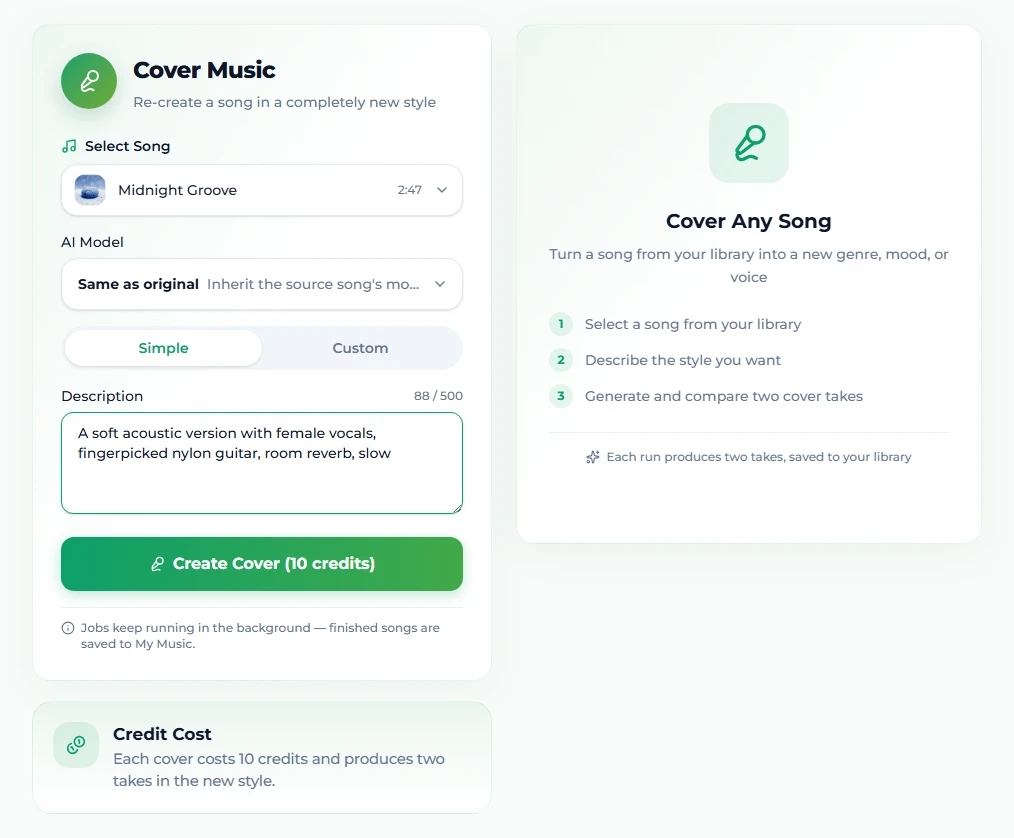
Open AI Song Cover and use Choose a song to cover. Any completed track in your library qualifies. Pick one whose melody you like and whose production you do not — that is the whole point of covering it.
Step 2: Describe the new style
Two modes:
Simple is one description field. Write the direction in plain words — "A soft acoustic version with female vocals, fingerpicked guitar, room reverb" is the placeholder on the page and a good template. Genre, mood, vocal character, one or two instruments. This is the mode for most covers.
Custom opens a Style field, a Title for the new version, and a lyrics field that is optional — leave it empty to keep the original words (which is what a cover normally does), or use it when the cover should be instrumental. Custom is for when you want the same control over a cover that you have over a fresh generation.
Above the mode toggle is the AI Model menu. Same as original re-performs with the model that made the source; switching to a PRO model — v6 or v6 Wild, on the paid plans — gives the cover the newer model's sound — often the reason to cover in the first place. On a free account, a source made on a PRO model is covered on v6 Mini.
Step 3: Generate
Click Create Cover (10 credits). The job runs in Your Covers under the form, usually finishing in one to three minutes, and keeps going if you leave the page.
Step 4: Compare the two takes
Every run returns two takes in the new style. They share the melody and lyrics but differ in performance and detail — listen to both, keep the one that serves the song, and remember both are saved to your library as songs of their own. Either can be covered again in yet another style, extended, or separated into stems.
Cover prompt recipes
The description field takes the same four-part formula as a style prompt — genre, mood, instrumentation, vocal — with one difference: you are describing a destination, so the contrast with the source is the thing to be explicit about.
- Stripped-back acoustic —
acoustic, intimate, fingerpicked nylon guitar, light brushed drums, close-mic female vocal, slow - Synthwave night drive —
synthwave, melancholic, analog synths, gated reverb drums, 100 BPM, breathy female vocal - Orchestral / cinematic —
cinematic orchestral, sweeping, strings and brass, timpani, choir on chorus, powerful male vocal - Lo-fi bedroom —
lo-fi bedroom pop, hazy, mellow Rhodes, dusty drums, tape hiss, soft male vocal - Heavy —
alt metal, intense, down-tuned guitars, double kick, male vocal, clean verse and screamed chorus - City pop —
80s city pop, glossy, funky bass, bright keys, horn stabs, 112 BPM, female vocal, smooth - Jazz standard —
vocal jazz, smoky, piano trio, upright bass, brushed snare, female vocal, late-night - Latin —
bossa nova, breezy, nylon guitar, soft percussion, flute, warm male vocal - Gospel —
gospel, uplifting, Hammond organ, full choir, hand claps, powerful female lead - Instrumental — any of the above in Custom mode with the lyrics field left empty and
instrumentaladded to the style
Change one slot at a time between runs. A cover is cheap to iterate — 10 credits, two takes — and the melody stays put, so every run is directly comparable to the last.
Getting the vocal right
Because the voice is re-performed, the vocal description carries more weight in a cover than anywhere else.
- Say who is singing.
female vocal,male baritone,duet. The Vocal Gender control on the create page does not exist here, so the words are the control. - Say how.
breathy,belted,whispered,raspy,smooth,choir on chorus. One or two — not five. - Match the register to the genre. A whispered vocal on a metal cover fights the arrangement; a belted vocal on a lo-fi cover swamps it.
- Expect a different singer. Even Same as original re-performs the voice. If the cover must have the original vocal take, cover is the wrong tool — separate the acapella instead.
Covers in the Suno app
Suno's own product launched a Covers feature that works on the same idea: open a track's menu in the Library, choose Cover, and describe a style; the melody is kept and the track is reimagined around it. Two differences from the tool here are worth knowing if you use both: Suno's Covers can take an uploaded clip as the source, and the feature is available on its paid plans. The creative rules transfer unchanged — describe the destination, expect the vocal to be re-performed, iterate one variable at a time.
What it costs
10 credits per cover, the same as a new generation, from the same balance; both takes are included. A new account's 16 free credits cover one run on v6 Mini. The paid plans add monthly credits, the PRO models, high-quality downloads and the commercial licence — which a cover of your own song inherits in full.
FAQ
Does a cover keep the original lyrics?
Yes. Words and melody carry over; the arrangement and the vocal performance are what change. To change the words as well, generate a new song instead of covering.
Can I cover a song I did not make here?
No. The tool works on tracks in your own library, which is also what keeps every cover cleanly licensed. Recreate the idea on the create page first if it started elsewhere.
Can I keep the original singer's voice?
Not with a cover — the voice is regenerated with the arrangement. Use the vocal remover to isolate the original vocal and build a new backing under it.
What styles can I cover in?
Anything you can describe: lo-fi, metal, orchestral, city pop, acoustic, synthwave, jazz. The description is read the same way the main generator reads a style prompt.
How long does a cover take?
Usually one to three minutes. The job runs in your cover list and continues if you navigate away.
Do I keep the commercial licence on a cover?
Yes. A cover carries the same licence as any other track from the site, with a certificate you can download on the paid plans.
Final take
A cover answers one question — what would this song sound like as a different record? — and answers it in three minutes for ten credits. Pick a song whose melody deserves a better production, describe the destination in four parts, and audition both takes. Keep the source inside your library and the result is yours to release.
Try it on a track you already have: open AI Song Cover.