

TL;DR
Removing vocals used to mean inverting one stereo channel and hoping the singer was dead-centre; it took the bass and kick with it and left a ghost of the voice behind. AI stem separation is a different operation: a model that has learned what a voice sounds like pulls it out of the mix, wherever it sits. On Suno AI Music's vocal remover that is three steps — upload an audio file or pick a song from your library, click Start, download — and one run hands back two files: a clean instrumental (the karaoke version) and the isolated vocal (the acapella). It costs 10 credits, takes one to three minutes, and runs in the background.
In this guide
- What you get from one separation
- How AI vocal removal works
- Remove vocals in three steps
- What to do with the stems
- What affects the result
- What it costs
- FAQ
What you get from one separation
Two files, both the full length of the song:
- Instrumental — everything except the voice: drums, bass, guitars, keys, synths, backing textures. This is the karaoke track, the video bed, the remix starting point.
- Vocal — the singing on its own, the acapella. This is what you layer a new arrangement under, sample from, or study for the melody.
They come back as a pair because the model does not delete the voice; it separates the mix into two parts, and both parts are useful. Both land in the task list on the vocal remover page and can be previewed there before you download.
How AI vocal removal works
It helps to know why the old method failed, because it explains what to expect from the new one.
Phase cancellation, the trick every "free vocal remover" used for twenty years, inverts one channel of a stereo file and sums it with the other. Anything identical in both channels — which, in a typical mix, includes the lead vocal panned to centre — cancels out. So does everything else panned to centre: the kick, the snare, the bass. And anything on the vocal that is not identical in both channels — the reverb tail, the stereo doubler, the delay — survives as a hollow echo of the singer. The result was a thin, bass-less backing track with a ghost in it, and there was no setting that fixed it because the method could not tell a voice from a kick drum; it could only tell centre from sides.
AI separation was trained on a large number of songs where the individual stems were known. It learned the spectral shape of a voice — the harmonics, the formants, the way consonants scatter across the spectrum — and it learned the shapes of drums, bass and everything else. Given a new mix, it estimates which energy in each moment belongs to the voice and reconstructs two signals. Panning is irrelevant; a vocal hard-left separates as cleanly as one dead-centre. The bass and kick stay in the instrumental because the model knows they are not a voice.
The practical differences: no hollow "underwater" sound, the low end intact, and a usable acapella as a by-product — which phase cancellation could never give you at all.
Remove vocals in three steps
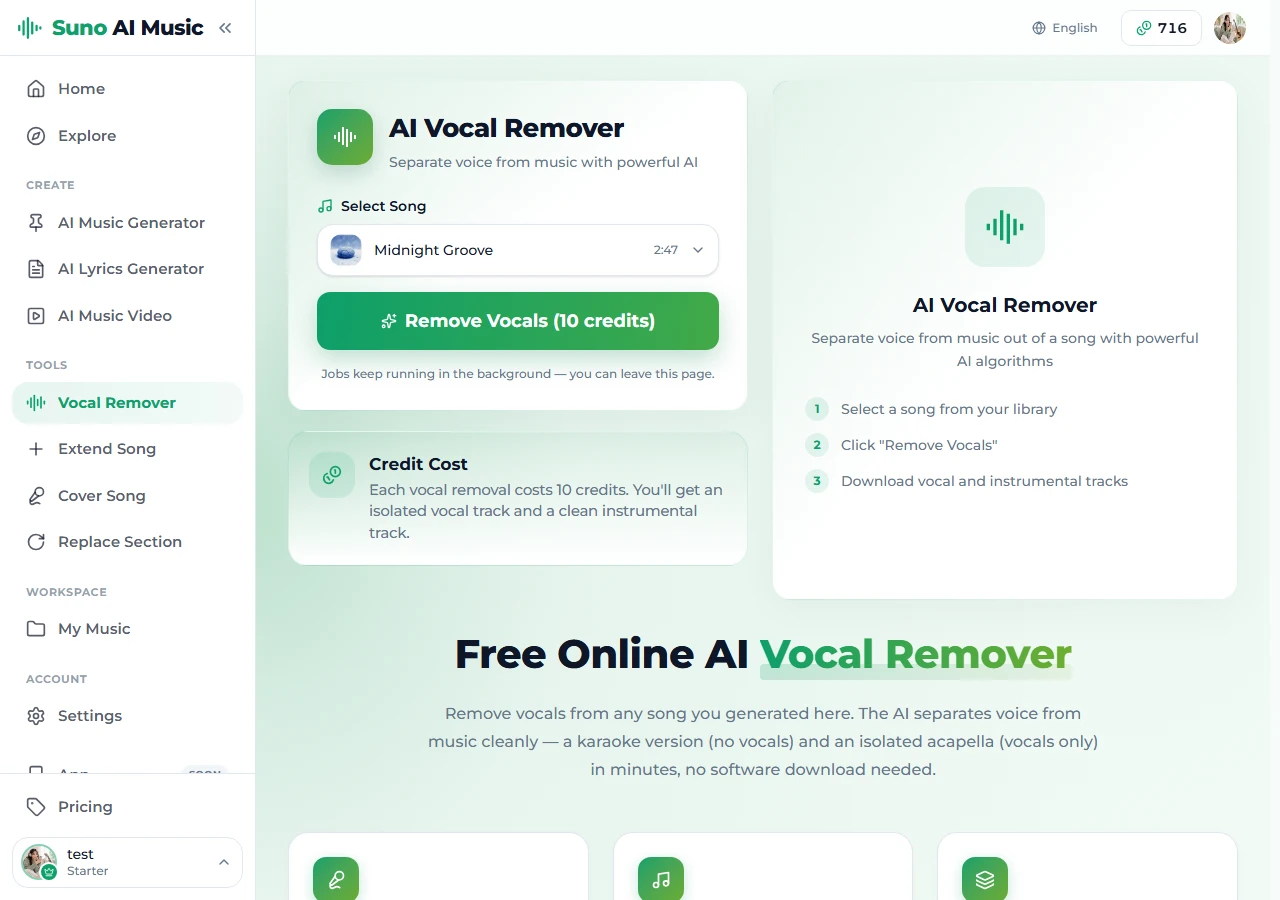
Step 1: Pick the song
Open the vocal remover. Under Select Song there are two sources. Upload a file takes an MP3, WAV or M4A, or the audio inside an MP4, up to 10 MB; the file is used for this one separation and deleted when the job finishes. From my library lists every completed song you have generated on the create page, covered, extended or re-cut; nothing needs uploading there, because the source is already on the server. Either way the whole thing stays in your browser with nothing to install.
You need an account for both. A new account starts with 16 free credits; a generation is 10, and so is a separation, whichever source you use.
Step 2: Start the separation
Click Remove Vocals (10 credits). The job appears in the task list under the form with a progress state, usually finishing in one to three minutes depending on the song's length. It keeps running if you leave the page — come back and the files are waiting.
Step 3: Preview and download
When the task completes, both stems show on the task card. Play each one before downloading: the instrumental should have its full low end and no audible voice; the vocal should be dry enough to sit on a new arrangement. Download the one you need, or both. High-quality downloads and the commercial licence for the stems come with the paid plans; the stems inherit whatever licence the source song has. For an uploaded file that means the rights stay with whoever owns the recording.
What to do with the stems
Karaoke and practice. The instrumental is the karaoke version. Singers use it to rehearse a song they wrote; bands use it to learn a part without the vocal in the way.
Video and content. A clean instrumental of your own song is background music you already own — no licence to clear, no claim to fight. If the song is too short for the video, extend it first and then separate the longer version.
Remixes and mashups. The acapella over a new beat is the classic move. Because the vocal is isolated rather than phase-cancelled, it sits on the new arrangement without carrying the old drums along.
Covers in a new style. If what you actually want is the same song, different arrangement, the AI cover tool does it in one step — it keeps the melody and lyrics and re-performs the rest — without you having to rebuild the instrumental yourself.
Study. An isolated vocal makes the melody and phrasing obvious in a way the full mix hides. Songwriters separate their own tracks to hear what the model actually did with the top line.
What affects the result
Separation is very good on most tracks, and it is honest about its limits. What moves the needle:
Density. A sparse arrangement — voice, guitar, light drums — splits almost perfectly. A wall of distorted guitars and stacked synths in the same frequency range as the voice is harder; expect a little of the vocal's air to remain in a very dense instrumental.
Effects on the vocal. Heavy reverb, long delays and doublers blur the line between voice and room. The model handles ordinary amounts well; extreme wash may leave a soft tail in the instrumental.
Harmonies and ad-libs. Stacked backing vocals separate as vocals — they go to the acapella, not the instrumental. If you wanted the harmonies kept in the backing track, they will not be.
Vocal-like instruments. Choirs, talkboxes and some lead synths share features with a voice and can be partly pulled into the vocal stem. Rare, but it happens.
None of these are settings you can change on the tool; they are properties of the song. If a separation is not clean enough, the fix is usually upstream: generate or cover a sparser version of the track and separate that.
What it costs
One separation is 10 credits, drawn from the same balance as generation, and it returns both files — there is no second charge for the acapella. The 16 free credits on a new account cover one separation or one generation. The paid plans add a monthly credit allowance, high-quality downloads and the commercial licence that covers every stem you pull from your own songs.
FAQ
Is the vocal remover free?
It is free to start: registration gives 16 credits and a separation costs 10. After that it draws from the same credits as everything else on the site.
Can I remove vocals from a song I did not make here?
Yes. Choose Upload a file and send an MP3, WAV or M4A, or the audio inside an MP4, up to 10 MB; it costs the same 10 credits. What changes is the rights: separating a track does not change who owns it, so stems from someone else's recording are fine for private practice but not for publishing. Stems from a song you made here carry that song's licence.
How accurate is it?
On the large majority of songs the voice comes out cleanly and the instrumental keeps its full low end. Very dense mixes and heavily effected vocals can leave a faint trace; see the section on what affects the result.
How long does it take?
Usually one to three minutes, depending on song length and load. The job runs in the task list, so you can leave the page.
Do I need to install anything?
No. Everything runs in the browser, on any device that can open the site.
Can I use the separated tracks commercially?
Stems from a song you generated here, yes — they inherit its licence. Every song generated on the site is copyright-free, and the commercial licence on the paid plans covers the stems too. Stems from an uploaded file belong to whoever owns that recording.
Do I get the backing vocals in the instrumental?
No. Harmonies and ad-libs are vocals, so they go to the vocal stem. The instrumental is the music without any singing.
Final take
The right mental model is separation, not removal: one song becomes an instrumental and an acapella, both usable, both yours. Pick the song, start the job, preview both files before you download, and if the result is not clean enough, fix the source rather than fighting the tool.
Try it on a file of your own or any song in your library: open the vocal remover.