

TL;DR
A Suno prompt is not one thing. It is a style description (genre, mood, instruments, vocals) that lives in the style box, and an optional lyrics sheet with structure tags like [Verse] and [Chorus] that lives in the lyrics box. Most disappointing songs come from putting song content in the style box or production instructions in the lyrics. Keep them apart, describe the style in four parts — genre, mood, instrumentation, vocal — and front-load the words that matter most. On Suno AI Music a run costs 10 credits and returns two takes, so the cheapest way to learn is to change one thing between runs and listen to the difference.
In this guide
- What a prompt controls
- Simple mode or Custom mode
- The four-part style formula
- Structure tags for lyrics
- Negative tags and vocal gender
- 30 Suno prompts by genre
- Mistakes that ruin prompts
- FAQ
What a prompt controls
Three fields, three jobs.
The style box tells the model how the record should sound: genre, sub-genre, mood, tempo, era, instruments, production texture and the kind of voice. It reads adjectives and nouns. It does not read stories — "a song about my grandmother's kitchen" in the style box gives the model nothing to build a mix from.
The lyrics box tells the model what is sung and in what order. Words, plus bracketed structure tags that mark sections. It is also the only reliable place to shape arrangement over time: an [Instrumental] tag before the last chorus is a bar of breathing room that no style adjective can request.
The title is metadata. It does not change the sound, but it does end up on the card in your library, in the share preview, and in the file name, so give it the two seconds it deserves.
Everything else in this guide is about keeping those three straight.
Simple mode or Custom mode
The create page offers both, and they answer different questions.
Simple is one description field (up to 500 characters). You write a sentence about the song — style and subject together — and the model writes the lyrics and picks the arrangement. It is the right mode when you want a finished idea fast, when the lyrics are not the point, or when you are testing whether a style direction is worth pursuing before writing words for it. The placeholder on the page is a fair template: "A dreamy lo-fi beat about rainy nights in Tokyo, with soft piano and vinyl crackle."
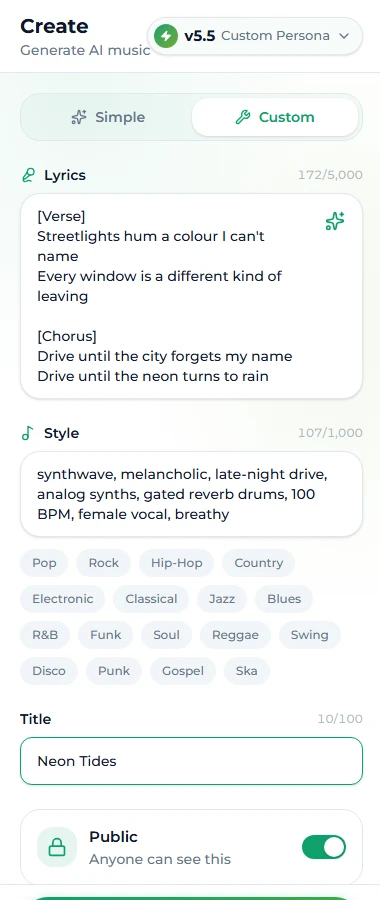
Custom splits the job into a Style field (up to 1,000 characters), a Lyrics field (up to 5,000), a Title, and two extras — Negative Tags and Vocal Gender — that only make sense once you are steering deliberately. Custom is where prompts start to work: the style box gets only style, the lyrics box gets only lyrics, and you can change one without disturbing the other.
Both modes share the Instrumental switch (no vocals, lyrics ignored) and the model picker. Suno v6 Mini is the free model; v6 and v6 Wild are marked PRO and unlock with any of the paid plans. Whichever mode, one generation is 10 credits and produces two takes.
A practical rule: write the first draft in Simple to find the sound, then rebuild it in Custom to control it.
The four-part style formula
A style prompt that works has four parts, in this order, in plain words separated by commas:
- Genre — one main genre, optionally one sub-genre or a fusion.
synthwave,bedroom pop,boom bap hip hop,acoustic folk. - Mood — one or two emotional words the whole track should carry.
melancholic,euphoric,late-night,tense. - Instrumentation and production — what is actually playing and how it is recorded.
analog synths, gated reverb drums,fingerpicked nylon guitar, room mic,808s, sparse hi-hats, tape saturation. - Vocal — who is singing and how.
female vocal, breathy, close-mic,male baritone, gospel choir on chorus, orinstrumental.
Add a tempo or an era when they matter (110 BPM, late 80s), and stop. A style box that reads
synthwave, melancholic, late-night drive, analog synths, gated reverb drums, 100 BPM, female vocal, breathy
gives the model eight concrete, non-contradictory instructions. A style box that reads "an amazing emotional song that everyone will love with a great beat" gives it none.
Three habits make the formula reliable:
- Front-load. The model weights the beginning of the prompt most heavily. Genre first, decoration last.
- One adjective per slot.
darkandupliftingin the same prompt is a coin flip. Pick the one the chorus needs. - Name instruments, not brands.
warm Rhodes pianoworks; a specific plugin or artist name mostly does not, and a real artist's name is the one thing worth keeping out of a commercial track anyway.
Structure tags for lyrics
Bracketed tags in the lyrics box mark sections. They are not commands — the model treats them as strong hints — but they are the most effective control you have over the shape of a song. The ones that pull their weight:
| Tag | What it does |
|---|---|
[Intro] | A short instrumental or spoken opening before the first vocal line |
[Verse] / [Verse 2] | Lower energy, narrative, new melody each time |
[Pre-Chorus] | Builds tension into the chorus |
[Chorus] | The hook — fuller arrangement, repeated melody on later occurrences |
[Bridge] | A contrasting section, usually once, before the last chorus |
[Instrumental] | No vocals for a stretch — a solo, a breakdown, a breath |
[Outro] | Winds the song down instead of stopping dead |
Rules of thumb that hold across models:
- Short tags beat long ones.
[Chorus]outperforms[This is the big emotional chorus]. One to three words. - A tag acts on the lines directly under it. Put it on its own line above the section, nothing else on that line.
- Repeat the chorus lyrics verbatim each time you want the same hook. The model does not assume repetition.
- Keep production notes out of the lyrics —
(add a guitar solo here)in the middle of a verse tends to get sung.
A minimal, working sheet:
[Verse]
Streetlights hum a colour I can't name
Every window is a different kind of leaving

[Pre-Chorus]
Hold the wheel a little looser now

[Chorus]
Drive until the city forgets my name
Drive until the neon turns to rain

[Verse 2]
...

[Chorus]
Drive until the city forgets my name
Drive until the neon turns to rain

[Bridge]
[Instrumental]

[Chorus]
Drive until the city forgets my name
Drive until the neon turns to rain

[Outro]
If you would rather not write the words yourself, the AI lyrics generator produces a full sheet with these tags already in place for 1 credit and hands it straight to Custom mode.
Negative tags and vocal gender
Two Custom-mode extras that solve specific problems.
Negative Tags is a list of what you do not want — heavy metal, fast drums is the placeholder on the page, and that is exactly the shape: nouns and adjectives, comma-separated. Use it when a genre keeps dragging in a texture you dislike (a gospel choir on every pop chorus, a trap hi-hat on every hip hop beat). It is far more reliable than writing "no drums" inside the style box, where a negation often reads as a mention. In Suno's own app the same control sits under Advanced Options as Exclude Styles, and the guidance is identical: put exclusions there, not in the style prompt.
Vocal Gender nudges the voice toward male or female. It raises the probability rather than guaranteeing it — the note on the page says so — and it works best in Custom mode alongside a matching vocal description in the style box (female vocal plus the switch set to female).
30 Suno prompts by genre
Each of these is a complete style box. Paste one into Custom mode's Style field on the generator, add lyrics or flip Instrumental, and run it. Swap one slot at a time to make it yours.
Pop
bright synth pop, euphoric, layered synths, punchy drums, 120 BPM, female vocal, confidentbedroom pop, wistful, soft electric guitar, lo-fi drums, tape hiss, male vocal, intimatedance pop, glossy, four-on-the-floor, sidechained bass, 124 BPM, female vocal, big chorus harmoniesacoustic pop, warm, strummed guitar, light percussion, hand claps, duet, male and female vocalspiano pop ballad, heartbroken, grand piano, strings enter on chorus, female vocal, powerful belt
Hip hop and R&B
boom bap hip hop, gritty, dusty drum break, upright bass sample, vinyl crackle, 90 BPM, male rap, laid backtrap, dark, 808 bass, rolling hi-hats, sparse piano, 140 BPM, male rap, autotune melody on hooklo-fi hip hop, calm, rainy night, mellow Rhodes, muted drums, 80 BPM, instrumentalcontemporary R&B, sensual, silky pads, finger snaps, sub bass, female vocal, breathy runsneo soul, warm, live drums, wah guitar, Rhodes, horn stabs, male vocal, soulful
Rock and metal
indie rock, restless, jangly guitars, driving bass, live drums, male vocal, slightly hoarsegarage rock, raw, fuzz guitar, one-take energy, shouted male vocal, 150 BPMalt rock anthem, cinematic, clean verse guitar, wall of distortion on chorus, female vocal, soaringheavy metal, aggressive, down-tuned riffs, double kick drums, male vocal, growl on verse, clean choruspop punk, nostalgic, palm-muted guitars, fast drums, gang vocals, male vocal, nasal
Electronic
synthwave, melancholic, late-night drive, analog synths, gated reverb drums, 100 BPM, female vocal, breathydeep house, hypnotic, rolling bassline, filtered chords, shakers, 122 BPM, instrumentaldrum and bass, urgent, chopped breaks, reese bass, 174 BPM, female vocal, etherealambient electronic, weightless, granular pads, slow evolving textures, no drums, instrumentalfuture bass, euphoric, supersaw chords, pitched vocal chops, trap drums, 150 BPM, female vocal
Acoustic, folk and country
acoustic folk, tender, fingerpicked nylon guitar, room mic, soft harmonies, female vocalmodern country, hopeful, telecaster twang, brushed drums, pedal steel, male vocal, warmbluegrass, joyful, banjo, fiddle, upright bass, fast, male vocal with harmoniessinger-songwriter, confessional, solo piano, close-mic female vocal, minimalamericana, dusty, slide guitar, tambourine, harmonica, male vocal, weathered
Jazz, classical and world
smooth jazz, late-night, muted trumpet, brushed snare, walking bass, instrumentalvocal jazz standard, romantic, piano trio, upright bass, female vocal, smokyneoclassical, reflective, solo piano with string quartet, slow, instrumentalbossa nova, breezy, nylon guitar, soft percussion, flute, Portuguese-flavoured female vocalafrobeats, sunny, log drums, syncopated percussion, bright synths, 105 BPM, male vocal
Numbers 8, 17, 19, 26 and 28 are instrumentals — flip the switch or leave the lyrics box empty and the model will treat them that way.
Mistakes that ruin prompts
Story in the style box. "A song about losing my dog" is a lyric brief, not a sound. Move it to Simple mode's description, or write the lyrics.
Contradictions. calm, aggressive; acoustic, heavy 808s; whispered, powerful. The model averages, and the average of two moods is neither.
Ten genres. A fusion of two is a style; a list of six is noise. If you are not sure which genre, run two prompts, not one prompt with both.
Artist names as a shortcut. They are unreliable as descriptors and they are the one thing that can complicate a commercial licence. Describe the sound — 80s power ballad, gated drums, big harmonies says more than a name.
Instructions inside the lyrics. (guitar solo) mid-verse gets sung; [Instrumental] on its own line gets played.
Judging from one take. Every run returns two. Listen to both before changing the prompt — often the prompt was fine and the first take was the unlucky one.
Changing three things at once. When a take misses, alter one slot of the formula and run again. Two 10-credit runs that each change one variable teach more than five that change everything.
From prompt to finished song
A prompt that lands gives you a track that is usually two to three minutes long, and can run to six when you set the length in Custom mode. From there the rest of the toolset picks up: extend it from the last bar you love, cover it in a second style to A/B directions, or lift the instrumental for a video bed. All of them work on songs in your library, which is why a good first prompt is worth the ten credits — everything downstream inherits it.
FAQ
How long should a Suno style prompt be?
Long enough to fill the four slots — genre, mood, instrumentation, vocal — and no longer. That is typically 8 to 15 comma-separated terms. Custom mode allows up to 1,000 characters, but prompts past a couple of lines mostly add contradictions, not control.
Do the bracket tags guarantee the structure?
No. They are strong hints the model follows most of the time, especially [Chorus] and [Instrumental]. If a section is ignored, shorten the tag, make sure it sits alone on its line, and check the lyrics under it actually read like that section — a four-line "chorus" with no repetition will be sung like a verse.
Should I write lyrics in the style box in Simple mode?
In Simple mode there is only one box, and it is meant for the whole idea — style and subject together. The model writes the lyrics for you. If you want your own words, switch to Custom.
What is the difference between the Suno models on the menu?
The generator's model menu offers Suno's v6 family — v6, v6 Wild and v6 Mini. v6 and v6 Wild are PRO models included with the paid plans; v6 Mini is free. Every model costs the same 10 credits per run.
Why does my chorus sound like another verse?
Usually because the chorus lyrics do not repeat, or the [Chorus] tag is missing or buried. Make the chorus lines identical each time they appear and put [Chorus] on its own line above each one.
Can I use these prompts in Suno's own app?
Yes — the style formula and the structure tags behave the same way there. The only mapping to know: our Negative Tags field is Suno's Exclude Styles under Advanced Options in Custom mode.
Final take
Write the style box like a spec sheet — genre, mood, instruments, vocal, in that order — and the lyrics box like a lyric sheet with short bracketed section tags. Keep the two apart, keep contradictions out, and change one thing per run. The thirty prompts above are starting points; the formula is what you keep.
Try one now on the Suno AI Music generator — a new account has enough free credits for the first run.