

TL;DR
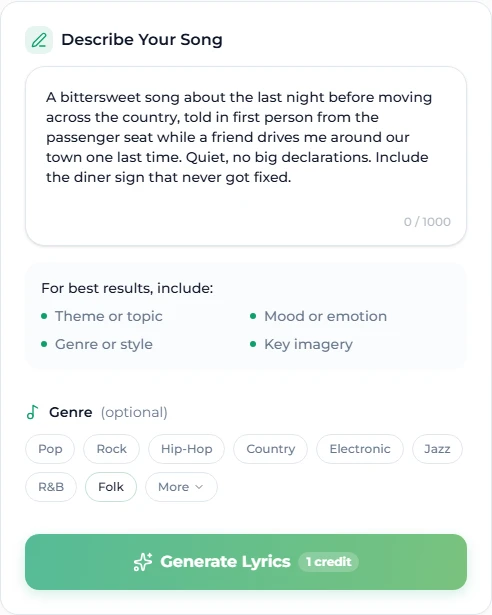
An AI lyrics generator turns a brief into a lyric sheet — verses, a chorus, usually a bridge, with section tags in place. The output is only as specific as the brief: "a love song" yields the average of every love song; "a love song about the last night before a long-distance move, told from the passenger seat, bittersweet, no big declarations" yields something you can sing. On Suno AI Music a draft costs 1 credit, you pick an optional genre, and one button carries the sheet straight into the music generator's Custom mode. Treat the draft as a first pass: cut clichés, sharpen images, fix the syllable counts, then make the song.
In this guide
- What the generator actually does
- How to write a brief that works
- Five example briefs
- Structure tags in the output
- Editing the draft into a lyric
- From lyrics to a finished song
- FAQ
What the generator actually does
You give it a short description of the song — theme, mood, story — and optionally a genre from the chip row (Pop, Rock, Hip-Hop, Country, Electronic, Jazz, R&B, Folk, and more under More). It returns a complete lyric sheet: typically two to four verses, a repeated chorus, and often a bridge, each section marked with a bracketed tag. The words are original; you own the output and can use it commercially, which is the plain answer to the question everyone asks first.
What it does not do is read your mind. The model has no idea whether "a song about summer" means a road trip, a heatwave, a lost job at a beach bar, or a child's last summer before school. Every one of those is a different song. The brief is where you decide.
How to write a brief that works
Five things, in roughly this order. You do not need all five every time, but each one you add removes a genre of blandness.
- The subject, specifically. Not "heartbreak" but "the week after, when the apartment is still half his". Not "the city" but "the 2 a.m. train that runs empty past my old street". A concrete noun beats an abstract one every time.
- The point of view and the tense. First person present ("I'm standing in the doorway") is immediate; second person ("you left the light on") is intimate; third person past is a story. Say which.
- The mood — one word, maybe two. Bittersweet. Defiant. Restless. Tender. The chip row on the page has mood prompts too; use one and the model stops hedging between three.
- One image you want in it. A detail from real life — the specific brand of cheap wine, the dent in the car door, the song that was playing. One planted image makes the whole lyric feel observed rather than generated.
- What to avoid. "No rhyming fire with desire. No 'baby'. No mention of the moon." Negative instructions in a lyric brief work better than in a style prompt, because the model is generating text, and it is good at not saying things when told.
Add the genre with the chip rather than in the text; the model uses it for line length and diction — a country lyric and a drill lyric have different sentences — and it keeps the brief itself about the song.
Keep the whole brief to two or three sentences. Longer briefs do not produce better lyrics; they produce lyrics that try to include everything.
Five example briefs
Paste any of these into the lyrics generator, pick the genre in brackets, and adjust the details to your own.
1. The move — [Folk]
A bittersweet song about the last night before moving across the country, told in first person from the passenger seat while a friend drives me around our town one last time. Quiet, no big declarations. Include the diner sign that never got fixed. Avoid the word "goodbye".
2. The comeback — [Hip-Hop]
Defiant, second person, present tense: the narrator talking to the people who counted them out, now that the plan worked. Specific about the years of small jobs. Braggadocio with receipts, not insults. No mention of cars or jewellery.
3. The late shift — [R&B]
Sensual and tired at the same time — two people who only see each other between night shifts. First person. The image: the kitchen light left on so the other one can find the plate. Slow, intimate, a chorus that is mostly one repeated line.
4. The small town — [Country]
A hopeful song about staying in the town everyone else left, told by someone who chose it. Third person, a character named by their job rather than a name. Include the water tower and the one traffic light. Warm, not sentimental.
5. The summer that ended — [Pop]
Euphoric on the surface, sad underneath: a song about the best summer of someone's life, written the week it ended. First person past tense in the verses, present tense in the chorus. Avoid the moon, the stars and the word "forever".
Each is two or three sentences and each would produce a recognisably different song from the same generator. That is the entire trick.
Structure tags in the output
The sheet comes back with bracketed section tags — [Verse], [Chorus], [Bridge], sometimes [Pre-Chorus] or [Outro]. Keep them. They are not decoration: when the lyrics go into the music generator, the tags are how it knows which lines are the hook, where the energy should lift, and where to give the arrangement a breath. Three rules when you edit:
- Leave each tag alone on its own line above its section.
- Keep the chorus lines identical every time the chorus appears. If you improve a chorus line, change every copy.
- Add
[Instrumental]on its own line wherever you want a stretch without vocals — a solo before the last chorus, a breakdown after the bridge.
The full tag vocabulary, and how the music generator reads it, is in the Suno prompts guide.
Editing the draft into a lyric
Generated lyrics are competent and a little too smooth. Ten minutes of editing is where they become yours. Go through the sheet once for each of these:
Cut the clichés. Read every line and ask whether you have heard it in another song. Hearts on fire, tears like rain, dancing in the moonlight — out. Replace with the specific thing you actually mean.
Sharpen one image per verse. The model gives you a scene; you give it the detail only you would know. "An old car" becomes "the Corolla with the taped-up mirror". One per verse is enough; more than that and the lyric turns into a list.
Check the syllable counts. Read each verse aloud to a steady beat. Lines in the same position of each verse should be about the same length. A line that runs long forces the singer to cram, and the model will cram it; a line that runs short leaves a hole. Trim or extend until they match.
Fix the rhyme scheme, then loosen it. Generators love perfect rhymes and rhyme every line. Real lyrics use slant rhymes (home / alone), rhyme every other line, or drop the rhyme for a line that needs to land plain. Decide the scheme for the verse — ABAB, AABB, or none — and hold it.
Make the chorus simpler than the verses. The chorus is the part a listener sings back; it should be shorter, more repetitive and more general than the verse that sets it up. If the draft's chorus is the most complex section, swap material with a verse.
Read the last line first. The final line of the song is the one that stays. If the draft ends on a summary, end instead on the strongest image from verse one, changed by what happened.
A dozen small changes and the lyric stops reading like output.
From lyrics to a finished song
The lyrics page has two buttons on the result: Copy, and Create Song with These Lyrics, which sends the sheet directly to the create page — it opens in Custom mode with the lyrics filled in. From there you add a Style description — genre, mood, instrumentation, vocal — and a title, and generate. One generation is 10 credits and returns two takes.
Two things make the hand-off work well:
- Match the style to the brief. If the lyric was written as a bittersweet folk song in first person, the style box should say
acoustic folk, bittersweet, fingerpicked guitar, close-mic female vocal. A style that fights the words produces a song that sounds like a misreading. - Keep the tags. The
[Chorus]and[Verse]markers are what tell the generator where the hook is. Do not strip them when you paste.
If the first result is close but not right, the cheap moves are, in order: change one slot of the style prompt; regenerate the lyrics with a tighter brief (1 credit); and only then rewrite the lyric by hand. Once you have a take you like, extend it if it needs a longer form, or cover it to hear the same words in a second style.
What it costs
One lyric draft is 1 credit. A new account starts with 16 free credits, which is a full song (10) plus six drafts of the words for it. The paid plans add a monthly allowance and the commercial licence for the songs you make from the lyrics; the lyrics themselves are yours from the moment they are generated.
FAQ
Are AI-generated lyrics copyright-free?
The lyrics the generator writes are original and you own the output, commercial use included. Review them before release as you would any draft — the point of the editing pass above is to make sure they are unmistakably yours.
Can I edit the generated lyrics?
Yes, and you should. The output is a starting point: cut, rearrange, combine sections, or keep only the lines you like. Nothing is locked.
How long are the generated lyrics?
Typically two to four verses, a chorus and an optional bridge — a full song structure of a couple of hundred words. Ask for shorter or longer in the brief if you need it.
What genres does it support?
Any. The chip row offers Pop, Rock, Hip-Hop, Country, Electronic, Jazz, R&B, Folk and more, and you can name any other genre in the brief. The genre mainly changes diction and line length.
Does it write in languages other than English?
Write the brief in the language you want the lyrics in, and say so explicitly. Results are strongest in English; check the sheet for idiom before you sing it.
Do I need the lyrics generator to make a song?
No — Simple mode on the create page writes lyrics for you from a one-sentence description. The generator is for when you want to see and shape the words before the music exists, which is the difference between a song about something and a song about your something.
Final take
The generator supplies structure and fluency in seconds; the brief supplies the subject, and the edit supplies the person. Write two specific sentences, plant one true image, cut what you have heard before, and send the sheet to the generator with its tags intact. That is the whole method, and it costs one credit a try.
Start with one of the five briefs above on the AI lyrics generator.