

TL;DR
If you can get the actual recording in front of a song finder, identification is close to instant. On Suno AI Music's Song Finder there are four ways in: paste a link (YouTube, TikTok, Instagram, X, Vimeo, Facebook, Spotify or Deezer), upload an audio or video file, record 15 seconds through your microphone, or hum / sing the tune. A lookup costs 20 credits, and only when a song comes back — a miss refunds automatically. We ran it for this guide: a YouTube link came back as Never Gonna Give You Up by Rick Astley, with listening links to six services, in well under a minute.
In this guide
- Which method to use
- Method 1 Paste a link
- Method 2 Upload a clip
- Method 3 Record what is playing
- Method 4 Hum or sing it
- When nothing comes back
- Tips that raise your match rate
- What to do once you know the song
- FAQ
Which method to use
Every song identifier on the market does the same core thing — acoustic fingerprinting. Your clip is reduced to a compact signature of how its frequencies move over time, and that signature is matched against a catalogue of commercial releases. The consequence matters: it matches the recording, not the melody. So the method you pick should be the one that gets the cleanest copy of the real recording to the tool.
| What you have | Best method | Why |
|---|---|---|
| A video or post with the song in it | Paste the link | The audio is fetched straight from the page — no speaker, no room noise |
| A file on your phone or computer | Upload it | Clean digital audio, the easiest case there is |
| The song is playing around you right now | Record | Stops itself at 15 seconds, which is all a fingerprint needs |
| Only the tune in your head | Hum / Sing | Matches on melody alone, so it misses more often — but it is the only option left |
The rule of thumb: go as far up that table as you can. A link beats a file only because it saves you a step; a file beats a recording because there is no room between the speaker and the mic; a recording beats humming because it is the actual track.
Method 1 Paste a link
This is the one most people need. The song under a TikTok, the track in a YouTube vlog, the background music in an Instagram reel — you have the post, you do not have the name.
- Copy the link to the post or video. On mobile that is Share → Copy link in almost every app.
- Open the song finder by link. The Paste a link tab is already selected.
- Paste the URL. The box accepts YouTube, TikTok, Instagram, X, Vimeo and Facebook links, plus Spotify and Deezer track links.
- Press Find my song (20 credits) and wait. A video has to be pulled from the page before it can be heard, so this takes longer than a file — usually under a minute.
- Read the result card: title, artist, cover art and buttons for Spotify, Apple Music, YouTube Music, YouTube, Deezer and Tidal.
Here is the run we did for this article, with a YouTube music video as the input:
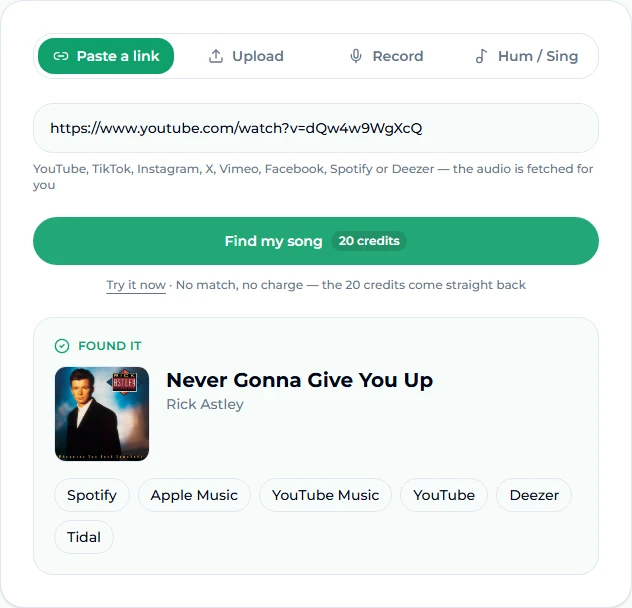
A Spotify or Deezer link already names the track, so it is looked up straight away — useful when a friend sends a link that opens in an app you do not have. If the song is in a YouTube video that is not a music video (a vlog, a gaming stream, an ad), the YouTube song finder and the find a song from a video page run the same engine and open on the same tab. Background music under talking is harder than a music video, but it often works, because fingerprinting is surprisingly robust to a voice laid over the top — see the background music finder for that case.
Method 2 Upload a clip
If the song is already on your device — a voice memo you took at a party, a screen recording of a story, an MP3 with a meaningless file name — upload it.
- Open the Song Finder and switch to the Upload tab.
- Choose an audio or video file. MP3, WAV, M4A, OGG, WebM and MP4 video all work, and a whole song is fine: before anything is sent, your browser cuts a 15-second clip from about a third of the way into the track, past the intro.
- Press Find my song.
You do not need to trim first, but length does not help either: ten to fifteen seconds of the track is all a fingerprint uses. If your file is a noisy recording — a party, a live set — trimming it yourself to the stretch where the music is clearest helps more than anything else: the chorus rather than the intro, the song rather than the crowd.
We also ran an upload that we knew would miss — a 12-second clip of an AI-generated tech house track we made ourselves, which by definition is in no commercial catalogue. This is what a miss looks like:
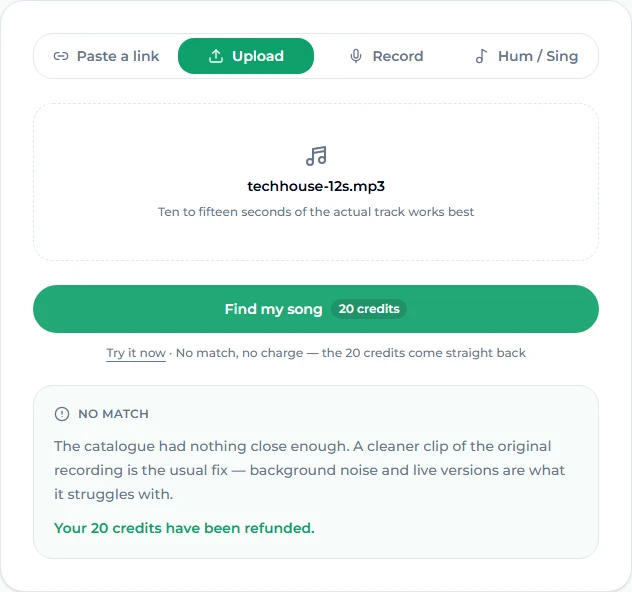
The credits came straight back. That refund applies to every miss and every error — an unreadable file, a page that will not load — so trying a second clip costs nothing if the first one fails.
Method 3 Record what is playing
The song is on in a shop, a car, a bar. Every second you spend unlocking your phone is a second closer to the fade-out.
- Open what is this song — or any of the finder pages — and switch to the Record tab.
- Allow microphone access when the browser asks.
- Tap to record and hold the phone toward the sound. The recorder stops itself at 15 seconds, because longer adds nothing.
- Press Find my song.
Distance and noise are what defeat a recording. Get closer to the speaker than feels natural, turn away from the conversation at your table, and aim for a stretch where the music is loud — a chorus, not a quiet bridge. A live band is a different problem entirely: a live performance is a different recording from the studio release, so the fingerprint may match a live album, or nothing.
Method 4 Hum or sing it
No recording, no link — just a tune going round your head. This is the hardest case, and the tool is honest about it.
- On the Song Finder, switch to Hum / Sing.
- Tap, then hum or sing the melody for ten seconds or more. Skip the intro; go straight to the part you remember best, usually the chorus hook.
- Keep it steady. Pitch does not need to be perfect, but tempo matters — rushing the tune changes its shape.
- Press Find my song.
Humming runs a different engine from the other three tabs. Fingerprinting matches an exact recording; a hummed melody can only be matched on the tune, so it misses more often than a recording of the real track does. A miss refunds the credits either way, so the cost of trying is time, not money.
Two tricks help. First, sing words if you remember any — even two words of the chorus narrow it down in a search engine if the hum misses. Second, if you know the rhythm but not the melody, tap it out; the tap tempo tool will at least tell you the BPM, which narrows the genre.
When nothing comes back
A miss does not mean the song is unfindable. It usually means one of five things:
- The clip was noisy. Record again closer to the source, or find the video and paste the link instead.
- It is a live version, remix or DJ edit. These are genuinely different recordings. Try another part of the track — the DJ may have left a longer stretch of the original in the middle.
- It is a cover. Fingerprinting matches the cover, not the original. If the cover is not a commercial release, there is nothing to match.
- It is production music or unreleased. A lot of YouTube and TikTok background music is library music or creator-owned audio that is not in the commercial catalogue. The creator's description or comments are your best bet.
- It is AI-generated. More and more background tracks are. If you suspect that, the AI music detector will tell you how likely it is and which generator it most resembles — our guide on how to tell if a song is AI-generated walks through a real test.
Tips that raise your match rate
- Aim for 10 to 15 seconds of the most distinctive part of the song. Not the intro, not the fade.
- Prefer links to recordings. If the song is anywhere online, find the post and paste it rather than holding your phone to a speaker.
- Trim silence and speech. If you upload a screen recording, start it where the music starts.
- Try a second section. A miss on the verse can be a hit on the chorus, and the refund makes the second try free.
- Use the free sample first if you want to see what a result looks like before spending credits: the Try it now link under the button runs a real, stored result with no account.
What to do once you know the song
The result card carries the links — tap through to Spotify, Apple Music, YouTube Music, YouTube, Deezer or Tidal and play it where you already listen. But there are three more useful things you can do with a name:
- Find its tempo and key before you practise or remix it: upload the track to the key and BPM finder.
- Get an instrumental or acapella of it for karaoke or practice with the vocal remover.
- Make something in the same shape. Describe what you liked — the groove, the instrumentation, the era — in the AI music generator and get an original track that scratches the same itch without the licensing questions.
FAQ
How much does it cost to identify a song?
20 credits per lookup, and only when a song comes back. A miss or an error refunds automatically, and the result card tells you so. Credits come with any plan or credit pack and are the same credits every other tool on the site uses. The sample result under the button is free and needs no account.
Do I need an account?
Yes, for a real lookup — you need to be signed in so the credits have somewhere to come from and go back to. The Try it now sample works without one.
Can it find a song from a TikTok or YouTube video?
Yes. Paste the link into the Paste a link tab. YouTube, TikTok, Instagram, X, Vimeo and Facebook links are fetched for you, which usually takes under a minute. A page that cannot be reached counts as a miss and refunds.
Can it really find a song from humming?
Sometimes. The Hum / Sing tab runs a melody-matching engine, so it can find songs you cannot play — but it misses more often than a recording of the real track. Hum ten seconds or more of the chorus, keep a steady tempo, and try again with a different section if the first attempt misses.
How long should my clip be?
Ten to fifteen seconds. The recorder stops at fifteen for that reason, and if you upload a whole song the page sends a fifteen-second cut from the body of the track rather than the full file.
Why did it find the cover instead of the original?
Because fingerprinting matches the exact recording it hears. A cover is a different recording, so if the cover itself is a commercial release, that is what comes back. The original artist is usually named in the cover's title.
What happens to the audio I upload?
It is sent to the identification service for that lookup. The tool is built to answer "what is this song", not to store your clips.
Final take
Finding a song without knowing its name is a solved problem as long as you can get the recording to the tool: paste the link if the song lives online, upload the file if it lives on your phone, record 15 seconds if it is playing around you, and hum as a last resort. Start on the Song Finder, pick the tab that matches what you have, and let the refund-on-miss rule make a second attempt free. And if the answer turns out to be "an AI track nobody released", that is its own kind of answer — one the AI music detector can confirm.