
TL;DR
"Find the instrumental" has two answers depending on whose song it is. For a released song by someone else: check for an official instrumental first, then a licensed karaoke catalogue, and only then consider separating the vocal yourself — remembering that the rights do not change because the voice is gone. For a song you made: you do not find the instrumental, you make it — flip the Instrumental switch on the create page before generating, or run the vocal remover on a song that already exists and get the clean backing plus the acapella for 10 credits. The five routes below are ranked by audio quality and by how confidently you can use the result.
In this guide
- First, whose song is it
- Route 1: Official instrumentals
- Route 2: Licensed karaoke catalogues
- Route 3: Separate the vocal yourself
- Route 4: Generate the instrumental
- Route 5: Cover the song as an instrumental
- When no instrumental exists
- FAQ
First, whose song is it
Everything downstream follows from this. A released recording has two owners — the writer of the composition and the owner of the master — and an instrumental of it is still theirs, whether an official release, a karaoke version, or a file you separated at home. Private use is one thing; public performance, streaming, videos and anything monetised need permission.
A song you generated on Suno AI Music has no such owners: it is copyright-free, and on the paid plans the commercial licence covers the song and every stem you pull from it. The instrumental of your own song is the one you can use without asking anyone.
So: for someone else's song, routes 1–3. For your own, routes 3–5.
Route 1: Official instrumentals
Some singles and many hip hop and pop releases ship with an official instrumental — sometimes on the single itself, sometimes on a deluxe edition, sometimes released separately for remix contests. When one exists it is the best possible backing track: it is the actual mix minus the vocal, with nothing removed by guesswork.
How to look: search the song title with "instrumental" on the streaming services and stores, check the single's tracklist, and check the artist's or label's official channels. Be sceptical of unofficial uploads titled "instrumental" — many are phase-cancelled fakes with a hollow sound and a ghost of the singer.
Audio: perfect. Rights: clean for listening; public use still needs a licence.
Route 2: Licensed karaoke catalogues
Karaoke services license songs and produce backing tracks — often re-recorded rather than the original master, usually with the option to keep or drop backing vocals, sometimes with key and tempo changes. For singing in public, at events, or on a stream, this is the route that comes with the rights handled, because the service has paid for them.
Audio: good to very good, but a re-recording rather than the record you know. Rights: the cleanest option for public performance of someone else's song.
Route 3: Separate the vocal yourself
AI stem separation takes a stereo mix and returns the instrumental and the vocal as separate files. It is the answer when no official instrumental exists and you need the actual recording rather than a re-recording — for a remix, a mashup, a practice track, a study of the arrangement.
The vocal remover on Suno AI Music does it in one run: upload an MP3, WAV or M4A up to 10 MB, or pick a song from your library, click Remove Vocals, and in one to three minutes you have a clean instrumental with its full low end and the acapella alongside it. Desktop plugins do the same job offline; the Audacity guide covers the free desktop route.
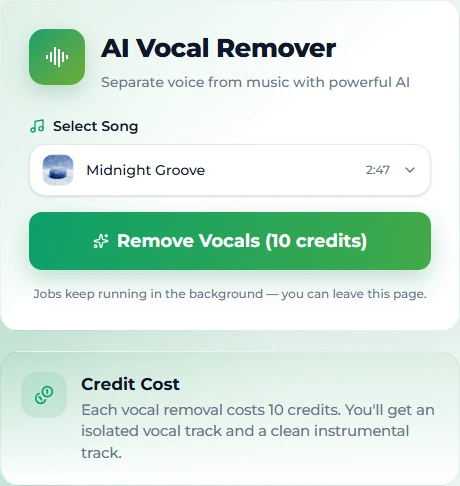
Two cautions. First, skip the old phase-cancellation trick — it removes the bass and drums with the voice and leaves a hollow echo; real separation does not. Second, separation does not change ownership: an instrumental you pull from someone else's master is still their master.
Audio: very good; dense choruses and heavily effected vocals are the hard cases. Rights: unchanged from the source.
Route 4: Generate the instrumental
For your own music, the fastest instrumental is the one you never put a vocal on. On the create page, flip the Instrumental switch before generating: the model produces a complete backing track — arrangement, drums, bass, melody instruments — in the style you describe, with no voice to remove. Describe it the way you would a song, minus the vocal slot: lo-fi hip hop, calm, mellow Rhodes, muted drums, 80 BPM is a complete instrumental prompt.
This is also the route for a backing track that does not exist yet — a bed for a video, an intro for a podcast, a track to write a top line over. Generate two takes for 10 credits, keep the one that fits, extend it if the video is longer than the song.
Audio: a finished, mixed instrumental. Rights: copyright-free; commercial use on the paid plans.
Route 5: Cover the song as an instrumental
If you already have a song you made — with a vocal — and you want its instrumental in a different arrangement, separation gives you the same arrangement minus the voice, but covering gives you a new one. Pick the song, switch to Custom mode, leave the lyrics field empty and add instrumental to the style description: the model re-performs the melody and structure as a backing track in the new style. An acoustic instrumental of your synth-pop song for an open mic, a cinematic one for a trailer.
Audio: a new, finished arrangement. Rights: inherits the source song's licence.
When no instrumental exists
For a released song with no official instrumental and no karaoke version, your realistic options are separation for private use, or a licensed karaoke service if one has the song. If you need the track for something public and the song is not available anywhere licensed, the honest answer is that the instrumental is not available to you — and the productive one is to make your own: generate a track in the same style (never an imitation of the artist) and use that. It is what a lot of creators do once they have hit the licensing wall a second time, and the result is theirs.
FAQ
Where can I find the instrumental of a song?
Check the single or deluxe edition for an official instrumental, then licensed karaoke catalogues. If neither has it, AI separation gives you the actual recording minus the vocal, for private use.
Are YouTube "instrumental" uploads safe to use?
Usually not: many are phase-cancelled with a hollow sound, and almost none carry the rights you would need for public or monetised use.
Can I make an instrumental of my own song?
Yes — generate it with the Instrumental switch on, or run the vocal remover on a song you already have. Both are in your library on Suno AI Music, and the result carries the song's licence.
What is the difference between separating and covering?
Separation keeps the exact arrangement and removes the voice. Covering re-performs the melody in a new arrangement. Use separation for this backing, covering for a different one.
Is an instrumental I separated legal to use?
For private practice, generally. For anything public — performance, video, stream, release — the song's owners still own it. Only a song you generated is yours to use, with the licence on the paid plans.
How long does separation take?
One to three minutes on Suno AI Music, in the background; similar for other separators.
Final take
For someone else's song: official first, licensed catalogue second, separation for private use third — and accept that the rights do not move with the voice. For your own: switch off the vocal before you generate, or pull it off afterwards; either way the backing track is yours.