
TL;DR
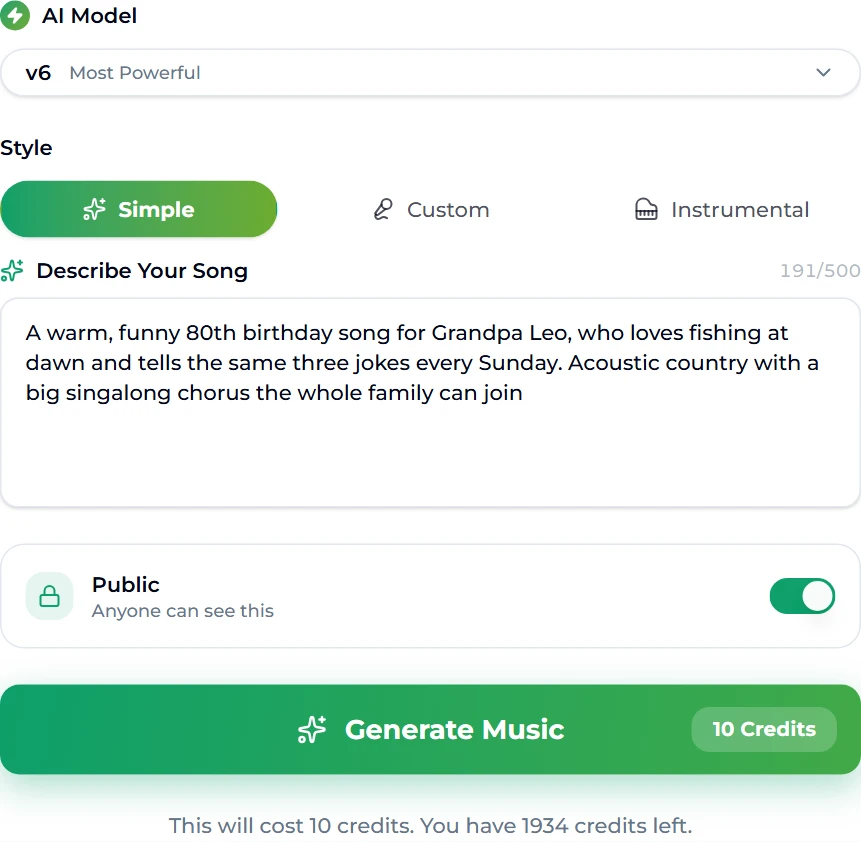
A personalised birthday song lands because it is about someone: their name in the chorus, the things only the family knows, in a style they would actually play. You can make one in about a minute. Open the AI birthday song generator, write one sentence — name, age or occasion, two or three details, and a style — and press Generate Music (10 credits). Two full takes with real vocals come back to your library. For this guide we asked for "a warm, funny 80th birthday song for Grandpa Leo, who loves fishing at dawn and tells the same three jokes every Sunday — acoustic country with a big singalong chorus". We got two songs, 3:10 and 2:47, with lines like "Tell those three jokes one more time — go on, don't be shy!"
In this guide
- What makes a birthday song personal
- Write the brief
- Step by step
- What the song said about Grandpa Leo
- Getting it to the party
- Ideas by recipient
- When the first take is not quite right
- FAQ
What makes a birthday song personal
The traditional song works because everyone knows it. A personal one works for the opposite reason: nobody else could have it. That comes from three ingredients:
- Their name, sung. In the chorus, more than once, so the room can shout it back.
- Specifics. Not "you are kind and funny" but the fishing at dawn, the burnt pancakes, the dog called Biscuit. One or two true details beat ten adjectives.
- Their sound. The style they would choose, not the one you would. A grandfather who plays Johnny Cash gets acoustic country; a teenager gets pop-punk or K-pop; a toddler gets something bouncy with a simple chorus.
The birthday song generator writes the lyrics, the melody, the arrangement and the vocal from that brief. Your part is the brief.
Write the brief
The page opens in Simple mode with one box, Describe Your Song (up to 500 characters), pre-filled with an example about Maya who loves hiking and terrible puns. Replace it with your own, using this shape:
| Slot | Why it matters | Our example |
|---|---|---|
| Tone + occasion | Sets the mood and tells the model it is a birthday | a warm, funny 80th birthday song |
| The name | Spell it the way it should be sung | for Grandpa Leo |
| Two or three details | These become the verses | loves fishing at dawn, tells the same three jokes every Sunday |
| Style | The genre and the one instrument that matters | acoustic country |
| Shape | Ask for what the party needs | a big singalong chorus the whole family can join |
Tips that make a real difference:
- Details should be scenes, not traits. "Tells the same three jokes every Sunday" gave us a whole verse; "has a good sense of humour" would have given us a cliché.
- Say the age if it is a milestone. The model built "eighty years and still the pride of this whole crowd" out of the word 80th.
- Keep private jokes decodable. A nickname only the two of you understand may be mispronounced or turned into something else. Add a hint: "his nickname Bear, as in teddy bear".
- Want your own words? The Custom tab takes lyrics you have written plus a style and a title. Our lyrics generator can draft verses to edit first.
Step by step
- Open the AI birthday song generator and sign in. New accounts start with 16 credits and a run costs 10, so your first birthday song is free.
- Write your one-sentence brief in Describe Your Song.
- Check the AI Model menu. Free accounts use v6 Mini by default; paid plans default to v6, which has the more natural vocal performance.
- Decide on Public. Leave it on, or — if your plan includes private songs — switch it off so the surprise stays a surprise.
- Press Generate Music (10 credits). You land on the create workspace while it renders.
- Listen to both takes, pick the one that makes you grin, and download it.
What the song said about Grandpa Leo
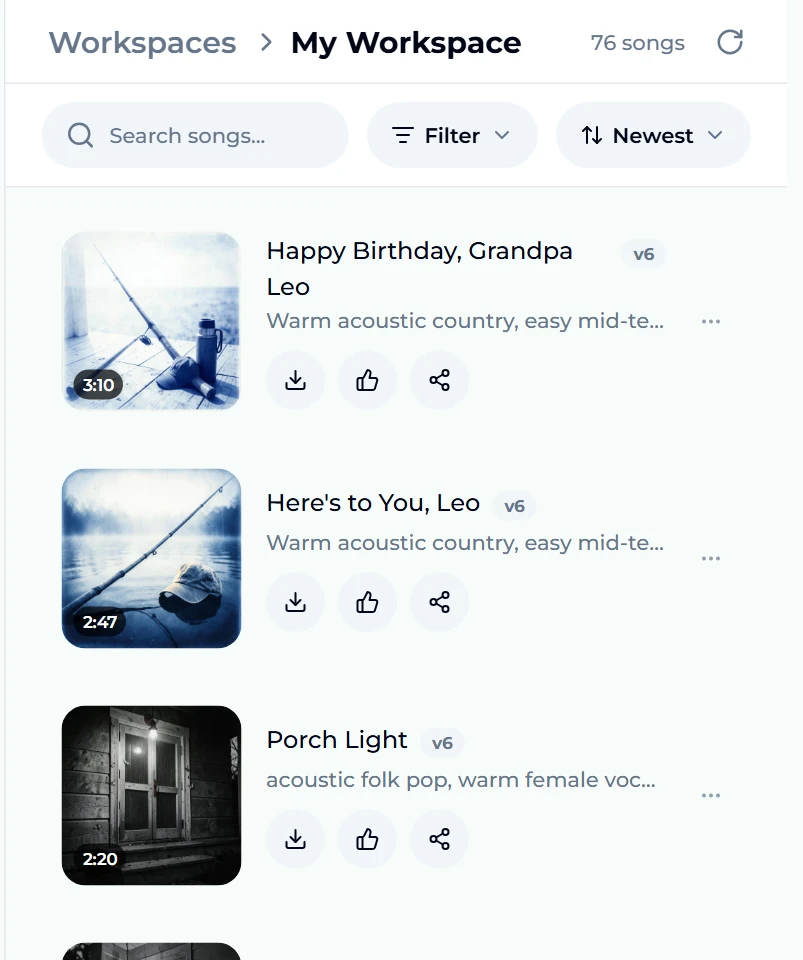
The run took about a minute. Two takes appeared at the top of the Songs panel: "Happy Birthday, Grandpa Leo" (3:10) and "Here's to You, Leo" (2:47), both on v6, both with cover art that — without being asked — shows a fishing rod on a dock at dawn.
The lyrics used every detail in the brief. The first verse is the dawn fishing trip — "Before the kettle, before the sun, Grandpa Leo's got his tackle spun" — and the second verse turned the three jokes into a family ritual: joke one gets "the same big sigh", joke two gets a fake look of surprise, joke three "still gets the biggest laughs". The chorus is built for a room to sing:
Happy birthday, Grandpa Leo, sing it loud, Eighty years and still the pride of this whole crowd. Raise a glass and pass the pie, Tell those three jokes one more time — go on, don't be shy!
There is even a bridge we would not have thought to ask for — "You taught us patience by the water's edge" — which is the line that will make someone at the table reach for a napkin. The style the model wrote for itself says what it was going for: warm acoustic country, easy two-step sway, fingerpicked guitar, fiddle fills, handclaps and mixed group backing vocals on the choruses.
Getting it to the party
A song on a laptop is not a birthday moment yet. Some ways to deliver it:
- Play it live. Download the MP3 and play it through a speaker when the cake comes out. The singalong chorus is there for exactly this.
- Send it. Share the song link, or send the file in a message at midnight.
- Put it on a video. Render an MP4 music video from it with the AI music video generator, or lay it under a photo slideshow. Our guide to making AI music videos covers both.
- Make it their ringtone. Cut the chorus with the ringtone maker and install it on their phone — every call becomes a birthday callback.
- Do a karaoke version. Split off the vocal with the vocal remover so the family sings the lyrics themselves.
Downloads come with every plan and credit pack; the pricing page lists them.
Ideas by recipient
Use these as starting sentences and swap in your own details:
- A child turning five: "A bouncy, silly birthday song for Nora turning five, who loves dinosaurs and her cat Pickle, bright kids' pop with an easy chorus to shout."
- A best friend: "An upbeat pop-punk birthday song for Sam, my best friend since school, about road trips, bad karaoke and the time we got lost in Porto."
- A partner: "A tender acoustic birthday love song for Priya, about Sunday pancakes, her terrible puns and ten years together, soft female vocal."
- A parent: "A soulful Motown-style birthday song for Mum turning 60, who gardens at sunrise and dances in the kitchen, with a brass section and backing singers."
- A colleague: "A cheerful office-friendly birthday jingle for Marco, the coffee-machine expert of the third floor, short and upbeat."
If you are stuck on a genre, the song maker and AI song maker pages run the same generator, and our guide to making AI music in any genre lists what each style needs in a prompt.
When the first take is not quite right
- The name is sung oddly. Spell it phonetically in the brief — "Siobhan (shi-VAWN)" — or use Custom mode with lyrics you have written.
- Too long for the moment. Ask for it: "a short 60-second birthday song". For the reverse, Extend adds length to a take you love.
- One line is wrong. Replace Section re-sings a 6–60 second span with new words in the same voice — cheaper than starting over when everything else is right. Our replace-a-section guide shows how to pick the span.
- Wrong mood. Change one word — funny to tender, country to folk — and run again. Each run is 10 credits for two new takes.
- Too generic. Add a specific scene. The fishing-at-dawn line did more for our song than any adjective.
FAQ
How do I make a birthday song with someone's name in it?
Put the name in your one-sentence description, spelled as it should be sung, on the AI birthday song generator. The model writes it into the lyrics — in our run, "Grandpa Leo" appears in every chorus and in both song titles.
How long does it take?
About a minute. Our run finished in roughly 60 seconds and returned two full songs of 3:10 and 2:47.
Is it free?
A new account gets 16 credits and each run costs 10, so the first song is free. After that, credits come with any plan or credit pack.
Can I write the lyrics myself?
Yes. Use the Custom tab: paste your lyrics, add a style line and a title. The model sings exactly your words.
Can I keep it private until the party?
Yes, on plans that include private generation: switch Public off before you press Generate.
Can I make a birthday song for a child?
Yes — ask for "kids' pop", a simple chorus and an age, and keep the details concrete: a favourite animal, a toy, a pet's name.
Which model gives the best vocals?
v6, on paid plans, has the most natural vocals. Free accounts use v6 Mini, which is good for trying ideas.
Final take
The difference between a birthday song and their birthday song is one sentence: a name, an age, two true details and a style they love. Write it on the AI birthday song generator, pick the take that makes you smile, and bring it to the party — played when the cake comes out, set to photos with the music video generator, or cut into a ringtone. Grandpa Leo got a three-minute country singalong about his jokes. Somebody you know deserves one too.