

TL;DR
Most AI songs are 90% right. The chorus lands, the arrangement is good, and one verse has a line the model misheard or a lyric you have since rewritten. Regenerating throws away the 90%. Replace Section on Suno AI Music keeps it: pick the track, mark the span you want redone — anything from 6 to 60 seconds — type the lyrics as they should be, and the model re-sings that stretch in the same voice, key and arrangement, generated with the original as context. 10 credits, two takes, the rest of the track untouched. The tighter the span and the cleaner its edges, the less you hear the join.
In this guide
- What Replace Section does
- When to replace, extend, or cover
- Step by step
- Choosing the span
- Writing the replacement lyrics
- If the join still shows
- The fixes it is best at
- FAQ
What Replace Section does
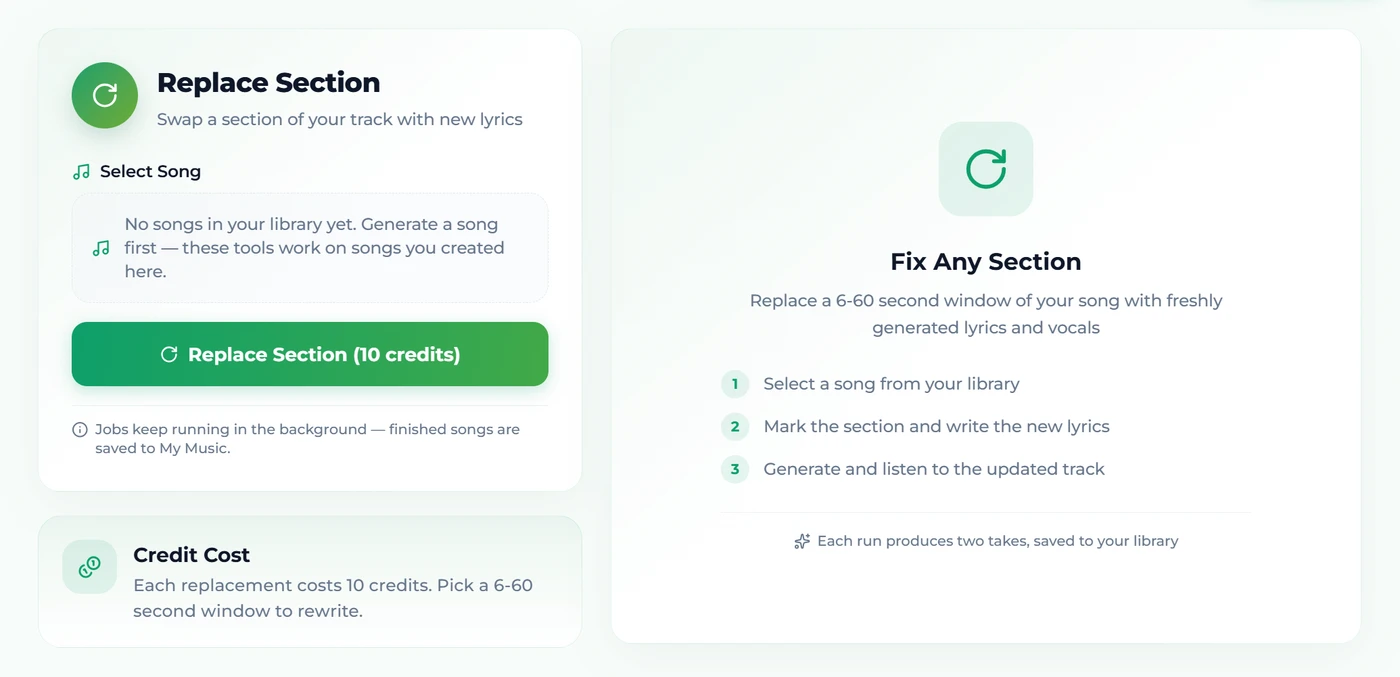
It re-cuts one part of a finished song. You mark a time range; you give it the words that belong there; it generates a new performance of that range on the same model, with the surrounding audio as context, so the new part arrives in the same key, tempo, voice and arrangement and hands back to the original at the end of the span. Everything outside the range is untouched — you are not paying for, or risking, audio you already had.
Three constraints define it:
- 6 to 60 seconds. Shorter than six and there is not enough context for the model to blend the join; longer than a minute and you are better off extending or regenerating.
- Your own library. Like the other tools it reads your songs — generated, covered, extended — rather than taking an upload.
- 10 credits, two takes. The same cost as a full generation, and the same two-take habit: audition both, keep the better join. Credits come from the 16 free on sign-up or any plan or credit pack.
When to replace, extend, or cover
The three editing tools solve different problems, and picking the wrong one wastes credits:
| The problem | The tool | Why |
|---|---|---|
| One line is wrong, the rest is right | Replace Section | Re-sings only the span; the song stays the song |
| The song ends too soon | Extend | Continues from a point; adds length rather than changing what exists |
| The arrangement or genre is wrong | Cover | Re-performs the whole song in a new style; melody and lyrics stay |
| The vocal is right but you need the instrumental | Vocal remover | Separates rather than regenerates |
| The whole thing is wrong | Generate again | Change one word in the prompt and run it |
The rule of thumb: if you can point at the seconds that are wrong, replace. If you cannot, the problem is bigger than a section.
Step by step
- Open the Replace Section tool and choose the song from your library.
- Play it and note the start and end of the part to redo — in seconds. Aim for the edges to sit on a phrase boundary (next section).
- Set the span. It must be between 6 and 60 seconds.
- Type the replacement lyrics — the words that should be sung in that span, and only those.
- Press Replace Section (10 credits). The job runs in the background; two takes arrive in a minute or three, each the full song with the new section in place.
- Listen to both joins at full volume with headphones. Keep the one where you cannot hear the seam; if both seams show, adjust the span (usually widen it to the nearest phrase boundary) and run again.
Choosing the span
The join is what you are managing, and the span decides it.
- Cut on phrase boundaries. Start where a line begins, end where a line ends. Cutting mid-word or mid-note is the seam people hear.
- Prefer a whole line or a whole section. Replacing "the second line of verse two" is possible but the model has more to match; replacing "verse two" gives it a natural entry and exit.
- Give it a breath on each side. If the wrong line is at 0:41–0:47, mark 0:40–0:48 so the model regenerates the breath in and the release out, which is where a splice would show.
- Stay under a minute. Past that, the model is effectively writing a new section, and the arrangement can drift.
- Instrumental spans work too. Mark a solo you dislike and replace it with the lyrics field empty; the model plays a new solo in context.
Writing the replacement lyrics
The lyrics field is the whole instruction; there is no style box for a replacement because the style is the song.
- Match the syllable count of the original line as closely as you can. The melody is being re-sung; a line with twice the syllables gets crammed, one with half gets stretched.
- Keep the rhyme sound if the surrounding lines rhyme with it — or change all of them by widening the span.
- Structure tags are optional inside a span, but a
[Chorus]or[Verse]line at the top helps the model read the energy if the span covers a section boundary. The tags guide covers what each does. - Only the words for the span. Pasting the whole song's lyrics into the field asks the model to fit them all into 20 seconds.
If the join still shows
Two takes and a clean span usually settle it. When a seam is still audible, the cause is almost always one of five things, and each has a fix that costs one more run rather than a new song:
- The cut landed mid-phrase. The most common one. Widen the span to the nearest silence on both sides — a beat before the line starts, a beat after it resolves — and run it again. A span that begins on a breath hides better than one that begins on a syllable.
- The syllable count moved. A replacement line noticeably longer or shorter than the original forces the model to re-time the melody, and the re-timing is what you hear, not the splice. Count the syllables of the original line and land within one or two.
- The span crosses a section boundary. Half a verse plus half a chorus asks the model to reproduce a transition it did not write. Either stay inside one section or take the whole of both.
- The energy jumps. If the replaced part sits under a build, add the structure tag (
[Chorus],[Bridge]) at the top of the lyrics so the model reads the intended level instead of inferring it. - The span is too short. At six or seven seconds there is barely enough context to match. If the wrong words occupy four seconds, replace the whole line around them.
If a third run still shows the seam, the problem is usually not the span — the section you are fixing is carrying something the rest of the arrangement depends on, and a cover of the whole song in the same style is the cheaper way out.
The fixes it is best at
Where a section replace beats every alternative:
- The misheard line. The model sang "a light in the hole" for "a light in the hall". Type it correctly, mark the line, done.
- The lyric you rewrote after hearing it. Songs improve once they exist; a verse that reads well and sings badly gets a better line without a new song.
- The name, the date, the place. A song for a wedding, a brand, a birthday — one sung detail changes and nothing else should.
- The weak bridge. Mark the bridge, rewrite it, keep the choruses everyone already likes.
- Cleaning a line for a public post. One word you would rather not have sung on a client's video.
- A different solo. Empty lyrics field, mark the solo, get a new one that still belongs to the track.
What it is not for: changing the genre (cover), making it longer (extend), or fixing a song that is wrong all the way through (regenerate — and change one word in the prompt first).
FAQ
How long can the replaced section be?
Between 6 and 60 seconds. Shorter leaves the model too little context to blend the join; longer is a job for extend or a new generation.
Does the new section match the rest of the song?
It is generated with the original track as context and on the same model, so it sits in the same key, voice and arrangement. A tight span on phrase boundaries makes the join hardest to hear.
Can I fix wrong or misheard lyrics this way?
Yes — it is the main use. Type the line the way it should be, mark the seconds it occupies, and the model re-sings that stretch.
What does it cost?
10 credits, the same as a full generation, and you get two takes. The rest of the track is untouched.
Which songs can I edit?
Any track in your own library — generated, covered, extended or previously edited. There is no upload.
Can I replace an instrumental part?
Yes. Mark the span and leave the lyrics empty; the model plays a new passage in context.
Final take
Point at the seconds that are wrong, give the model the words that belong there, and keep everything else. Replace Section is the tool that turns a 90%-right song into a finished one for 10 credits — cut on phrase boundaries, match the syllables, audition both takes, and the seam disappears.