
TL;DR
"Suno tags" are three different things that get lumped together. Structure tags — [Verse], [Chorus], [Bridge], [Instrumental], [Outro] — go in the lyrics box on their own lines and shape the arrangement over time; they are the only tags that reliably do what they say. Voice and style descriptors — female vocal, breathy, synthwave, 100 BPM — go in the style box as plain comma-separated words, not in brackets. Exclusions go in the Negative Tags field on Suno AI Music (Exclude Styles in Suno's app), never as "no drums" inside the style prompt. Keep tags short, put each on its own line above the section it governs, and repeat the chorus lyrics verbatim under every [Chorus].
In this guide
- Three kinds of tag
- Structure tags
- A fully tagged lyric sheet
- Voice tags
- Style tags
- Exclusions are not tags
- Tags that do nothing
- FAQ
Three kinds of tag
The confusion starts with the word. Guides list "100 Suno tags" and mix bracketed section markers with genre names and adjectives, as if they all worked the same way. They do not.
| Kind | Looks like | Goes in | What it changes |
|---|---|---|---|
| Structure tag | [Chorus] | Lyrics box, own line | When things happen: sections, energy curve, instrumental breaks |
| Voice descriptor | female vocal, breathy | Style box | Who sings and how |
| Style descriptor | synthwave, melancholic, 100 BPM | Style box | What the record sounds like |
Only the first kind uses brackets. Putting [synthwave] in the lyrics box mostly gets a word sung; putting [Chorus] in the style box does nothing at all.
On the create page the split is physical: Custom mode gives you a Style field and a Lyrics field, and the rest of this guide follows that split.
Structure tags
These are the ones that earn the name. Each goes on its own line, directly above the lines it governs, nothing else on that line.
| Tag | What the model does with it | Notes |
|---|---|---|
[Intro] | A short opening — instrumental or a spoken line — before the first sung line | Leave it empty for a purely instrumental intro |
[Verse] | Lower energy, narrative delivery, a new melody | Number them ([Verse 2]) when you have more than one |
[Pre-Chorus] | A short build that raises tension into the chorus | Two lines is usually enough |
[Chorus] | The hook: fuller arrangement, higher energy, and repetition on later occurrences | Repeat the chorus lyrics verbatim each time |
[Bridge] | A contrasting section, usually once, before the final chorus | Change the rhyme sound or the point of view here |
[Instrumental] | A stretch with no vocals — solo, breakdown, breath | Strongest tag after [Chorus]; also the cleanest cut point for a later extend |
[Break] | A shorter pause than [Instrumental], often just drums | Use sparingly |
[Outro] | Winds the song down instead of stopping dead | Add a final line or leave empty for a fade |
[End] | Asks for a definite stop | Helps when the model wants to keep going |
Four rules that hold across model versions:
- Short beats long.
[Chorus]outperforms[Big emotional chorus with harmonies]. One to three words. - A tag acts on what is under it. Lines above the tag belong to the previous section.
- Repetition is yours to write. The model does not assume the chorus repeats — paste the lines again under each
[Chorus]. - Tags are strong hints, not commands. Most of the time they are honoured; when one is ignored, shorten it, check it is alone on its line, and make sure the lyrics under it read like that section.
A fully tagged lyric sheet
Paste this into Custom mode's Lyrics field on the generator, set the style to synthwave, melancholic, late-night drive, analog synths, gated reverb drums, 100 BPM, female vocal, breathy, and run it. Then change one thing.
[Intro]

[Verse]
Streetlights hum a colour I can't name
Every window is a different kind of leaving
Radio's a stranger's voice again
Counting exits like I'm counting on believing

[Pre-Chorus]
Hold the wheel a little looser now

[Chorus]
Drive until the city forgets my name
Drive until the neon turns to rain
I don't need the road to lead me home
Just far enough to feel I'm not the same

[Verse 2]
Coffee going cold against the dash
Your jacket in the back seat still has weather
I could turn around at any sign
I keep on choosing later over never

[Pre-Chorus]
Hold the wheel a little looser now

[Chorus]
Drive until the city forgets my name
Drive until the neon turns to rain
I don't need the road to lead me home
Just far enough to feel I'm not the same

[Bridge]
Maybe home is just the leaving done right

[Instrumental]

[Chorus]
Drive until the city forgets my name
Drive until the neon turns to rain
I don't need the road to lead me home
Just far enough to feel I'm not the same

[Outro]
Just far enough
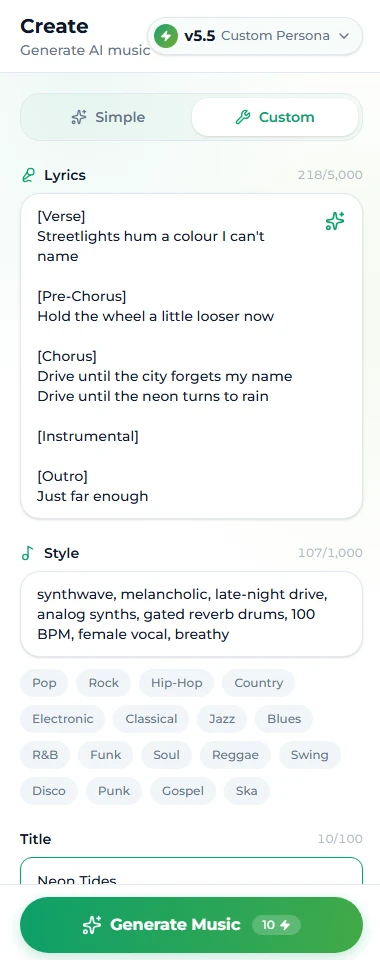
Things to notice: the chorus is identical every time; the pre-chorus is one line so it stays a build; the bridge changes the rhyme sound and the perspective; [Instrumental] sits alone and gives the last chorus a runway; the outro reuses the hook's last words so the ending is planned rather than faded.
If you would rather have the words generated, the AI lyrics generator returns a sheet with these tags already placed for 1 credit and hands it straight to Custom mode.
Voice tags
Voice descriptors are plain words in the style box. They describe the singer and the delivery, and they carry more weight than most people expect because a vocal is the first thing a listener identifies.
Who: female vocal, male vocal, male baritone, female alto, duet, choir, child-like vocal, gang vocals.
How: breathy, whispered, belted, raspy, smooth, nasal, soulful, spoken word, autotune melody, harmonies on chorus.
Rules:
- One "who", one or two "how".
female vocal, breathy, close-micis a direction;female vocal, breathy, powerful, whispered, beltedis a coin toss. - Match the register to the genre.
whisperedon a metal prompt andscreamedon a lullaby both produce a fight between the voice and the arrangement. - Vocal Gender is a nudge, not a switch. The control in Custom mode raises the probability; the words in the style box do the rest. Use both together.
- Instrumental beats every voice tag. The Instrumental switch ignores the lyrics and the voice words entirely.
Style tags
Style descriptors are the four-part formula — genre, mood, instrumentation, vocal — plus tempo and era when they matter, front-loaded, comma-separated. The Suno prompts guide covers them in depth with thirty examples; here is the vocabulary by slot so you can build your own.
Genre and sub-genre: synthwave, bedroom pop, boom bap, deep house, bluegrass, city pop, neo soul, pop punk, afrobeats, neoclassical.
Mood: melancholic, euphoric, tense, tender, defiant, hazy, late-night, sunny, cinematic, intimate.
Instrumentation and production: analog synths, gated reverb drums, fingerpicked nylon guitar, Rhodes, 808 bass, brushed snare, wall of distortion, tape hiss, vinyl crackle, string quartet, Hammond organ, horn stabs.
Tempo and era: 80 BPM, 124 BPM, late 80s, early 2000s, slow, double-time.
Model choice is not a tag, but it changes how tags are read: every model honours the structure tags, and the newer PRO models (v6 and v6 Wild — on the paid plans) tend to follow voice descriptors more closely. Free accounts generate on v6 Mini; the examples here were first tested on v4.5.
The one word type to leave out is an artist's name. It is unreliable as a descriptor and it is the single thing that can complicate a commercial licence. Describe the sound instead: 80s power ballad, gated drums, big harmonies says more than a name and belongs to nobody.
Exclusions are not tags
"No drums" in the style box is read as a mention of drums roughly as often as a ban on them. Exclusions have their own field for exactly this reason.
On Suno AI Music it is Negative Tags in Custom mode: comma-separated nouns and adjectives you do not want — the placeholder heavy metal, fast drums is the right shape. In Suno's own app the same control is Exclude Styles under Advanced Options. Use it when a genre keeps dragging in a texture you dislike: a gospel choir on every pop chorus, a trap hi-hat on every hip hop beat, a saxophone that appears uninvited.
Keep the list short. Excluding six things does not make the model more precise; it makes it avoid the genre.
Tags that do nothing
Save the characters:
- Production notes in brackets inside the lyrics —
(guitar solo here),[make this louder]. They get sung or ignored. Use[Instrumental]for a solo and the style box for loudness. - Long descriptive tags —
[emotional bridge with strings entering softly]. Shorten to[Bridge]and putstrings enter on bridgein the style box. - Tags in the style box —
[Chorus]there is noise. - Stacked contradictory descriptors —
calm, aggressive;acoustic, heavy 808s. The model averages them. - Brand and plugin names — the model knows sounds, not products.
- Artist names — see above; unreliable and a licensing risk.
FAQ
Do tags guarantee the structure?
No. They are strong hints the model follows most of the time, [Chorus] and [Instrumental] most reliably. If one is skipped, shorten it, give it its own line, and make the lyrics under it read like that section.
Should I write [Verse 1] or just [Verse]?
Either works; number them when there are several so you can read the sheet. The model treats both as a verse.
Where do voice tags go?
In the style box, as plain words — female vocal, breathy. Not in brackets, not in the lyrics.
How do I get a purely instrumental section?
Put [Instrumental] on its own line where the break should be, with no lyrics under it. For a whole instrumental song, flip the Instrumental switch instead.
Can I use these tags in Suno's own app?
Yes — structure tags behave the same way there. The one mapping to know: our Negative Tags field is Suno's Exclude Styles under Advanced Options.
Why does my chorus sound like a verse?
Almost always because the chorus lyrics are not repeated, or the [Chorus] tag is missing or shares a line with lyrics. Paste the chorus in full under every [Chorus].
Final take
Brackets for structure, words for sound, a separate field for what you don't want. Keep tags to one or two words, put each on its own line above what it governs, and repeat the chorus yourself. Paste the sheet above into Custom mode, run it, and change one tag at a time — that is how you learn what each one moves.