

TL;DR
To turn a poem into a song you need two things: the poem itself, sung exactly as you wrote it, and a sound that matches what you hear when you read it aloud. A gentle poem about hope wants soft folk; a dark poem about the sea wants drums and strings. The quickest way is poem to song: paste your poem into the Own Lyrics tab, describe the sound (or tap one of six "Start from a vibe" tiles, each with a finished example), press Generate Music for Free, and about a minute later you hear two versions of your poem sung line by line. One run costs 10 credits, and new accounts in many countries get 16 free credits on sign-up.
In this guide
- What it takes to turn a poem into a song
- Step by step with poem to song
- Getting your poem ready
- Six ways to set a poem to music
- Common mistakes
- Choosing a model
- After the song is made
- FAQ
- Final take
What it takes to turn a poem into a song
Songwriters have turned a poem into a song for centuries, and the craft comes down to a few decisions. Each one is something you can put in the style description:
- Your exact words. In the Own Lyrics tab every line of the poem is sung in order. Nothing is rewritten. That is the difference between turning a poem into a song and asking the AI to write a song about your poem.
- A sound that matches the poem. Before you turn a poem into a song, read the poem aloud and notice the mood. Hopeful, playful, tender, brooding, nostalgic. The style should feel the same way.
- The rhythm of the lines. Short, regular lines with rhymes make it easy to turn a poem into a song with a traditional shape. Long free-verse lines often sound best as a soft ballad or spoken-sung folk.
- The right voice. Soft breathy female vocal, warm Scottish male vocal, brooding male vocal that builds to a powerful shout, warm female vocal with a small children's choir.
- A meter if you know it. A poem in a lilting rhythm often suits slow 3/4 or a slow waltz; a marching one suits a steady 4/4.
- A chorus, optionally. Poems rarely have one. Repeating your strongest line or couplet under a
[Chorus]tag is the simplest way to turn a poem into a song that feels like one.
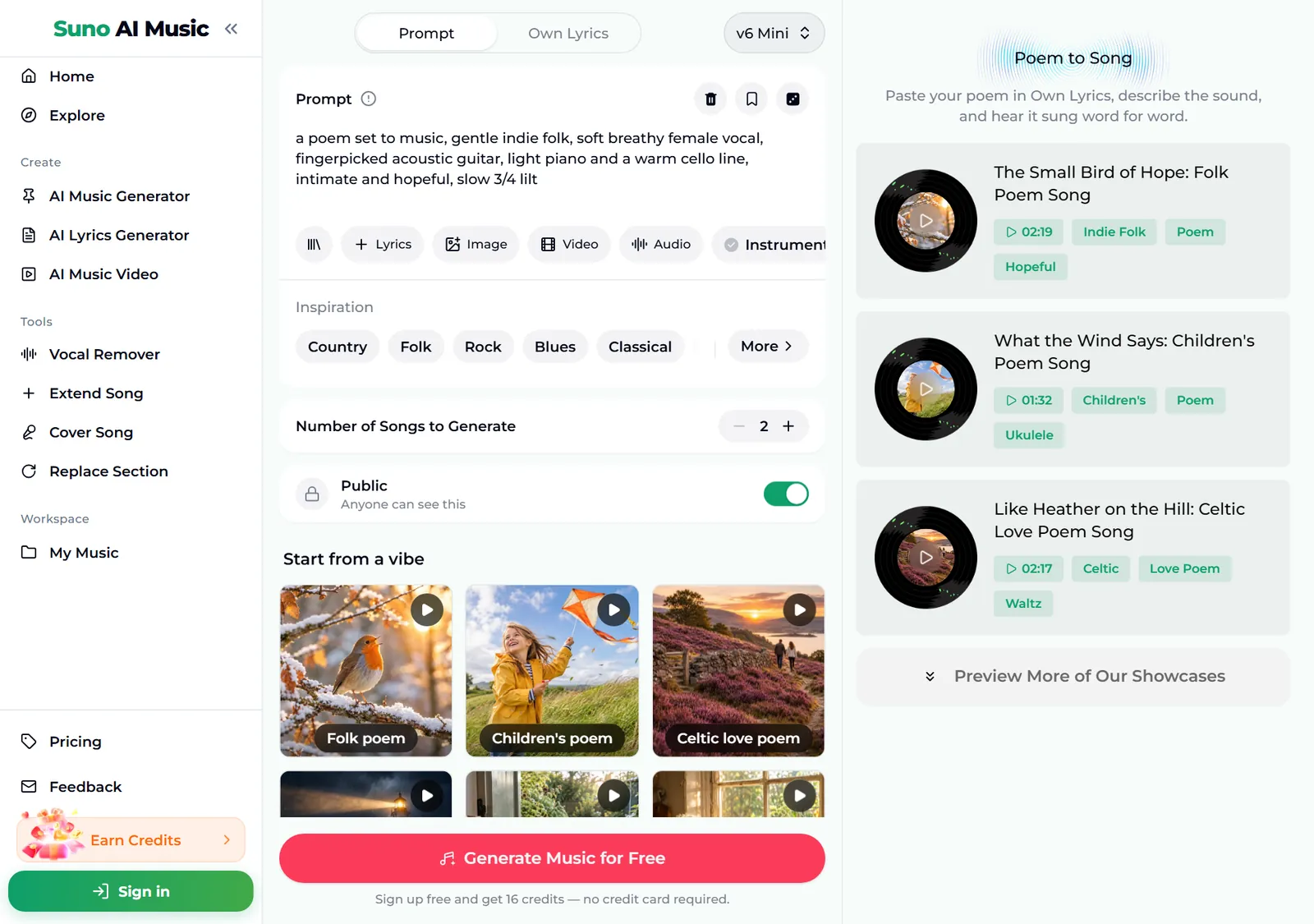
The preset on the page shows how short the style can be: a poem set to music, gentle indie folk, soft breathy female vocal, fingerpicked acoustic guitar, light piano and a warm cello line, intimate and hopeful, slow 3/4 lilt. Starting with a poem set to music tells the model the words come first.
Step by step with poem to song
- Open poem to song. It is the same studio as the main AI music generator, set up for poems. The header says it plainly: "Paste your poem in Own Lyrics, describe the sound, and hear it sung word for word." The Prompt box opens with the gentle indie folk sound described above.
- Look over the form. Under the box are chips for your library, + Lyrics, a reference Image, Video and Audio, and Instrumental. Below sit an Inspiration row of genre chips, Number of Songs to Generate (2 by default) and the Public switch. On the right, the first three examples are listed with their lengths and tags.
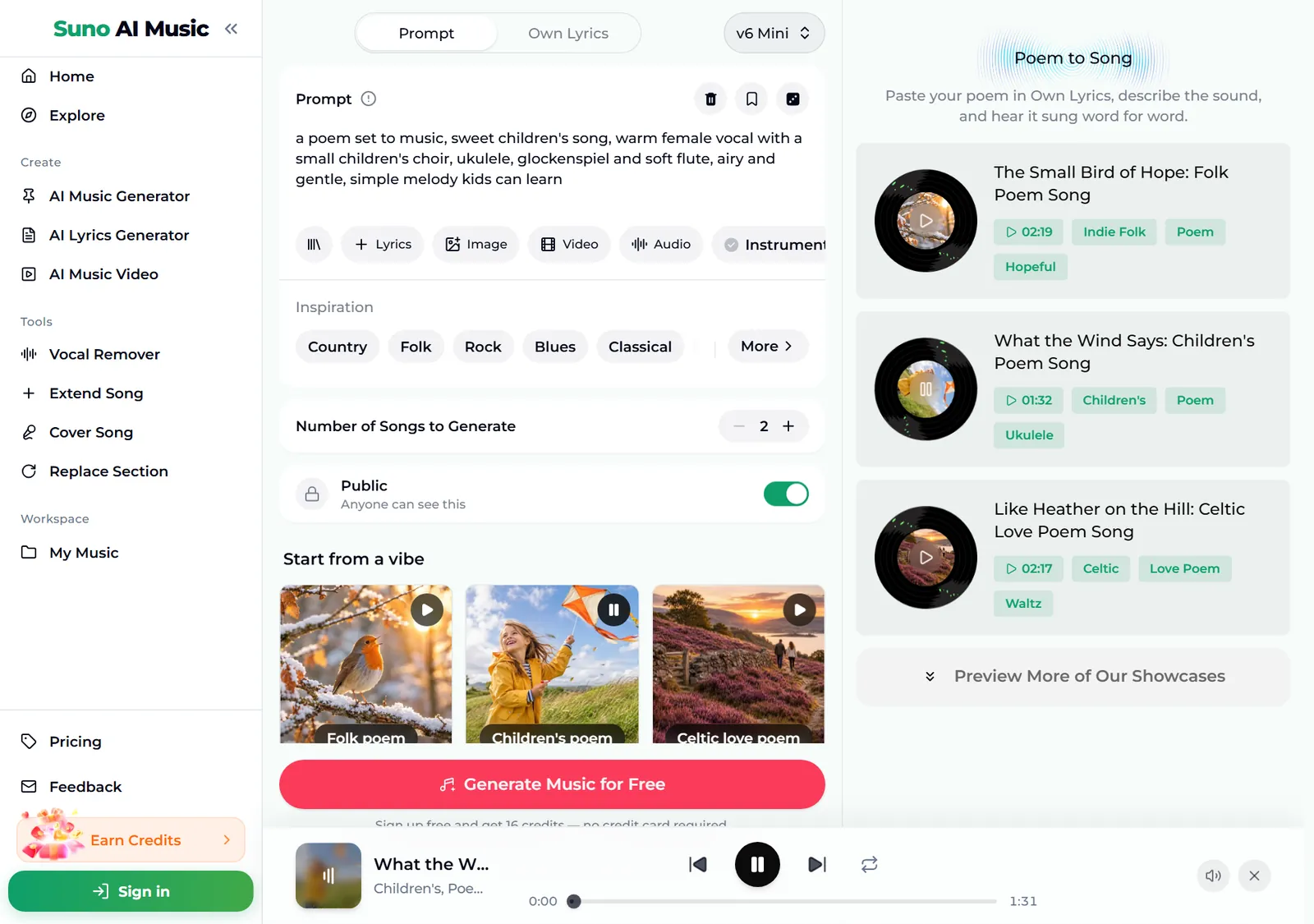
- Play a vibe to find a sound. Hearing how someone else's poem turned out is the fastest way to decide how to turn a poem into a song of your own. Tap a tile under Start from a vibe. One tap plays that tile's example in the player bar and copies its sound description into the Prompt box. Below, we tapped Children's poem: the tile shows a pause icon, the box now holds a sweet children's song style with ukulele and glockenspiel, and the player bar plays "What the Wind Says", 1:31 long.
- Paste your poem in Own Lyrics. Switch to the Own Lyrics tab at the top, paste the poem (up to 5,000 characters), and put the sound description in the style box. Section tags such as
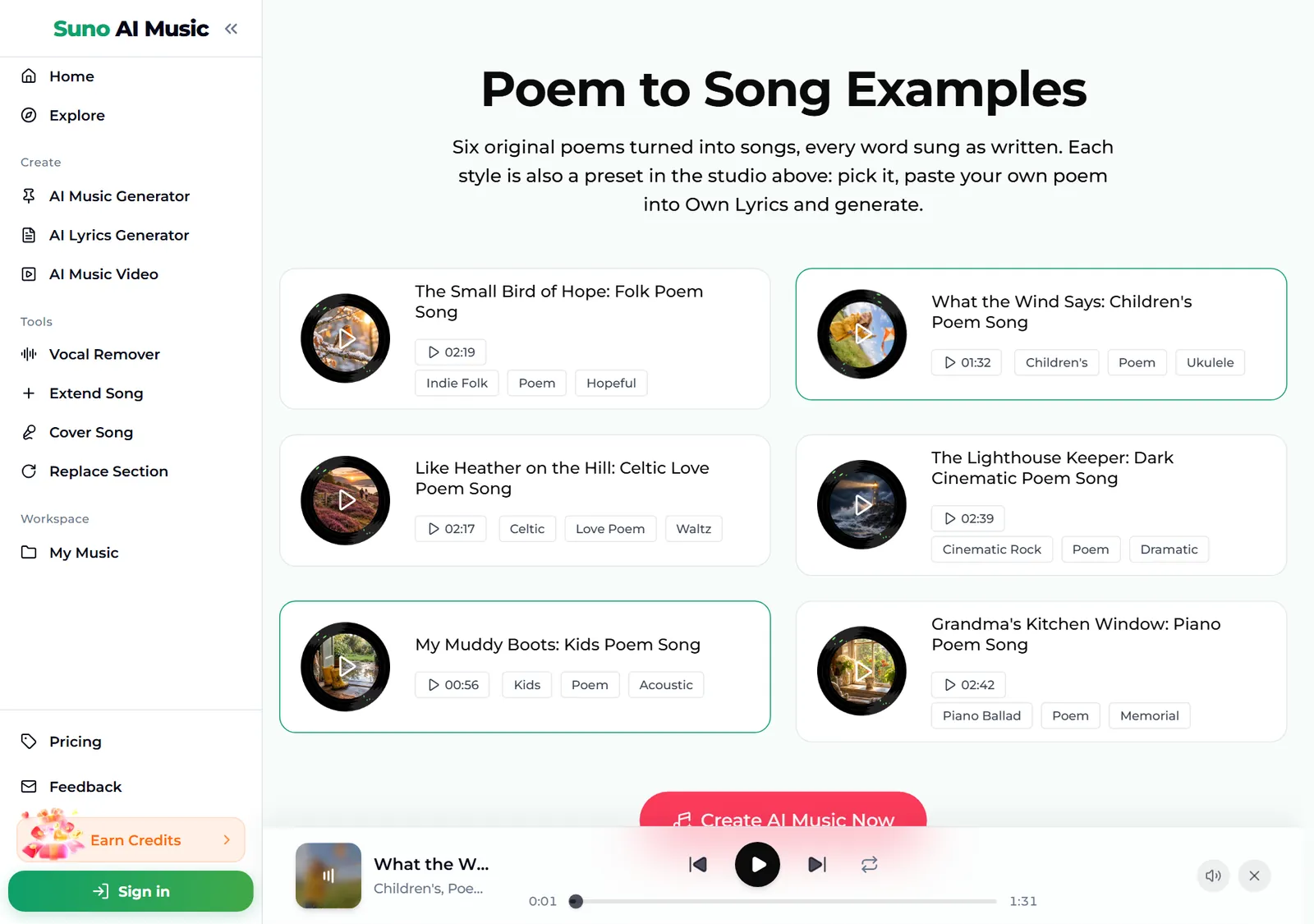
[Verse]and[Chorus]guide the structure and are not sung. - Browse the examples. Further down, the Poem to Song Examples section lists all six songs. Each is an original poem sung word for word, and each card is also a preset in the studio above.
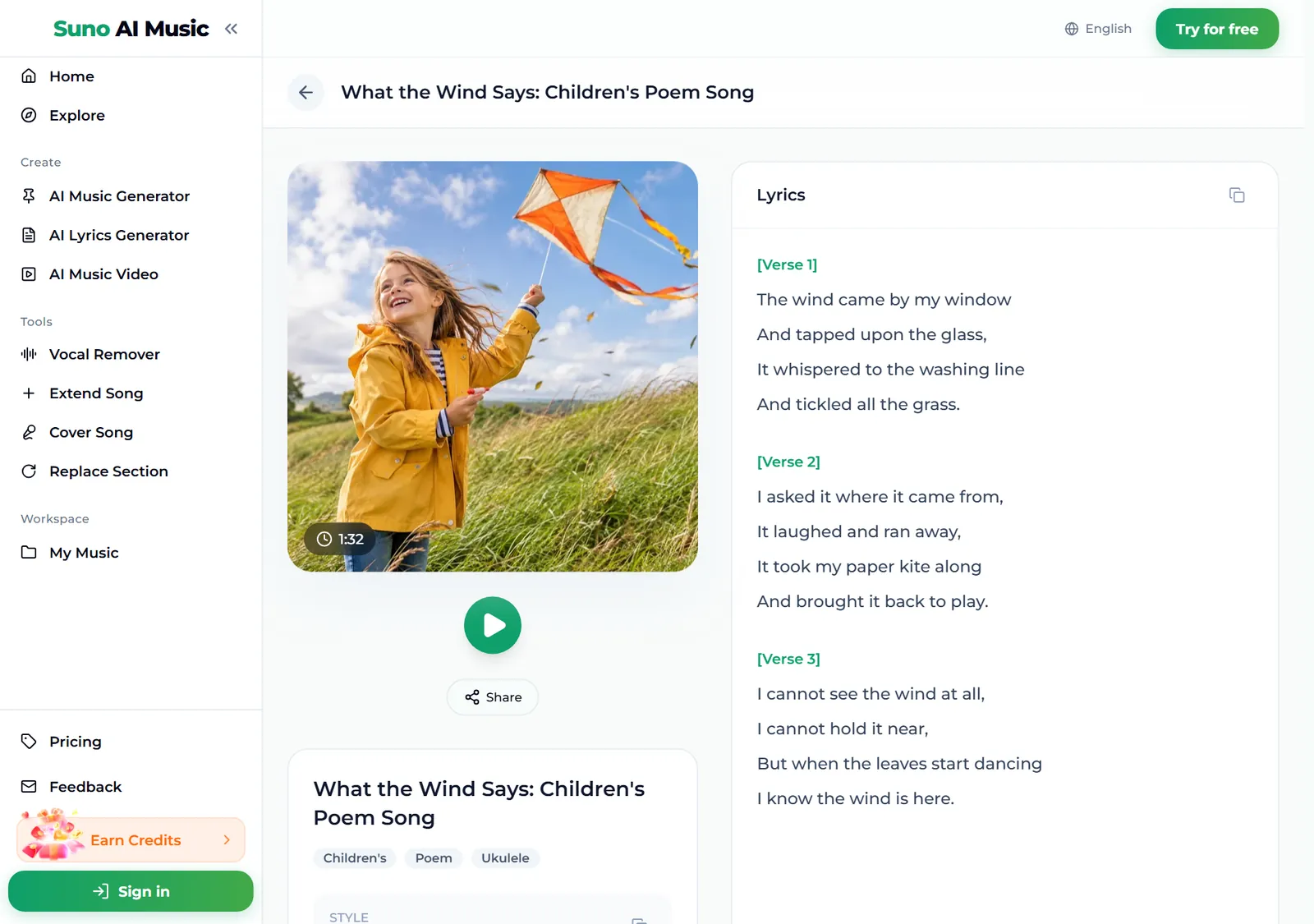
- Open an example to see the poem. Each song has its own page, for example What the Wind Says. The lyrics panel shows the poem exactly as written, in four-line stanzas: "The wind came by my window / And tapped upon the glass".
- Press Generate Music for Free. Logged out, the button asks you to sign up first. A run takes about a minute and turns a poem into a song twice over: two full versions of your poem, each with its own melody and arrangement.
Getting your poem ready
You can paste a poem exactly as it is, but a few small edits help when you turn a poem into a song:
- Mark the stanzas. Put
[Verse]above each stanza. It tells the model where the musical sections start. - Add a chorus. Pick the line or couplet that carries the poem and repeat it under
[Chorus]between stanzas. Even one repeated line makes a big difference. - Keep it a sensible length. Up to 5,000 characters fit, which covers most poems. For a very long poem, choose the strongest stanzas or split it into two songs.
- Free verse is fine. A poem does not need to rhyme. Free verse often sounds better as a soft ballad or spoken-sung folk, so choose a gentle style.
- Read it aloud first. Where you naturally pause is where a line should end. Long lines that make you run out of breath will be rushed when sung.
- Use your own poems. The filter may refuse very well-known texts, even old ones, because it checks lyrics against known works. The tool is made for your own poems: something you wrote, a poem your child wrote, or one written for someone you love.
If you have no poem yet, switch to the Prompt tab, describe what the song should be about, and the lyrics are written for you; or start in the AI lyrics generator.
Six ways to set a poem to music
Each style below is a different way to turn a poem into a song. These are the six tiles on poem to song, with the exact style each one fills in. Every example is an original poem sung word for word on v6.
| Vibe | What it is | Style |
|---|---|---|
| Folk poem | Gentle indie folk, 2:19 example | a poem set to music, gentle indie folk, soft breathy female vocal, fingerpicked acoustic guitar, light piano and a warm cello line, intimate and hopeful, slow 3/4 lilt |
| Children's poem | Ukulele and small choir, 1:32 example | a poem set to music, sweet children's song, warm female vocal with a small children's choir, ukulele, glockenspiel and soft flute, airy and gentle, simple melody kids can learn |
| Celtic love poem | Fiddle and slow waltz, 2:17 example | a poem set to music, Celtic folk ballad, warm Scottish male vocal, fiddle, tin whistle, bodhran and acoustic guitar, tender and romantic, slow waltz |
| Dark cinematic poem | Brooding rock and choir, 2:39 example | a poem set to music, dark cinematic rock, brooding male vocal that builds to a powerful shout, pounding tom drums, low strings, distorted guitar and choir swells, dramatic and intense |
| Kids' poem | Storybook acoustic pop, 0:56 example | a poem set to music, playful acoustic pop for kids, cheerful male vocal, bouncy acoustic guitar, upright bass, light brushes and whistling, storybook feel |
| Piano ballad poem | Nostalgic and tender, 2:42 example | a poem set to music, heartfelt piano ballad, warm female vocal, soft piano and light strings, nostalgic and tender, gentle build in the last verse |
Two extra styles of our own, untested, if you want to go beyond the six:
- Spoken word (untested): a poem set to music, spoken word over a slow jazz trio, warm low male voice speaking more than singing, brushed drums, upright bass and soft piano, late night
- Choral (untested): a poem set to music, a cappella mixed choir, slow and reverent, rich harmonies, each stanza building in volume
Already have song lyrics rather than a poem? Lyrics to song is set up for verses and choruses; for prose, try text to song.
Common mistakes
- Pasting the poem into the Prompt box. The Prompt tab treats your text as a description and writes new lyrics. To turn a poem into a song word for word, use Own Lyrics.
- A style that fights the poem. The most common way to turn a poem into a song badly is a mismatched sound: a grief poem over upbeat pop feels wrong. Read the poem aloud and choose the mood you hear.
- Very long lines. Lines that run on for twenty words get rushed. Break them where you would pause.
- No repetition. A poem with no repeated line can feel like it never lands. Add a
[Chorus]with your best line. - Famous poems. Very well-known texts may be refused by the filter. Use your own words.
- Judging from one take. Each run returns two versions with different melodies. One often fits the poem much better than the other.
Choosing a model
The model picker sits at the top right of the form.
- v6 Mini is the free tier, described as "Fast drafts, high volume". It is a good place to try styles for your poem.
- v6 is "Most powerful, for any song". All six examples were made on v6, which follows long lines and unusual rhythms more naturally. It needs a paid plan.
- v6 Wild is "Best for experimental ideas", also on paid plans, for unusual settings like a sonnet over trip hop.
Every run costs the same 10 credits to turn a poem into a song in two versions, whichever model you pick. Plans and credit packs cover everything after the free sign-up credits.
After the song is made
- Make it longer. Extend Song adds an instrumental ending or another pass of the chorus.
- Fix one stanza. Replace Section re-sings one part, for example a stanza where the melody felt rushed.
- Get the music on its own. Once you turn a poem into a song, you may want to perform it yourself. The vocal remover splits the song into vocals and instrumental, so you can perform the poem live over the music.
- Share it. Songs download as MP3 with any plan or credit pack, and WAV on Standard and above; pricing lists what each one includes.
FAQ
How do you turn a poem into a song?
Paste the poem into the Own Lyrics tab of poem to song, describe the sound (genre, voice and mood) or tap a vibe tile, and press Generate. You get two versions of your poem sung word for word in about a minute.
Will my poem be sung exactly as written?
Yes, when you paste it into Own Lyrics. Every line is sung in order, and tags such as [Verse] and [Chorus] guide the structure without being sung.
Does my poem need to rhyme?
No. Rhymes and a steady rhythm sound more like a traditional song, but free verse works well as a soft ballad or spoken-sung folk.
How long can the poem be?
Up to 5,000 characters in Own Lyrics, which covers most poems. Split a very long poem into two songs.
Can I turn a poem into a song in another language?
Yes. Paste the poem in its language, and write the language in the style description if you want to be sure.
Can I share or publish the song?
Songs made on the Standard plan and above, 2,500+ credit packs and Team plans carry a commercial licence. Songs made with sign-up credits, on the Starter plan or with a Mini credit pack are for personal use only.
Final take
To turn a poem into a song, keep the words exactly as they are and spend your effort on the sound: a style that matches the mood, a voice that fits, and maybe one repeated line as a chorus. Paste your poem into poem to song, start from a vibe, and change one detail per run until you hear the poem the way you meant it.