
TL;DR
The trending sound you want is probably not available to you: business and brand accounts on TikTok are limited to the Commercial Music Library, and since TikTok renewed its deal with Universal in May 2026 the platform is actively removing unauthorized AI music, including anything that imitates a real artist's voice. The way through is to make a track that is yours. Describe the sound on the create page — genre, mood, instruments, a hook line — generate two takes for 10 credits, keep the 15 seconds that work, and either render it into an MP4 or drop the audio into your editor. Original AI music does not need TikTok's AI label unless it imitates someone; realistic synthetic visuals do. On the Standard plan and above the commercial licence covers the video, so a sponsored post or a brand account is fine.
In this guide
- Why the trending sound is the wrong plan
- TikTok's AI rules in 2026
- What a TikTok track needs
- Step by step
- Six prompt recipes for TikTok formats
- Make it an original sound
- Licensing
- FAQ
Why the trending sound is the wrong plan
Personal accounts can use most of TikTok's music library. Business accounts cannot: they get the Commercial Music Library, a catalogue of pre-cleared tracks that excludes almost every mainstream song — using a copyrighted hit on a business account is prohibited, and videos get muted or taken down. Creators who post sponsored content sit in the same boat, because a paid partnership is a commercial use whatever kind of account it comes from.
That leaves three options: a track from the Commercial Music Library (which every other brand is also using), a stock-music subscription, or a track you make. The third is the only one that gives you a sound nobody else has, an original sound other users can pick up and spread, and no licence renewal to remember. It is also the only one where "make it 20 BPM faster and drop the vocal" is a two-minute change instead of a new search.
TikTok's AI rules in 2026
The rules are stricter than a year ago, but they are aimed at a specific problem, and original music is not it.
- Labels are for realistic synthetic content. TikTok's 2026 policy requires a visible AI label on generated visuals and audio that depict realistic people or scenes. It also reads C2PA Content Credentials to detect synthetic media automatically, so it does not rely on you declaring it.
- Original AI music generally does not need a label — unless it imitates a specific real artist's voice. Voice cloning, "in the style of [artist]" prompts and realistic vocal replication are the high-risk cases, and they can violate TikTok's integrity policies even when labelled.
- Unauthorized AI music is being removed. When TikTok and Universal Music Group renewed their agreement on May 26, 2026, the deal included a commitment to remove unauthorized AI-generated music from the platform and to improve crediting for artists and songwriters. Enforcement had already stepped up in late 2025, with tens of thousands of synthetic-media videos removed and thousands of accounts banned.
Practical translation: describe a sound, not a singer. upbeat indie pop, handclaps, female vocal, bright is a track you can post; [famous artist] singing about my coffee is a takedown waiting to happen. The prompts guide covers the describe-don't-name habit in detail.
What a TikTok track needs
A TikTok track is not a song. It is 8 to 30 seconds of a song, heard on a phone speaker, by someone who will scroll in the first two seconds if nothing happens. Design for that.
- A hook in the first three seconds. No intro, no build. The chorus, the drop, the vocal line — first.
- A loopable section. Most videos are 15 to 30 seconds and loop; a section that ends where it begins keeps the replay seamless.
- A moment. One beat where something changes — a drop, a stop, a vocal cut — is where the transition, the reveal, the before/after lands.
- Phone-speaker mix. Sub-bass vanishes on a phone; the hook has to live in the mids — vocal, snare, a bright synth.
- Words that name the moment, if there is a vocal. "Get ready with me", "wait for it", "day one" — a lyric that matches the format's caption is the lyric people will lip-sync.
Instrumental beds are the safer default for talking-head and product videos; a vocal hook is the higher-ceiling choice for trends, transitions and anything you want others to reuse.
Step by step
1. Decide: hook or bed
If the video has you talking, you want a bed — instrumental, steady, no vocal to fight your voice. Flip the Instrumental switch on the create page and describe the mood.
If the video is a transition, a montage, a dance or a trend, you want a hook — a vocal line that arrives at once. That is Custom mode, next step.
2. Write the prompt
Use the four-part formula: genre, mood, instruments, vocal. Add tempo if you know it. Keep it front-loaded and specific.
hyperpop, euphoric, glitchy synths, pitched-up female vocal, 150 BPMlo-fi hip hop, cozy, Rhodes, vinyl crackle, no vocal, 80 BPM
Two takes come back per run, and they differ more than you would expect; the second one is often the keeper.
3. Start on the chorus
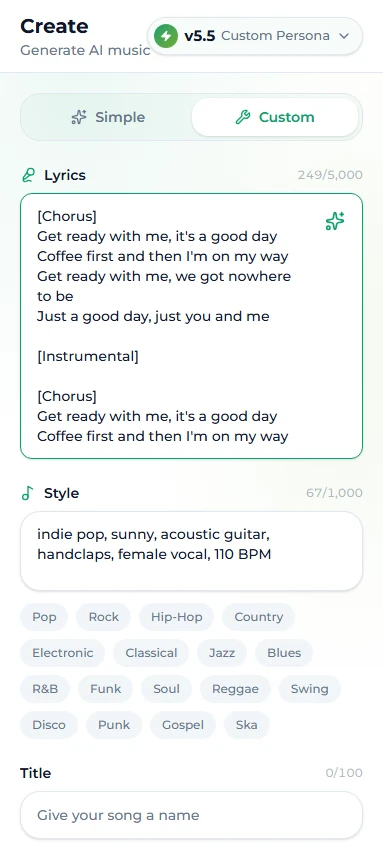
In Custom mode, write the lyrics so the first line is the hook. No [Intro], no [Verse] before it. A sheet built for TikTok looks like this:
[Chorus]
Get ready with me, it's a good day
Coffee first and then I'm on my way
Get ready with me, we got nowhere to be
Just a good day, just you and me

[Instrumental]

[Chorus]
Get ready with me, it's a good day
Coffee first and then I'm on my way
The [Instrumental] line gives you a clean bed after the hook for the part of the video where you are talking; the second [Chorus] gives you a loop point. The tags guide explains what each bracket does.
4. Generate and choose the 15 seconds
Run it — 10 credits, two takes, a minute or two. Listen on your phone, not your headphones. Find the 15 to 30 seconds with the hook and the moment, and note where it starts. If the take is right but too short for a longer video, extend it from the end of the section rather than regenerating.
5. Get it into the video
Two routes:
- Render an MP4 on the site. The music video generator turns any finished track into a video with visuals matched to the music — 10 credits, usually two to five minutes, an MP4 sized for TikTok, Reels and Shorts. You can print your name on the cover frame and add a watermark along the bottom, and the file is available to download for 14 days. Good for lyric videos, sound-only posts and the video that introduces your sound.
- Export the audio and edit yourself. Download the track, drop it into CapCut or TikTok's editor, trim to the 15 seconds you picked, and cut your footage to the moment. This is the route for anything with your own footage.
6. Post it right
Upload with the sound attached (not added from TikTok's library) so it registers as your original sound. Name the sound. If your visuals are AI-generated and realistic, add the AI label; the music itself does not need one. Use the format's caption words in the video text so the lyric and the caption reinforce each other.
Six prompt recipes for TikTok formats
| Format | Style prompt | Sound type |
|---|---|---|
| Get ready with me / morning routine | indie pop, sunny, acoustic guitar, handclaps, female vocal, 110 BPM | Vocal hook |
| Transition / outfit change | hyperpop, explosive, glitchy synths, pitched-up vocal, hard drop, 150 BPM | Vocal hook with a drop |
| Product demo / unboxing | minimal house, sleek, plucky synths, tight drums, no vocal, 120 BPM | Bed |
| Recipe / cooking | bossa nova, warm, nylon guitar, brushed drums, no vocal, 95 BPM | Bed |
| POV / storytime | bedroom pop, intimate, soft piano, hushed male vocal, 85 BPM | Vocal hook, low energy |
| Day in the life / vlog | lo-fi hip hop, cozy, Rhodes, vinyl crackle, no vocal, 80 BPM | Bed |
For the vocal rows, write a two-line hook that names the format — the "get ready with me" sheet above is the template. For the beds, flip the Instrumental switch and skip the lyrics entirely. Generate two or three prompts per format and keep a small library; you will reuse them for months.
Make it an original sound
The growth mechanic on TikTok is not the video, it is the sound. When your track is attached as an original sound, every viewer can tap it and make their own video with it — and each one links back to you. That is how a two-line hook turns into a trend.
To make that likely: keep the hook short enough to lip-sync, put the drop somewhere obvious, give the sound a searchable name, and post two or three of your own videos with it in the first week so the sound page is not empty when someone lands on it. If a sound starts to move, cover it in a second genre — the same hook as a slowed acoustic version or a sped-up club version is how creators keep a sound alive for a second cycle.
Licensing
A track generated on Suno AI Music is copyright-free. On the Standard plan and above (and the larger credit packs) it also carries a commercial licence with a downloadable certificate, and the licence covers the video rendered from it. That is the version you need for a business account, a sponsored post, or anything with a brand attached. The free tier and the Starter plan are for personal use — fine for a personal account, not for a paid partnership. Plans are on the pricing page.
Two things to keep straight regardless of plan: the licence covers the music; any footage, faces or logos in the video are your responsibility. And a track built on a real artist's name is a problem the licence cannot fix, because TikTok's rules — not the licence — decide whether it stays up.
FAQ
Is AI music allowed on TikTok?
Yes. Original AI-generated music is allowed and does not need an AI label. What TikTok removes is unauthorized AI music — tracks that imitate a real artist's voice or reproduce copyrighted songs.
Can a business account use AI music?
Yes, and it is one of the few kinds of music a business account can use freely: business accounts are restricted to the Commercial Music Library for licensed songs, but a track you own with a commercial licence is yours to post.
Do I need to label the video as AI?
Label it if the visuals are realistic synthetic content — generated people or scenes. Original music on its own does not require the label.
How long should the track be?
Make a full track and use 15 to 30 seconds of it. Start the lyrics on the chorus so the hook is in the first three seconds, and pick a section that loops.
Can I make an MP4 without editing software?
Yes. The music video generator renders any finished track into an MP4 with matched visuals for 10 credits, with an optional author name and watermark, downloadable for 14 days.
Will TikTok's copyright detection flag my AI track?
Not if it is original. Detection is looking for licensed recordings and for imitations of real artists. A track described by sound rather than by singer is not either.
Final take
Stop searching for a sound you are allowed to use and make one. Hook first, 15 seconds that loop, a moment for the cut, mixed for a phone. Two takes for 10 credits on the create page, an MP4 in a few minutes if you need one, and a licence that lets the brand account post it. The sound is yours — which means when it spreads, it spreads to you.