
TL;DR
If you have the audio file, drop it into a song BPM finder: it reads the whole track in your browser and gives you the tempo, plus the half-time and double-time readings, in a few seconds. If you only have the song playing somewhere else — a radio, a video, a friend's speaker — use tap tempo and tap along with the beat for eight or so taps. Either way, sanity-check the result against the genre: a lo-fi beat that reads 154 is almost certainly 77 counted in double time. Once you know the BPM, the BPM calculator turns it into note lengths in milliseconds for delays, LFOs and loop edits. All three tools are free and need no account.
In this guide
- What BPM means and why it matters
- Method 1 upload the song to a BPM finder
- Method 2 tap along with tap tempo
- Method 3 count it by ear
- Half time and double time
- Using the BPM once you have it
- FAQ
- Final take
What BPM means and why it matters
BPM — beats per minute — is the pulse you tap your foot to. At 120 BPM, a beat falls every half second; at 60 BPM, once a second. It is the single number that lets two pieces of music line up.
You need it more often than you might think:
- DJs match the BPM of the incoming track to the outgoing one before they blend.
- Runners and fitness instructors build playlists at a steady tempo — around 160–180 BPM for running cadence, 120–130 for a spin class warm-up.
- Producers set a project tempo so samples, loops and MIDI line up with the bar grid.
- Video editors cut on the beat, which is just BPM turned into seconds.
- Musicians learning a song set a metronome to its tempo — then slow it down.
Method 1 upload the song to a BPM finder
This is the fastest and most precise option when you have the file. The song BPM finder (also available as Get Song BPM — same engine) decodes the track and analyses its beat in your browser. The file is never uploaded, so there is no queue, no sign-up and no size penalty beyond the 50 MB limit.
We tested it on two tracks generated on our AI music generator, where we know the tempo that was asked for in the prompt.
- Open the finder and keep the source on Upload a file.
- Drop in the track — MP3, WAV, M4A, FLAC or OGG, at least five seconds long. Shorter clips do not contain enough beats to be sure of anything, and the tool says so.
- Press Find the BPM. A 3-minute song takes a few seconds on a normal laptop.
- Read the result. You get the BPM in large type, a tempo band (Andante, Moderato, Allegro and so on), the track length, where the first beat lands, and — importantly — the alternative readings.
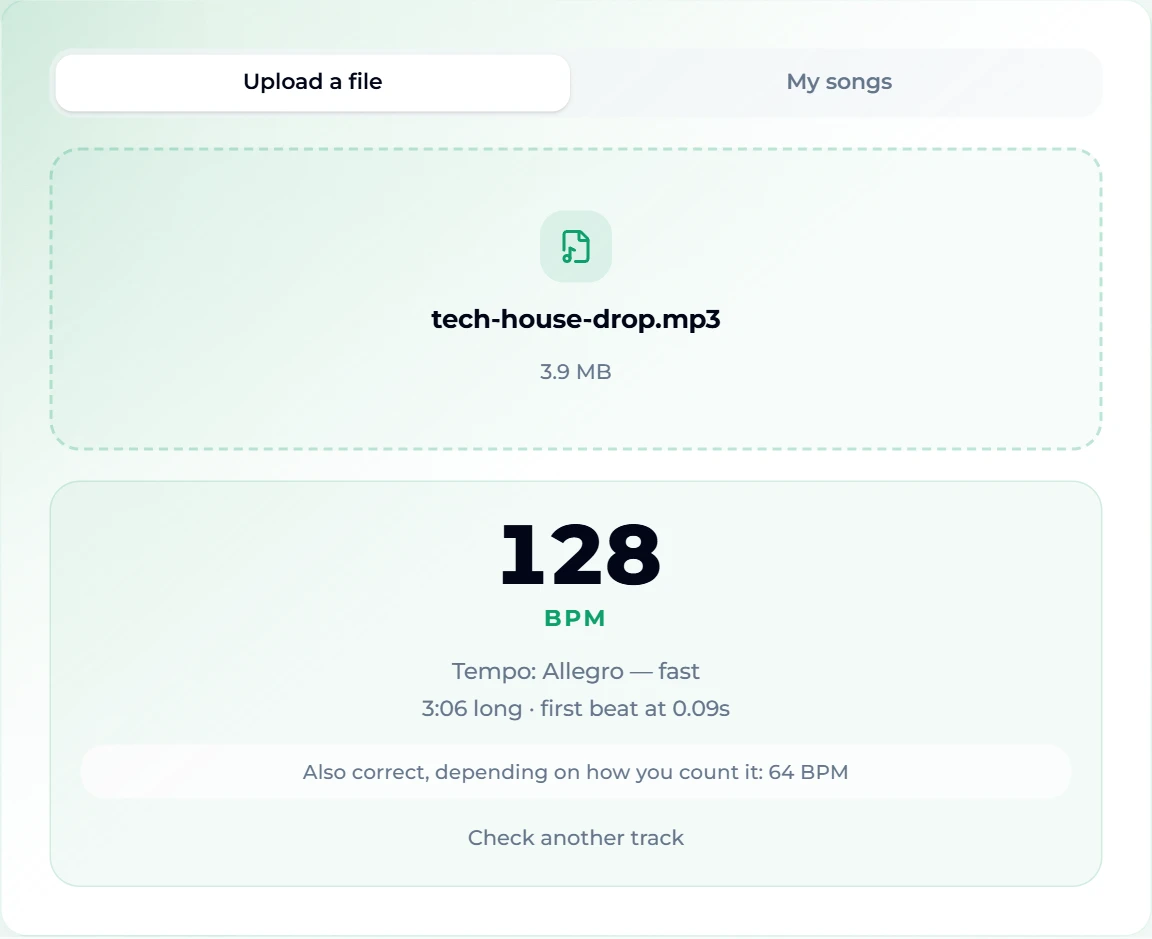
The tech-house track was prompted at 126 BPM and read as 128 — within the couple of beats per minute that a generated performance drifts. For four-on-the-floor dance music, the finder is at its most reliable: the kick drum marks every beat.
The lo-fi track is the instructive one:
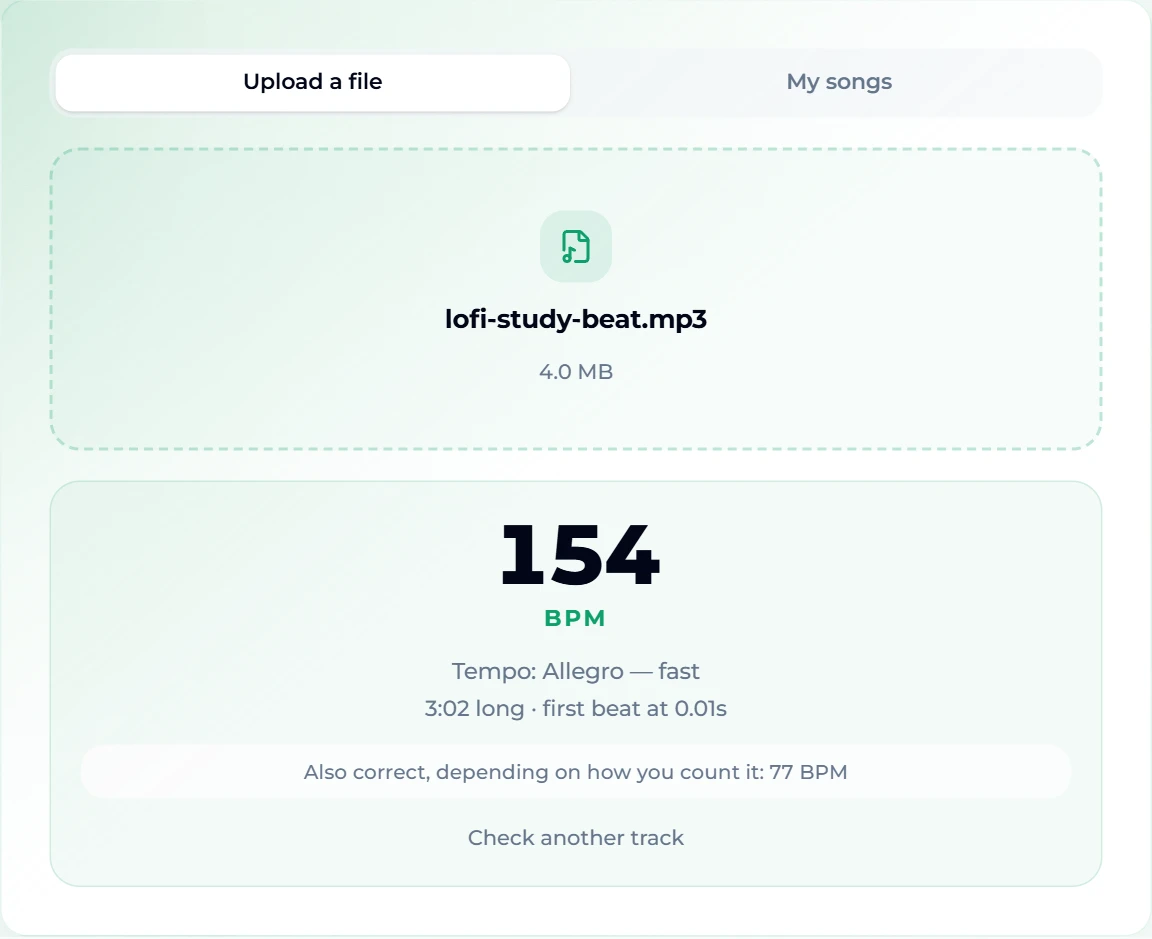
It was prompted at 78 BPM and the finder's headline says 154, with 77 offered as the alternative. Neither the tool nor the song is broken: lo-fi hip hop has busy swung hi-hats and snares that fall between the main beats, so a detector hears twice as many pulses as a listener nods to. This is why the alternatives line exists — and why the section on half time and double time below matters.
If you made the song on this site, switch to My songs instead of uploading; it reads the track straight from your library (sign-in required).
Method 2 tap along with tap tempo
When the music is not a file you have — a song in a café, a TikTok clip, a band rehearsing — tap it. Tap tempo turns the gaps between your taps into BPM.
- Start the music and find the beat you would clap to.
- Tap the big Tap button, or press the space bar (Enter or any letter key works too), on each beat.
- A tempo appears after two taps and settles after a few more. The tool averages your last eight intervals, so one sloppy tap does not throw it off.
- Stop tapping for two seconds and it resets for the next song — or press Esc or Reset.
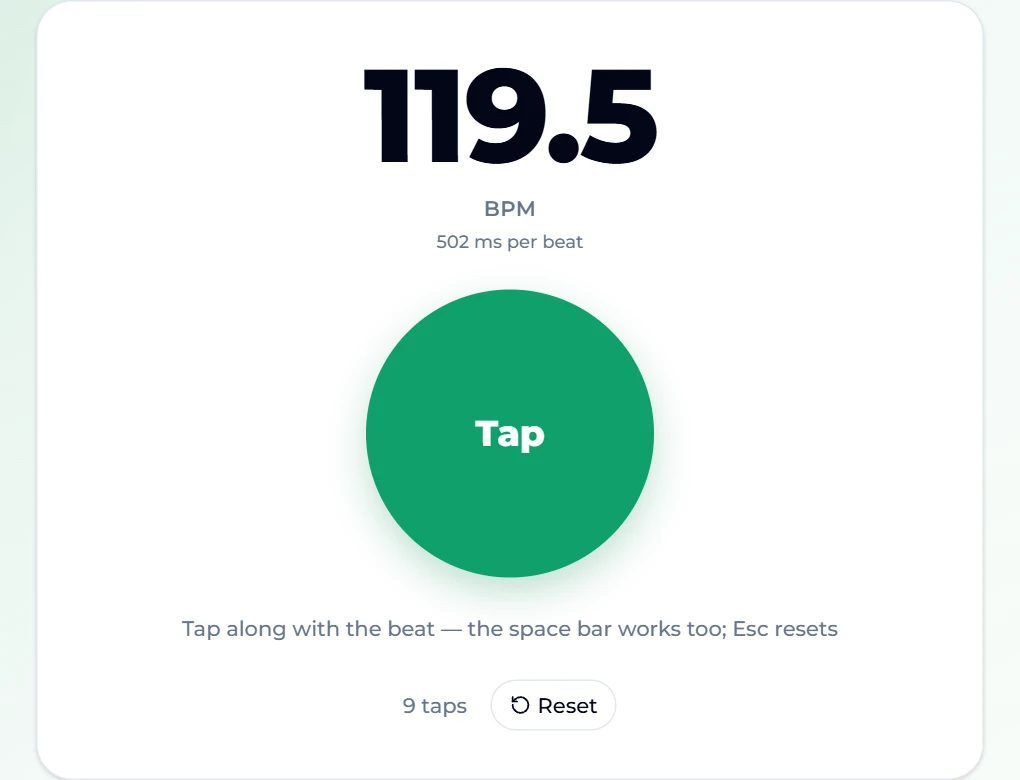
Tapping is less precise than analysis — human taps wobble by a few percent — so round the answer to the nearest whole number, and to the nearest value that is common for the genre. The screenshot shows 119.5 after nine taps; the song is almost certainly at 120.
Tips for a better tap reading:
- Tap for 8–16 beats. More taps, steadier average.
- Tap the kick or the snare, not the hi-hat. Hi-hats tempt you into double time.
- Use the keyboard. A space bar is easier to hit in time than a trackpad click.
Method 3 count it by ear
No device at all? Count beats for 15 seconds on a clock and multiply by four. Thirty beats in 15 seconds is 120 BPM. It is accurate to within four or so BPM, which is plenty for choosing a playlist or checking whether a detector's reading is the half or the double.
Half time and double time
Almost every "wrong" BPM reading is actually a right one counted at a different level. A song at 85 BPM can be felt at 170 (counting every eighth note), and a drum and bass track at 174 is often described as 87 half time. Both numbers describe the same music.
How to pick the one you want:
- Ask what the genre usually sits at. Lo-fi and boom-bap: 70–95. House and tech house: 118–130. Techno: 125–145. Trap: 130–150, often felt at half time (65–75). Drum and bass: 160–180. Ballads: 60–80.
- Ask what you need the number for. A DJ mixing two trap tracks cares about the doubled figure; a singer learning the song cares about the pulse they breathe to.
- Clap along. Whatever you naturally clap to is the listener's BPM.
The BPM finder always shows the halved and doubled alternatives next to the main figure precisely because no detector can know which level you want.
Using the BPM once you have it
A tempo becomes useful when you turn it into time. The BPM calculator does the arithmetic: type a tempo, and it lists the length of whole, half, quarter, eighth, sixteenth and thirty-second notes in milliseconds — straight, dotted and triplet — plus how long a number of 4/4 bars lasts and the quarter note expressed as an LFO frequency.
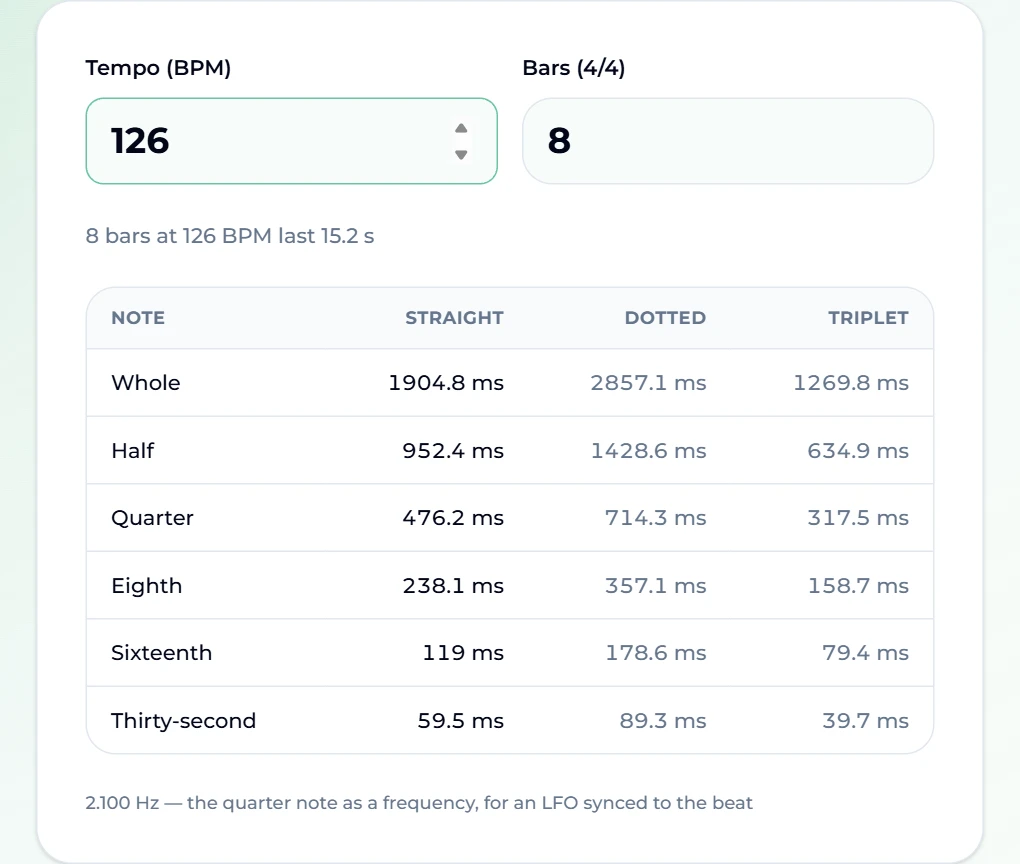
Real uses, at the 126 BPM of our tech-house test track:
- Delay time: a dotted-eighth delay (the classic U2-style echo) is 357.1 ms.
- Video edit: 8 bars last 15.2 seconds, so a 15-second social clip holds eight bars almost exactly.
- Loop length: a 4-bar loop is 7.6 seconds.
- Sidechain or tremolo: sync the LFO to 2.1 Hz for a pulse on every quarter note.
And if you are making music rather than measuring it, the BPM goes straight into a prompt: writing "126 BPM" in the style box of the AI music generator steers the tempo of the song it makes, which is exactly how our two test tracks were set. Our Suno prompts guide covers other details worth specifying.
FAQ
How accurate is an online BPM finder?
On music with a steady drum beat, within a BPM or two of the true tempo — our tech-house test at a prompted 126 read as 128. The usual "error" is not imprecision but the half or double reading, which is why both alternatives are shown. Free-tempo music (rubato piano, ambient drones, speech) has no single BPM, and any number a detector returns for it is meaningless.
Is the BPM finder free, and is my file uploaded?
It is free with no account, and the analysis runs in your browser — the file is never uploaded. The same is true of tap tempo and the BPM calculator.
Why does the finder say 154 when the song feels like 77?
Because busy hi-hats or a syncopated snare make twice as many pulses audible as the beat you nod to. 154 and 77 are the same tempo counted at different levels. Use the one that matches your purpose — see half time and double time.
Can I find the BPM of a song on YouTube or Spotify?
Not by pasting a link — the finder reads audio files. Play the song and use tap tempo, or if you own a copy of the track, upload that.
Does the song change tempo partway through?
Some do — live recordings drift, and some songs have a slower bridge. The finder reports one overall tempo for the file. For a song with a clear tempo change, trim the section you care about and analyse that clip on its own (it needs to be at least five seconds).
What about the key of the song?
The key and BPM finder reads both at once, along with length and loudness. Our guide on how to find the key of a song explains how to read its answer.
Final take
For a file you own, the BPM finder is a five-second job; for anything playing out loud, tap tempo gets you within a beat or two. The skill that matters is the one no tool can do for you: deciding whether the song lives at 77 or 154. Check the genre, clap along, pick the level you need — then let the BPM calculator turn that number into delay times, loop lengths and edit points.