
TL;DR
A beat is drums, bass and one memorable musical idea, locked to a tempo. Producers build that from samples and a drum machine; an AI beat maker builds it from a sentence. On Suno AI Music, the rap beat maker opens with a trap preset — trap beat, hard 808s, crisp hi-hats, dark piano, 140 bpm — and the AI beat maker with a hip hop one. We ran both for this guide: the trap preset untouched gave two takes of 1:50 and 1:52; a rewritten boom bap prompt at 88 BPM gave 2:37 and 2:12. Each run is 10 credits, returns two versions, and has no vocals on it — room left for yours.
In this guide
- The parts of a beat
- Make a trap beat from the preset
- Write your own beat prompt
- Beat recipes by style
- Picking the take to keep
- Beat or full rap song
- Tips for beats you can actually rap on
- FAQ
The parts of a beat
Every hip hop beat, from 1994 boom bap to 2026 drill, is made of the same few layers. Knowing them is what lets you describe a beat precisely:
- Tempo. Boom bap lives around 85–95 BPM. Trap is written at 130–150 BPM but feels half as fast, because the snare lands on beat three. Drill sits around 140 with sliding 808s. Always put the number in your prompt.
- Drums. The kick and snare set the bounce; the hi-hats set the energy. Boom bap wants punchy, dusty, swung drums. Trap wants rattling or rolling hi-hats — fast triplet rolls.
- Bass. Boom bap uses a bass guitar or upright bass line. Trap and drill use the 808: a long, distorted, pitched kick that doubles as the bassline.
- The idea. One loop the listener remembers — a piano phrase, a flute, a chopped soul sample, a dark bell melody. One is enough; three compete with the rapper.
- Space. A beat is meant to be rapped over, so the middle of the frequency range, where the voice sits, has to stay fairly clear.
Make a trap beat from the preset
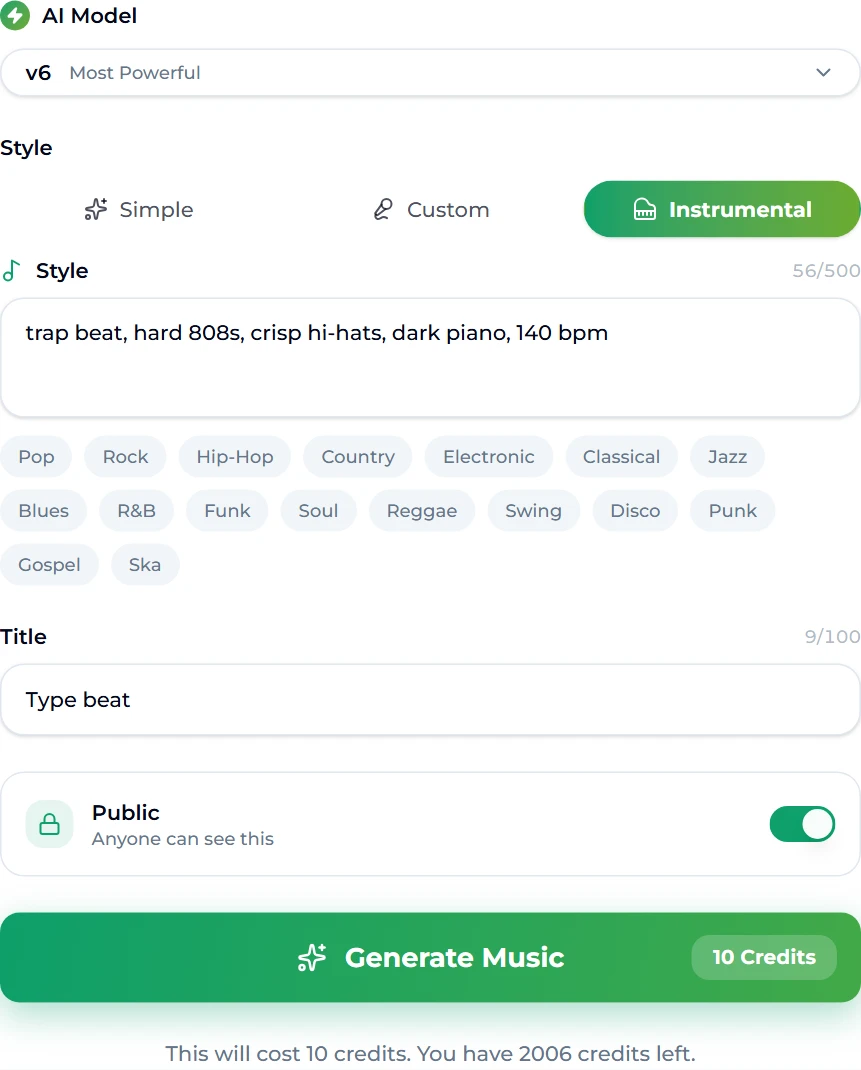
- Open the rap beat maker. It is the site's generator form, pre-set for rap beats: the Instrumental tab is selected, so nothing will be sung.
- Check the preset. The style box reads trap beat, hard 808s, crisp hi-hats, dark piano, 140 bpm and the title is Type beat. That is a complete prompt: genre, the two defining drum elements, a melodic idea and a tempo.
- Press Generate Music. The button shows the cost — 10 credits — and the credits left on your account.
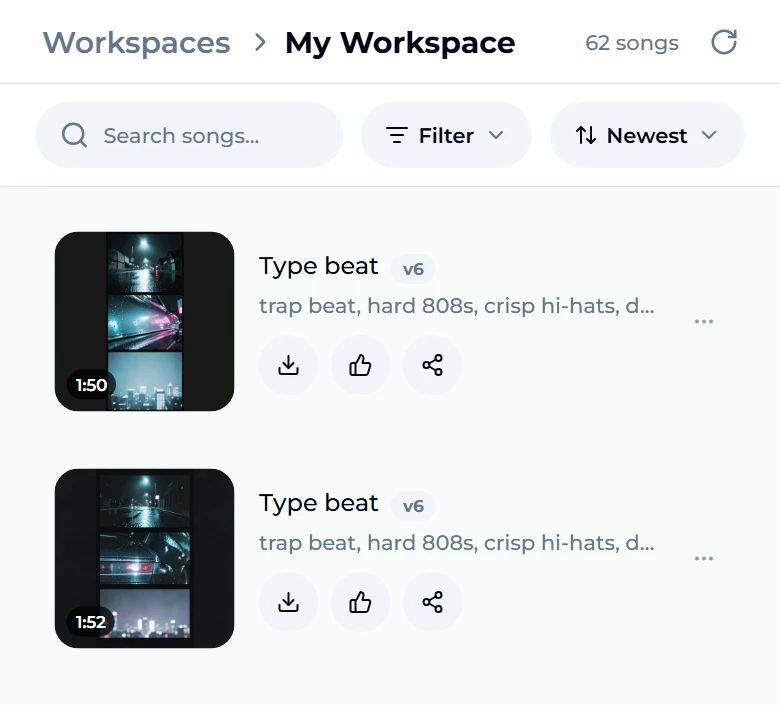
- Wait about a minute. You are taken to the studio, where the two takes render at the top of your workspace.
- Audition both. Ours came back at 1:50 and 1:52 — two different beats from the same brief, each with its own cover art.
The AI trap generator runs the same engine with a slightly harder trap preset — booming 808s, rattling hi-hats, dark melody, 145 bpm — if you want a darker starting point.
Write your own beat prompt
The preset gets you a trap beat. To get your beat, rewrite the style box. For the second run we opened the AI beat maker, replaced its preset with a boom bap brief, and changed the title:
boom bap hip hop beat, dusty vinyl drums, jazzy piano chops, upright bass, 88 bpm
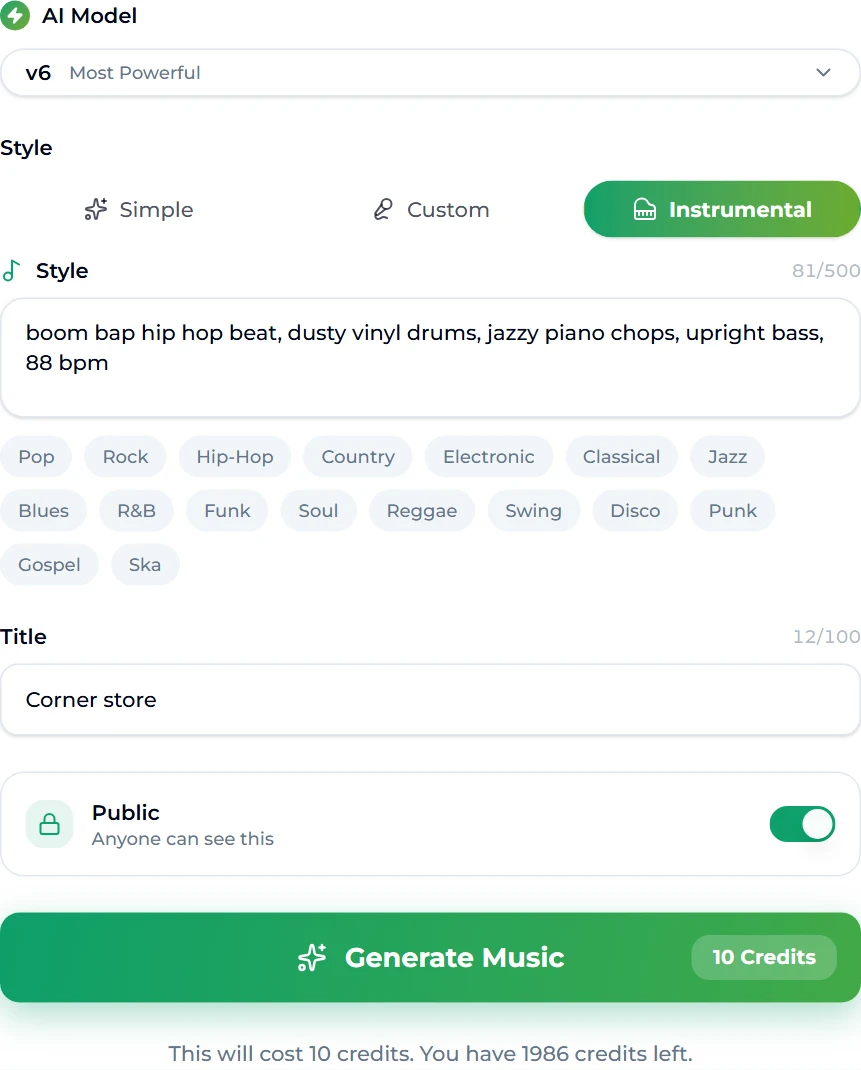
It returned two takes titled Corner store, at 2:37 and 2:12:
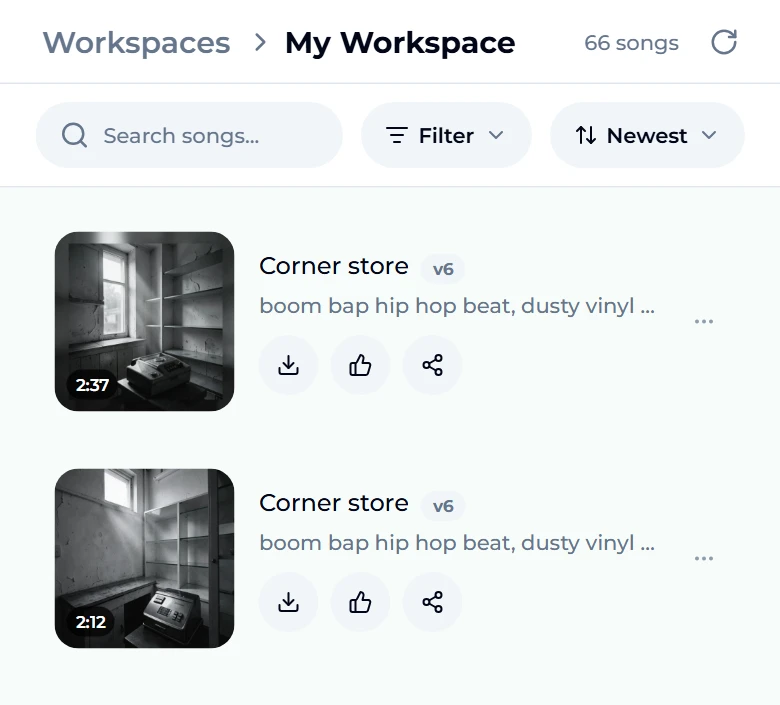
The structure of that prompt is the one to reuse:
- Style first — boom bap hip hop beat.
- Drums — dusty vinyl drums.
- The idea — jazzy piano chops.
- Bass — upright bass.
- Tempo — 88 bpm.
Five slots, one phrase each. If a result misses, change one slot and run again; with two takes per run you compare four versions in two minutes. The genre tags under the style box (Hip-Hop, Soul, Funk, Jazz…) add a word with one tap. Our Suno prompts guide has more words that reliably move the sound.
Beat recipes by style
Paste any of these into the style box of the AI beat maker or rap beat maker:
| Style | Style prompt |
|---|---|
| Trap | trap beat, hard 808s, crisp hi-hats, dark piano, 140 bpm |
| Boom bap | boom bap hip hop beat, dusty vinyl drums, jazzy piano chops, upright bass, 88 bpm |
| Drill | UK drill beat, sliding 808s, sparse hi-hats, eerie strings, 142 bpm |
| West Coast | West Coast hip hop beat, G-funk synth lead, talk box, laid-back groove, 94 bpm |
| Soul sample | soulful hip hop beat, chopped soul vocal sample, warm Rhodes, head-nod drums, 90 bpm |
| Melodic trap | melodic trap beat, emotional guitar loop, rolling hi-hats, soft 808, 150 bpm |
| Phonk | phonk beat, cowbell, distorted 808s, dark, aggressive, 130 bpm |
Picking the take to keep
Two takes from one prompt are rarely equally good for rapping. Before you choose on first impression, run each through the same four checks:
- The first eight bars. A beat that takes 20 seconds to arrive wastes the top of your verse. Prefer the take whose drums land early.
- The pocket. Nod along or tap the desk. If you lose the one after a few bars, a vocal will too — the drums are too busy or the swing is uneven.
- The middle. Hum a flow over it. If the lead melody keeps stepping on your voice, pick the sparser take or add minimal to the prompt.
- The ending. Generated beats sometimes finish abruptly. If the best take ends badly, Extend Song can continue it from a point before the ending and give it a proper outro.
In our trap run, the two takes differed by only two seconds in length but had different melodic loops over the same drum idea — one darker, one more open. In the boom bap run the difference was bigger: 2:37 against 2:12, the longer one with an extra section. Neither is "the right one"; the right one is the one your flow sits in.
Beat or full rap song
A beat is an instrumental. If you want the whole song — verses, hook and a rapped vocal on top — use the AI rap generator instead. It opens on the Simple tab, where you describe the track (a hard-hitting rap track with a confident flow over booming 808s…) and the vocal is generated with it. If you have your own bars, the Custom tab on the main AI music generator takes your lyrics word for word.
Rule of thumb: rapping yourself → make a beat. Want to hear a finished song → make a rap track.
Tips for beats you can actually rap on
- Keep the melody simple. A busy lead fights the vocal. Ask for sparse, minimal or name one instrument.
- Match the tempo to your flow. Fast, dense flows sit well on 85–95 BPM boom bap; triplet flows want 130–150 BPM trap. Our BPM guide explains half time, and the tap tempo tool reads the speed of a beat you like.
- Name the key if you already have a hook. Adding in A minor to the prompt is worth a try; the key finder tells you the key of a reference track.
- Need it longer? Beats come back at about two minutes. Extend Song continues a take from any point for a full-length instrumental.
- Want the drums alone? The vocal remover splits a track into stems for mixing.
FAQ
Can I sell or lease AI beats?
Selling or leasing is commercial use. On Suno AI Music, tracks generated on the Standard plan and above carry a commercial licence with a downloadable certificate; the free tier and Starter are for personal use. Check the pricing page for what each plan covers.
What BPM should a trap beat be?
Usually 130 to 150 BPM, written with a half-time feel. Put the exact number in the prompt; the preset uses 140.
Will the beat have vocals on it?
No. The beat makers open on the Instrumental tab, so nothing is sung. For a song with a rapped vocal, use the AI rap generator.
Which model should I use for beats?
Free accounts generate on v6 Mini, which is quick and fine for drafting beats. The PRO models on paid plans — v6 and v6 Wild — are more polished and more adventurous respectively. Our runs used v6.
How long does it take to make a beat?
About a minute per run, and every run returns two takes.
Why do my two takes sound so different?
They are two interpretations of the same brief. Ours from one trap prompt were 1:50 and 1:52 long with different melodies. Keep the one that fits your flow.
Final take
Making a beat with AI comes down to describing five things: the style, the drums, one musical idea, the bass and the tempo. Start from the trap preset on the rap beat maker or write your own brief on the AI beat maker, run it, and change one slot at a time. Two takes a minute is a fast way to find the beat you want to write to — and when you want the whole rap song instead, the AI rap generator is one click away.