

TL;DR
A karaoke version is the song with the lead vocal taken out and everything else left intact — full bass, full drums, no ghost of the singer. There are four ways to get there: AI stem separation (the only one that reliably delivers that), a DAW with a stem splitter (Logic Pro), the phase-cancellation trick in Audacity or GarageBand (works on a minority of songs), and finding an official instrumental (rare, and only for released songs). For a song you generated yourself, the answer is one click: Suno AI Music's vocal remover returns a clean instrumental and the isolated vocal for 10 credits, and — unlike a karaoke track of someone else's song — you are allowed to use it.
In this guide
- What a karaoke version actually needs
- Method 1: AI stem separation
- Method 2: A DAW with a stem splitter
- Method 3: Phase cancellation
- Method 4: An official instrumental
- Karaoke of a song you wrote
- The rights question
- FAQ
What a karaoke version actually needs
Three things, in order of how often they are missing:
- The lead vocal gone — not quieter. A reduced vocal fights the singer; a removed one leaves room.
- The backing track intact. Bass, kick, snare and the melody instruments must survive. A thin, hollow instrumental is the tell of a bad method.
- The backing vocals decided. Real karaoke tracks often keep harmonies and ad-libs so the singer is not alone on the chorus. Separation tools treat all singing as vocal and remove it; know which you want.
Lyrics on screen and a bouncing ball are a separate job (a video editor or a karaoke app); this guide is about the audio.
Method 1: AI stem separation
A separation model has learned what a human voice looks like in a spectrum and pulls it out of the mix wherever it is panned, leaving the instruments alone. This is the method that meets all three requirements, and it is the one behind every modern karaoke tool.
On Suno AI Music, for any song in your library or an audio file up to 10 MB: open the vocal remover, choose the song or upload the file, click Remove Vocals (10 credits), and in one to three minutes you get two files — the instrumental (your karaoke track) and the acapella. Both are saved beside the original. Harmonies go with the acapella, so the instrumental is fully clean; if you want backing vocals kept for the chorus, layer the acapella back in quietly under the instrumental in any editor.
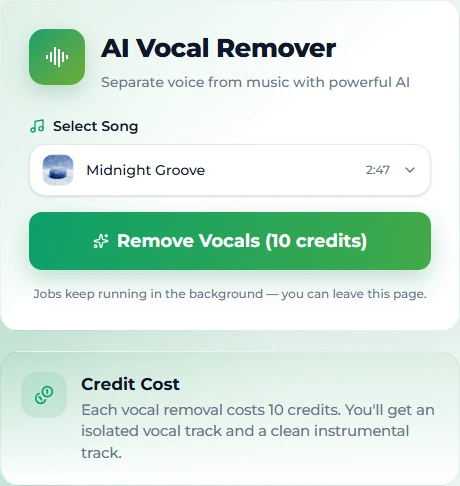
Elsewhere, other online separators and desktop plugins do the same job. Quality is generally good; the differences are in how they handle dense choruses and heavily effected vocals, and in what you are allowed to do with the output — see the rights section.
Cost: credits or a subscription. Time: minutes. Quality: the only method that keeps the low end and removes the reverb tail with the voice.
Method 2: A DAW with a stem splitter
Logic Pro's Stem Splitter does neural separation inside the DAW — drop the file in, split into vocals, drums, bass and other, mute the vocal track, bounce. Other DAWs are adding equivalents. If you already own the software, this is separation without a browser, and you can EQ and balance the remaining stems before exporting.
GarageBand does not have this; see the GarageBand guide for what it can and cannot do. Audacity gets it through a free plugin on Windows and Linux; see the Audacity guide.
Cost: the DAW. Time: minutes. Quality: on par with online separation.
Method 3: Phase cancellation
The twenty-year-old trick: invert one stereo channel and sum with the other, cancelling anything identical in both — which, in many mixes, is the centre-panned lead vocal. Audacity's built-in Vocal Reduction and Isolation effect does it in one menu; GarageBand can do it with a duplicated track and a polarity flip.
It works on a minority of songs: those with a dry, mono, centred vocal and a rhythm section that is not also centred. On everything else it removes the bass and kick along with the voice and leaves the vocal's reverb and doubling behind as a hollow echo. There is no setting that fixes that, because the method cannot tell a voice from a kick drum — it can only tell centre from sides.
Cost: free. Time: seconds. Quality: try once; abandon the moment the low end disappears.
Method 4: An official instrumental
Some released songs have an official instrumental or a licensed karaoke version. When one exists it is the best possible backing — it is the record without the vocal — and it is legally clean when you have obtained it from a legitimate source. The catch is availability: most songs have none, and for the ones that do, the version may differ from the radio mix you know.
Cost: the price of the track or a karaoke subscription. Time: whatever the search takes. Quality: perfect when it exists.
Karaoke of a song you wrote
This is the case where the whole thing is simplest, and it is more common than it sounds — songwriters wanting to practise their own material, a band wanting a backing track for a gig, a creator wanting the bed under a lyric video.
If you wrote the song on Suno AI Music, or covered or extended it there, the karaoke version is one run of the vocal remover, and there are two shortcuts worth knowing:
- Generate it instrumental in the first place. If you have not made the song yet, flip the Instrumental switch on the create page and the model produces a backing track with no vocal to remove — the same arrangement it would have sung over.
- Cover it instead of stripping it. If you want the karaoke track in a different arrangement — acoustic for an open mic, say — cover the song with an instrumental style description and the model re-performs the backing in the new style, melody intact.
Either way the result inherits the song's licence, which is the point of the next section.
The rights question
A karaoke version of someone else's recording is a derivative of their master and their composition. Making one for private practice is one thing; performing it publicly, posting it, or putting it in a video is where licensing applies, and "I removed the vocal myself" changes nothing. Licensed karaoke services exist precisely because the rights have to be paid for.
A karaoke version of a song you generated is different in kind: the song is copyright-free, and on the paid plans the commercial licence covers the stems you pull from it, with a certificate you can download. If the backing track is going anywhere public — a venue, a stream, a video with a sponsor — that is the version you can actually use.
FAQ
What is the best way to make a karaoke version?
AI stem separation. It is the only method that removes the voice completely while keeping the bass and drums intact. On Suno AI Music the vocal remover does it in one run, for a song in your library or an uploaded file up to 10 MB.
Can I make a karaoke version for free?
The phase-cancellation trick in Audacity or GarageBand is free and works on some songs. AI separation costs credits or a subscription; on Suno AI Music a new account's 16 free credits cover one separation.
Will the backing vocals stay?
With separation tools, no — all singing goes to the vocal stem. If you want harmonies on the chorus, mix a quiet copy of the acapella back under the instrumental.
Why does my karaoke track sound hollow?
Because it was made with phase cancellation, which removes centre-panned bass and drums with the voice and leaves the vocal's reverb behind. Redo it with separation.
Can I sing over it in public?
A karaoke track of your own generated song, yes — on the paid plans, with the licence certificate. A karaoke track you made from someone else's recording needs their permission, regardless of the method.
How long does separation take?
One to three minutes on Suno AI Music; similar for desktop and online separators. Jobs run in the background.
Final take
If the song is yours, make the karaoke version with the vocal remover — one click, both stems, licensed. If it is someone else's, separation still gives the best audio, but the rights are the real constraint. Phase tricks are for a quick test; official instrumentals are the prize when they exist.