
TL;DR
A good rap beat isn't the busiest one. It needs a tempo that suits your flow, drums with a pocket, and a loop that leaves room for words. On the rap beat maker you describe that in one line and the AI produces the full instrumental. The page opens with Instrumental Only already on and a freestyle preset at 92 BPM. Six "Start from a vibe" tiles each play a beat made on v6 from exactly the prompt they load, and one run costs 10 credits and returns two beats in about a minute. This guide covers how to make a rap beat that fits what you are about to rap.
In this guide
- What makes a rap beat work
- Step by step with the rap beat maker
- Writing a beat prompt
- Six proven rap beat prompts
- Common rap beat mistakes
- Choosing a model
- After the beat is made
- FAQ
- Final take
What makes a rap beat work
Start from the verse, not the beat. Ask what you are rapping and how fast you want to say it. Each of these ingredients then becomes a word or number in the prompt:
- Tempo. Boom bap and storytelling beats sit around 84–95 BPM. That is slow enough for dense lyrics and long storytelling lines. Trap and melodic beats run 130–160 BPM but are felt at half time, so the snare lands on beat three and the flow still feels relaxed. Club rap often sits near dance tempos, around 120–130. Write the number.
- Pocket. This is the groove the flow sits in. Laid-back drums, hard drums, bouncy and swung all change it. A freestyle beat wants a steady, predictable pocket that anyone can ride.
- The loop. Most rap beats are built on a short repeating idea: a dusty jazz sample loop, an emotional piano loop, a funk guitar sample, a tense string loop. Name one.
- Low end. Deep bass for boom bap, soft 808s or punchy 808 kicks for trap and club. The low end is what people feel in a car or at a party.
- Space. This is the ingredient beginners skip. A melody that plays all the time fights the voice. Steady and open so a rapper can ride it, space for vocals and minimal melody all tell the model to step back.
- Mood. Intimidating and gritty for battles, reflective and cinematic for stories, party energy for the club. The same drums with a different mood word give a different beat.
Step by step with the rap beat maker
- Open the rap beat maker. It is the full studio with the Prompt tab selected, Instrumental Only switched on (highlighted in red) and v6 Mini in the model picker for free accounts.
- Read the preset. It is freestyle rap beat instrumental, 92 BPM, simple hard drums, dusty jazz sample loop, deep bass, steady and open so a rapper can ride it. That is tempo, drums, loop, bass and space in one line, and you can press Generate on it as it is.
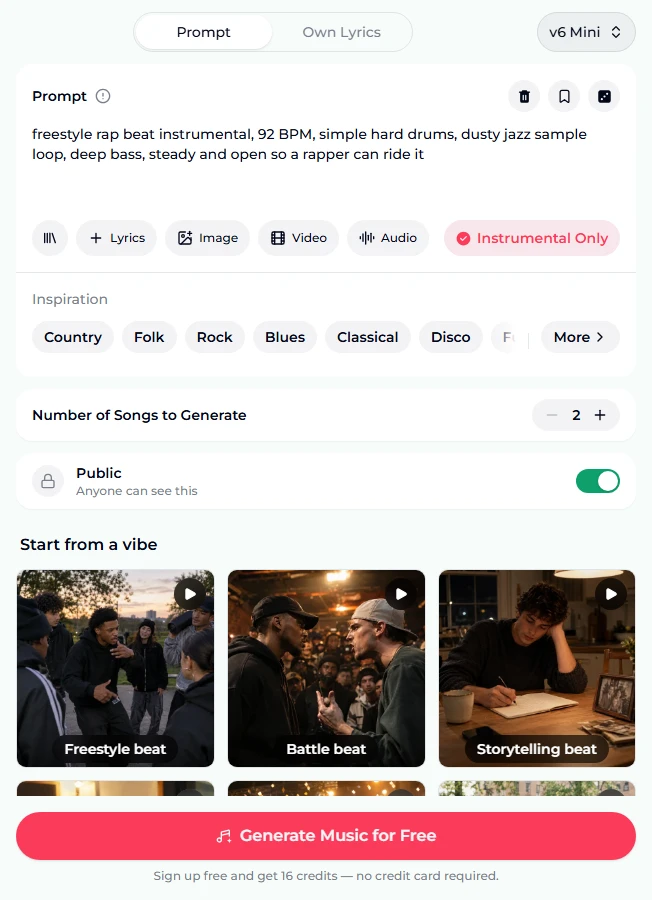
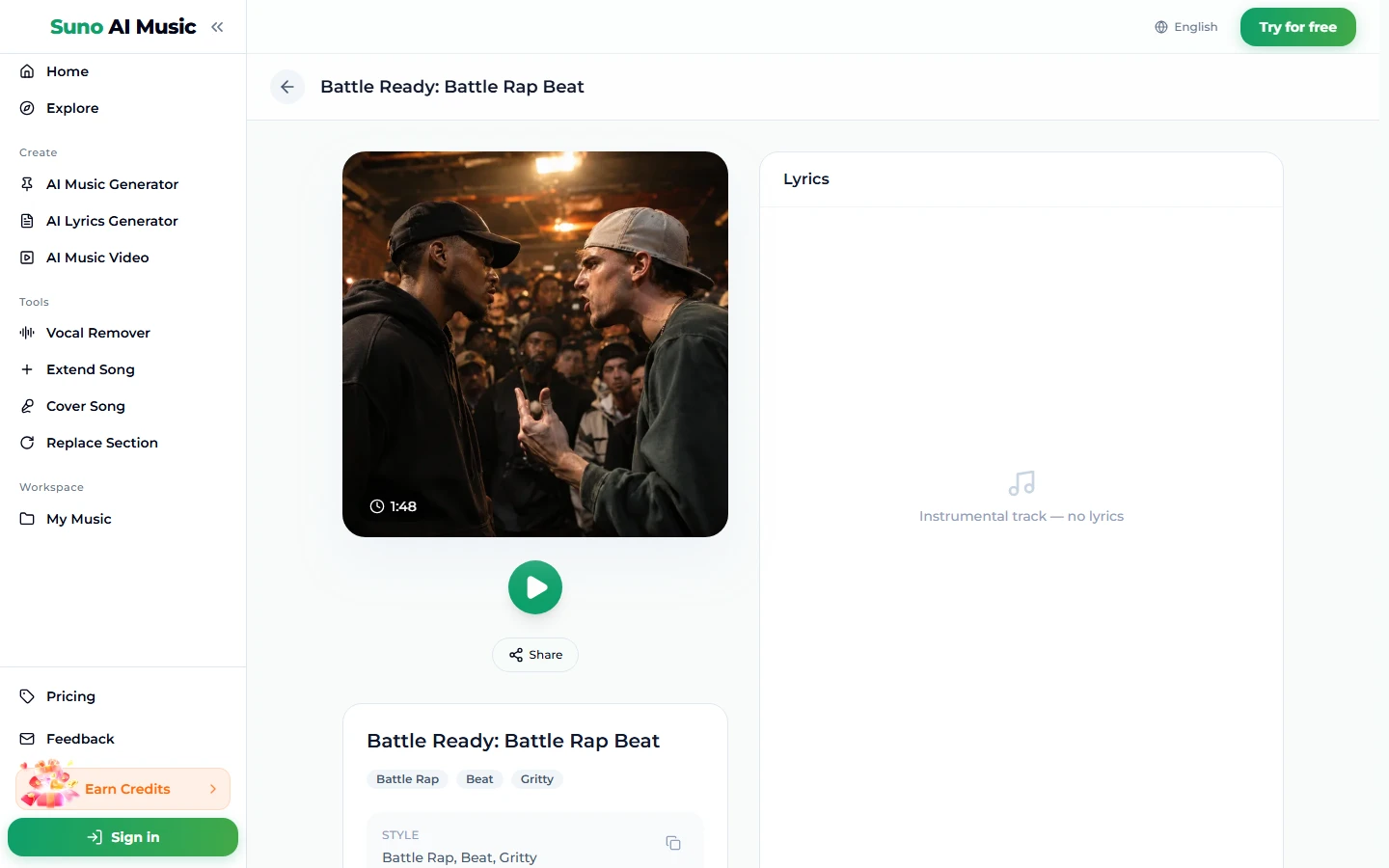
- Tap a vibe to hear it. One tap plays the example and copies its prompt into the box. Instrumental Only stays on because every vibe here is instrumental. Tapping Battle beat loads the 88 BPM battle prompt and plays Battle Ready, the example on that tile, made on v6 from exactly this prompt. It runs 1:48.
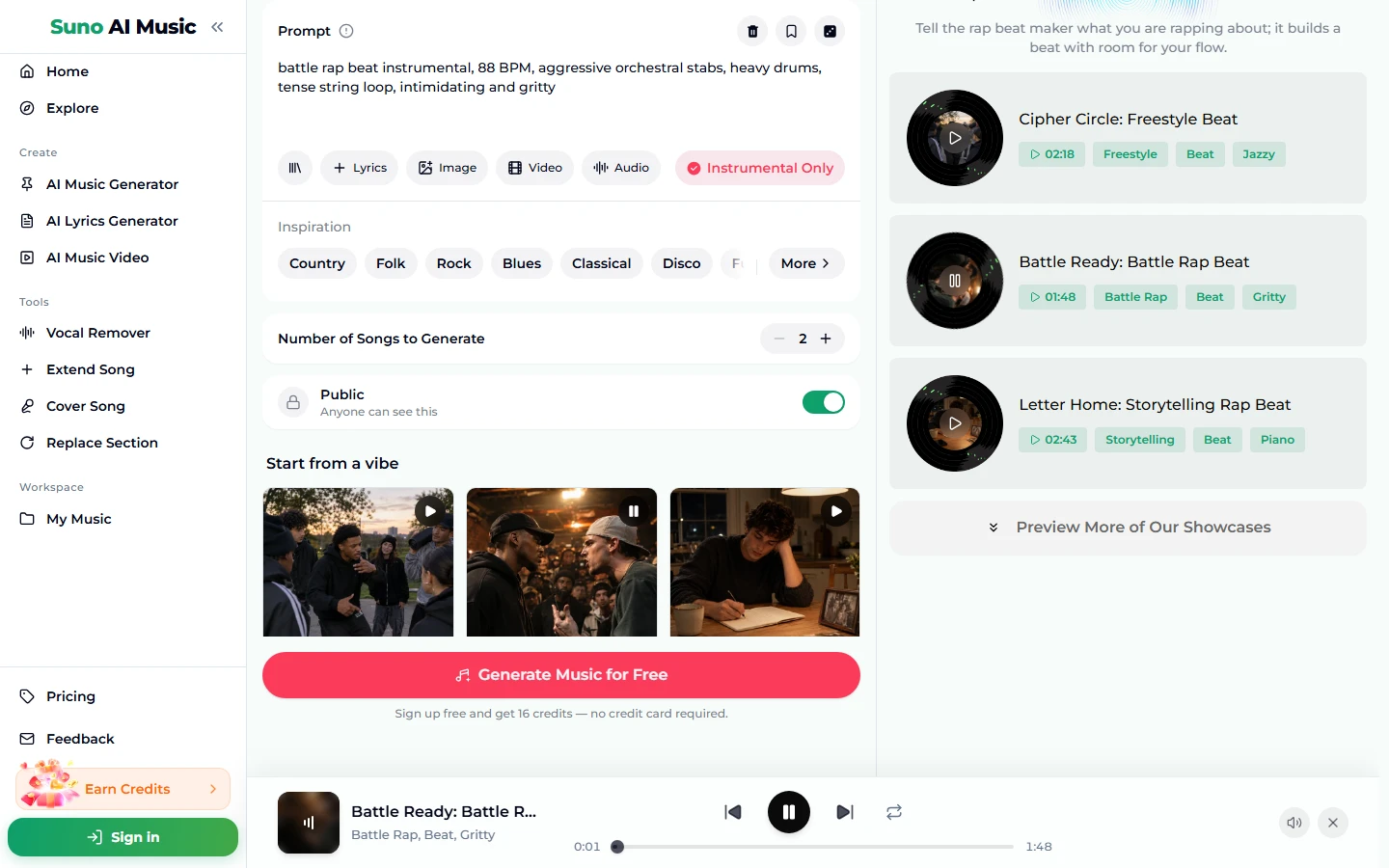
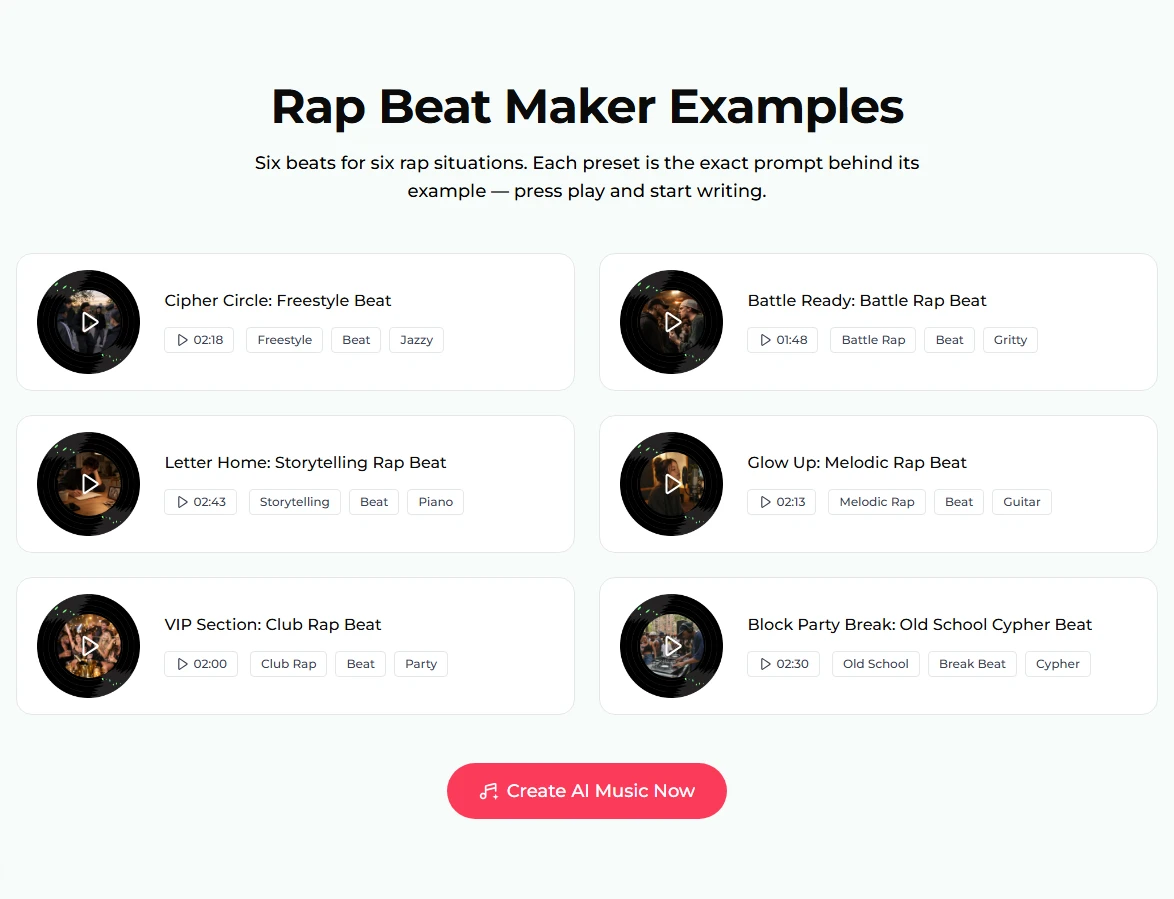
- Compare all six beats. The examples section lists them with lengths and tags: freestyle, battle, storytelling, melodic, club and old school cypher. Play a couple and rap a line or two over each; your own voice is the real test.
- Open a beat's page. Each example has its own page, such as Battle Ready, with the cover, a play button, Share and the tags. The lyrics panel reads "Instrumental track — no lyrics", which is exactly what you want from a beat.
- Change one thing. Keep a preset you like and change the tempo, the loop instrument or the mood.
- Press Generate Music for Free. If you are logged out, sign up first; new accounts get 16 free credits, no card. One run is 10 credits for two beats and takes about a minute. The stepper counts songs, so 2 means one run. Your beats are new ones in that style, not copies of the example.
Writing a beat prompt
The pattern all six presets follow is situation → "instrumental" → BPM → drums → loop → bass → mood/space. It fits easily in the 500-character Prompt box.
- Start with the situation. freestyle rap beat, storytelling rap beat, club rap beat. This page is organised by what you are rapping, and the first words set the character.
- Write "instrumental" even with the toggle on. Every preset does, and it keeps the intent clear if you ever copy the prompt elsewhere.
- Give a BPM, with "half time" if it is trap. 150 BPM half time tells the model the hats run fast but the groove feels slow. Suno follows tempo roughly, not to the exact number. If you need to match an existing verse, measure it first. Our BPM guide explains how.
- One loop, one bass, one drum description. emotional piano loop, warm bass, laid-back drums. More elements rarely make a better beat.
- End with the space you need. steady and open, made for sung-rap, leave room for vocals.
- Try reference audio. The Audio chip lets you attach one track (6 seconds to 30 minutes), such as a rough loop you made or a voice memo of a rhythm, and the beat borrows its feel. It costs the same 10 credits.
For more on how beats are put together in general, see our guide on how to make a beat.
Six proven rap beat prompts
These are the six vibes on the rap beat maker, each verbatim and each behind the example on its tile, made on v6.
| Vibe | What it is | Prompt |
|---|---|---|
| Freestyle beat | Simple, open jazz-sample beat for ciphers (2:18) | freestyle rap beat instrumental, 92 BPM, simple hard drums, dusty jazz sample loop, deep bass, steady and open so a rapper can ride it |
| Battle beat | Tense orchestral beat for battle rounds (1:48) | battle rap beat instrumental, 88 BPM, aggressive orchestral stabs, heavy drums, tense string loop, intimidating and gritty |
| Storytelling beat | Slow piano beat with room for long verses (2:43) | storytelling rap beat instrumental, 84 BPM, emotional piano loop, soft strings, laid-back drums, warm bass, reflective and cinematic |
| Melodic beat | Half-time guitar beat for sung-rap (2:13) | melodic rap beat instrumental, 150 BPM half time, emotional guitar loop, soft 808s, crisp hi-hats, spacey pads, made for sung-rap |
| Club beat | Bouncy party beat (2:00) | club rap beat instrumental, 128 BPM, punchy 808 kicks, bouncy synth riff, claps and chants, party energy |
| Old school cypher | Funky break beat with scratches (2:30) | old school hip hop break beat instrumental, 98 BPM, funky drum break, scratches, funk guitar sample, rumbling bass, classic cypher vibe |
Two of our own, untested:
- UK drill rap beat instrumental, 142 BPM, sliding 808 bass, skippy hi-hats, dark choir sample, cold and minimal, space for vocals (untested)
- lo-fi boom bap rap beat instrumental, 86 BPM, dusty vinyl drums, mellow Rhodes loop, upright bass, relaxed, room for long verses (untested)
Common rap beat mistakes
- Too busy. A lead melody that never stops leaves no room for your voice. If a beat sounds great alone but your verse disappears over it, ask for minimal melody or space for vocals.
- Wrong tempo for your flow. A dense, wordy verse at 100 BPM feels rushed; a slow drawl at 150 full-time drags. Rap a bar over the example first and adjust the number.
- Forgetting "half time" on trap. Without it, 150 BPM can come back as a frantic full-speed groove.
- Leaving Instrumental Only on when you want a reference verse. Turn it off if you want the AI to rap on the beat first so you can hear a flow, then write your own.
- Stacking moods. Dark, happy, aggressive, chill cancel each other out. Pick one or two.
- Judging from one take. Two beats come back per run, and one often has the better pocket. Keep the one that makes you want to write.
Choosing a model
The picker sits at the top right of the form:
- v6 Mini is the free tier, described as "Fast drafts, high volume". It's good for trying tempos and loops quickly.
- v6 is described as "Most powerful, for any song". All six example beats were made on it. Use it for the beat you will record on.
- v6 Wild is described as "Best for experimental ideas". Try it for odd samples or genre mash-ups.
v6 and v6 Wild need a paid plan; the pricing page has details. The cost is the same on every model: 10 credits for two beats.
After the beat is made
- Loop it while you write. The player has a repeat button. Play the beat on repeat and write to it.
- Make it song length with Extend Song, continuing from any point.
- Swap a section with Replace Section, for example to make a quieter bridge for a slower verse.
- Hear a reference flow. Turn Instrumental Only off and use the same prompt on the AI rap generator to hear an AI verse over that style. If you later want only the backing from a rapped song, the vocal remover splits it into vocals and instrumental.
- Explore other beat styles. The AI beat maker is organised by beat style, the AI trap generator goes deeper on 808s, and the phonk maker covers cowbell-driven phonk.
- Download for recording. Downloads come with a plan; see pricing.
FAQ
Can I make a rap beat for free?
Yes. New accounts get 16 free credits with no card, and one run costs 10 credits for two beats on v6 Mini.
What BPM should a rap beat be?
Roughly 84–95 for boom bap and storytelling, and 130–160 half time for trap and melodic rap. Write the number in the prompt.
How do I get a beat with space for vocals?
Ask for steady and open, space for vocals or minimal melody, and name just one loop instrument.
Can I release songs on these beats commercially, on YouTube or on Spotify?
Commercial use is included only on the Standard plan and above, 2,500+ credit packs, and Team plans. Beats made with free credits, the Starter plan or Mini credit packs are for personal use only.
Can I get the drums or bass on separate tracks?
No. The vocal remover splits a track into two stems, vocals and instrumental. There are no separate drum or bass stems.
Can the AI rap on the beat too?
Yes. Switch off Instrumental Only, or use the AI rap generator for full rap songs.
Can I keep my beats private?
Yes, on a paid plan: turn Public off before generating.
Final take
Knowing how to make a rap beat mostly comes down to knowing what you will rap over it. Pick the situation, write the tempo, name one loop and one kind of drums, and leave space. Start on the rap beat maker, tap the vibe nearest your verse, rap a bar over the example, then change one word and generate your own two beats.