
TL;DR
Ambient music is slow, beatless or nearly beatless, and built from pads, drones, texture and a few distant notes that change gradually over minutes. If you want to know how to make ambient music without learning synthesis, open the AI ambient generator and describe a place, a light or a feeling instead of a genre and a beat. The form opens with Instrumental Only already switched on and a morning-fog prompt filled in, and six "Start from a vibe" tiles let you hear a finished example of each style before you spend a credit. One run costs 10 credits and returns two pieces in about a minute; new accounts get 16 free credits.
In this guide
- What makes ambient music sound ambient
- Step by step with the AI ambient generator
- Writing an ambient prompt that works
- The six ambient vibes and their prompts
- Common ambient mistakes
- Choosing a model
- After the piece is made
- FAQ
- Final take
What makes ambient music sound ambient
Brian Eno named the genre with Ambient 1: Music for Airports in 1978 and described the goal as music that is "as ignorable as it is interesting". It should reward attention but never demand it. That goal translates into a short list of ingredients, and each one is a word you can put in the Prompt box:
- No drums, or almost none. A beat pulls attention forward. No drums is the single most useful phrase in an ambient prompt. Ambient electronica is the exception: slow soft beat at 80 BPM.
- Pads and drones. Long sustained tones that fill the space. Warm synth pads, vast shimmering pads, low cosmic drones, soft organ drones.
- Slow change. Ambient moves by fading and swelling, not by verse and chorus. Slowly evolving, pads that swell and fade.
- Texture. A layer of noise or grain that makes the sound feel physical. Soft tape hiss, radio static, long reverb.
- A few distant notes. A melody, if any, is sparse and far away. Distant piano notes, soft felt piano, glassy plucks.
- Nature sounds. Optional, very effective. Gentle rain and forest sounds, soft ocean waves, singing bowls.
- An image. The best ambient prompts describe a scene: like fog lifting off a lake at dawn, light pouring through tall windows. The image sets the colour of the sound.
- A mood word. Very calm, weightless, spiritual and serene, deeply calming.
Step by step with the AI ambient generator
- Open the AI ambient generator. It is the same form as the main AI music generator, set up for ambient music. You can look around and play the examples without an account.
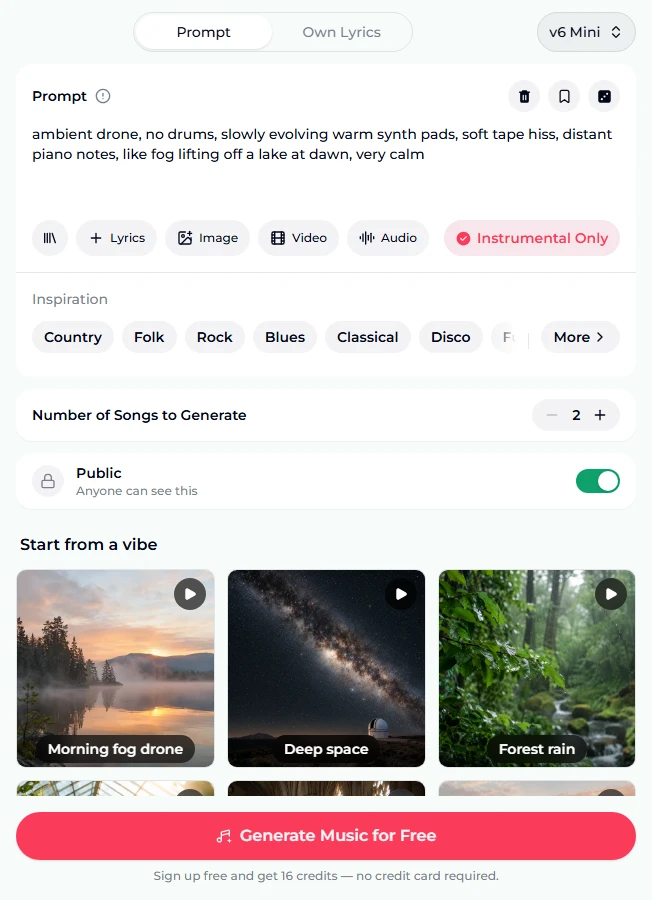
- Read the preset. The Prompt box holds ambient drone, no drums, slowly evolving warm synth pads, soft tape hiss, distant piano notes, like fog lifting off a lake at dawn, very calm. It follows the recipe above: style, no drums, pad, texture, notes, image, mood. The Instrumental Only chip is highlighted, so there will be no vocals.
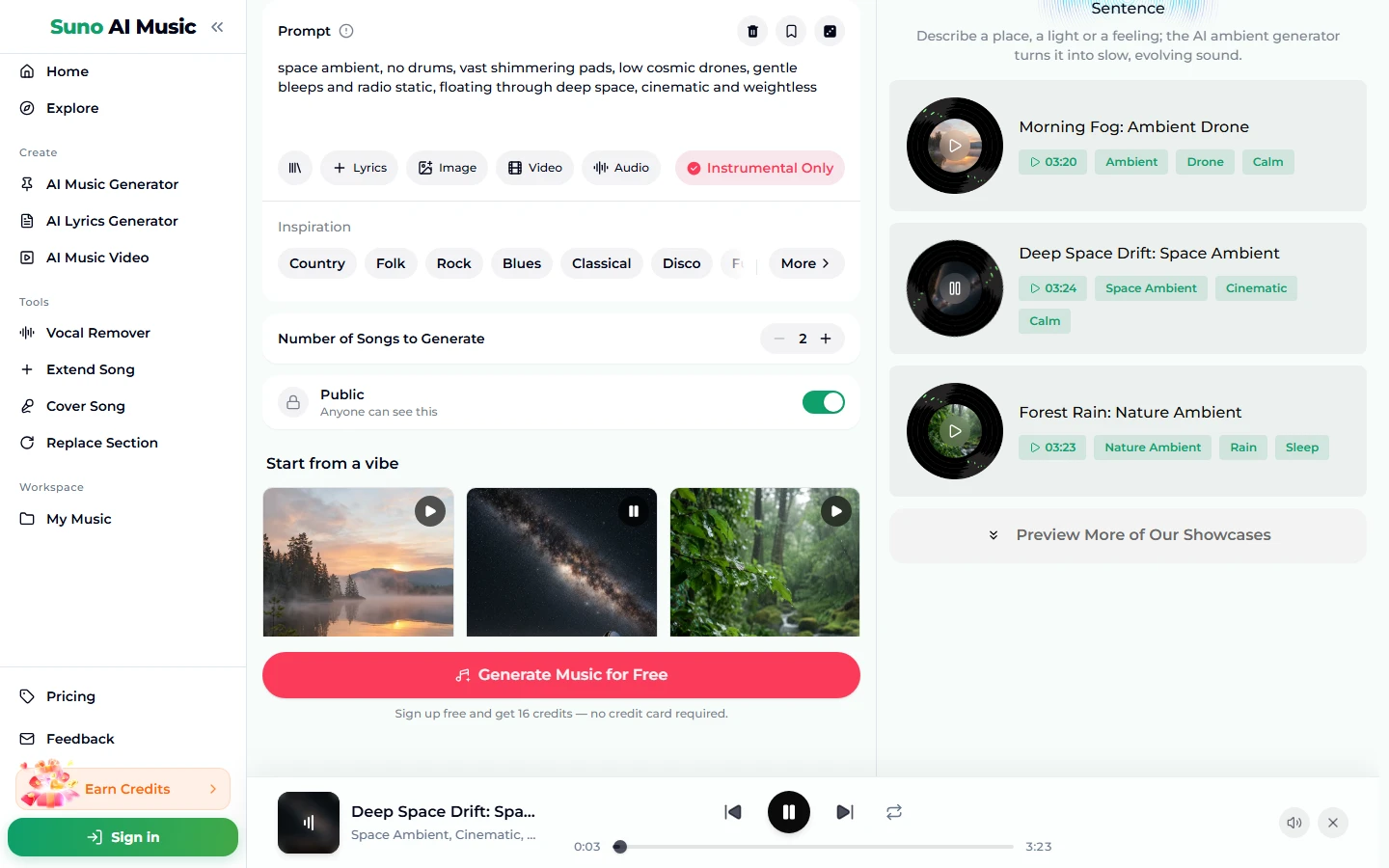
- Tap a vibe. Under "Start from a vibe" there are six tiles. One tap plays that tile's example and copies its prompt into the Prompt box. Tap Deep space and the box changes to the space ambient prompt, the tile shows a pause icon, and Deep Space Drift: Space Ambient plays in the bar at the bottom. That example was made on v6 from exactly this prompt and runs 3:24.
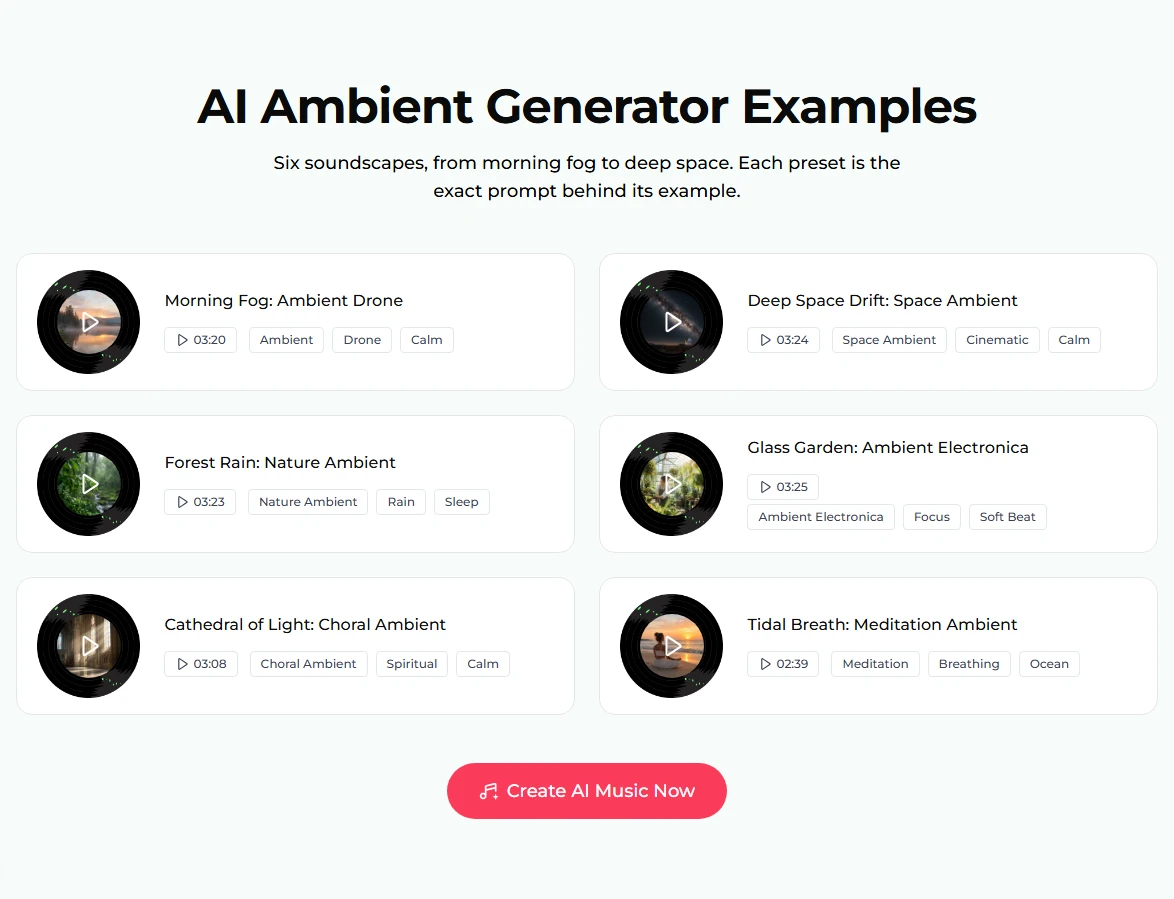
- Compare the six examples. The examples list further down shows all six with their lengths and tags. Most run a little over three minutes; the meditation piece is 2:39.
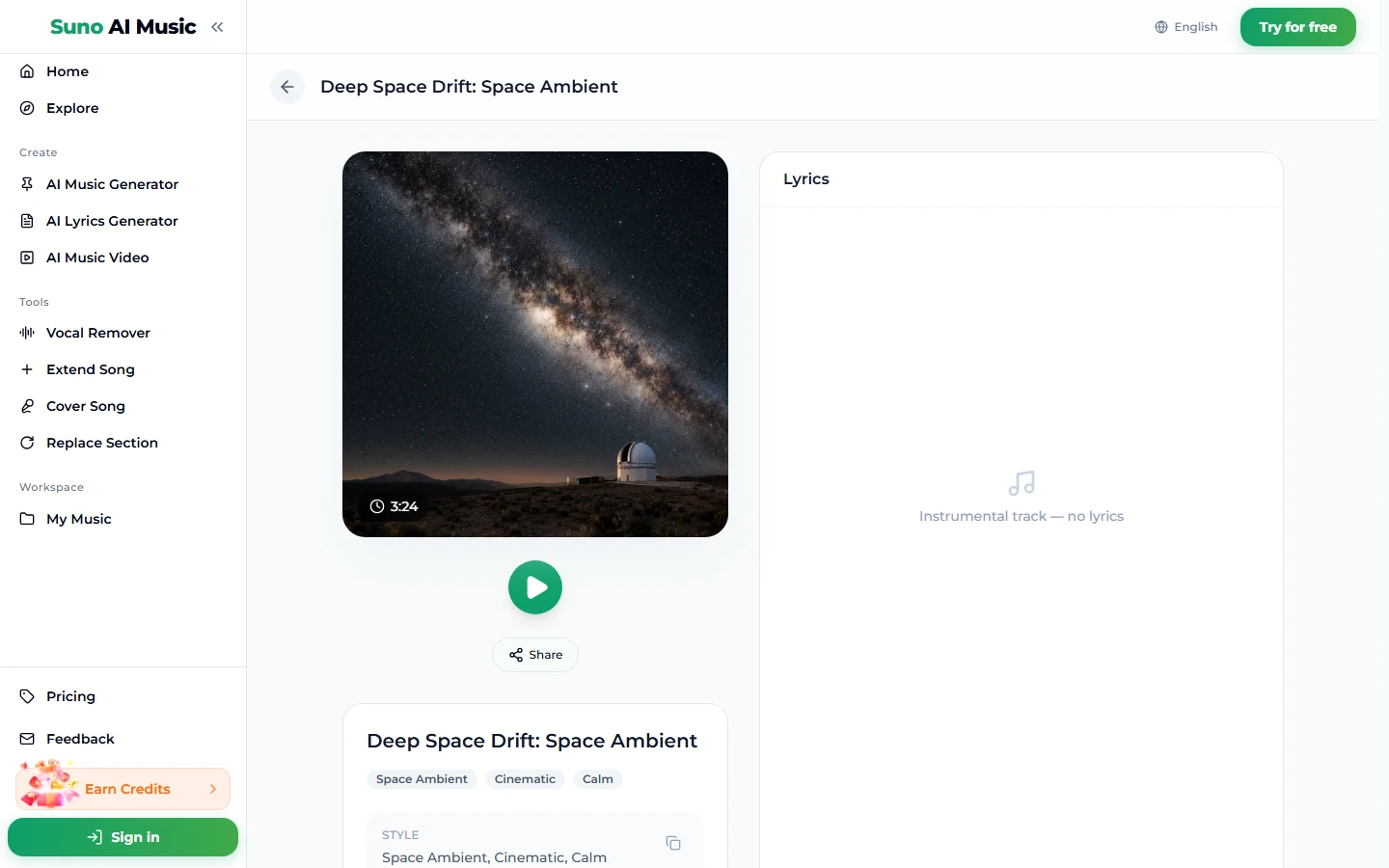
- Open a song page. Every example has its own page. Deep Space Drift shows a Milky Way cover photo, a play button, Share and its tags; the lyrics panel reads "Instrumental track — no lyrics".
- Press Generate. Logged out, the button reads "Generate Music for Free"; signing up gives you 16 credits with no card. A run costs 10 credits and returns two pieces in about a minute. They are new pieces in the style of the prompt, not copies of the example, and the two will have different textures.
- Keep the calmer one. Ambient is personal: one take may feel right for sleep and the other for work. Keep both if you like, or change one word and run again.
Writing an ambient prompt that works
The Prompt box takes up to 500 characters, but the six presets are each one line. With ambient, less is almost always more.
- Write "no drums" unless you want a beat. Without it the model may add a soft pulse. With it, the piece stays beatless from start to finish.
- Describe one image, not a story. Fog lifting off a lake at dawn works; a paragraph about a journey through three landscapes does not, because ambient does not change scene often.
- Name two or three sounds. A pad, a texture and one melodic voice is plenty. Warm synth pads, soft tape hiss, distant piano notes.
- Add a word about light. Dawn, moonlight, candlelight and "light pouring through tall windows" all shift the colour. Brighter light tends to mean brighter, higher sounds.
- Use motion words. Slowly evolving, swell and fade every few seconds, weightless, floating.
- Add a use if it helps. Perfect for sleep and meditation at the end of the forest rain preset nudges the arrangement softer.
- Keep Instrumental Only on. Wordless choir is still possible with the toggle on, as the Choral light preset shows: write ethereal wordless choir.
For a longer list of words that reliably change the sound, see the Suno prompts guide.
The six ambient vibes and their prompts
These are the six tiles on the AI ambient generator. Each prompt is copied verbatim; each example was made on v6 from exactly that prompt, with Instrumental Only on.
| Vibe | What it is | Prompt |
|---|---|---|
| Morning fog drone | Warm drone with distant piano, 3:20 | ambient drone, no drums, slowly evolving warm synth pads, soft tape hiss, distant piano notes, like fog lifting off a lake at dawn, very calm |
| Deep space | Cinematic space ambient, 3:24 | space ambient, no drums, vast shimmering pads, low cosmic drones, gentle bleeps and radio static, floating through deep space, cinematic and weightless |
| Forest rain | Nature sounds with felt piano, 3:23 | nature ambient, no drums, gentle rain and forest sounds, soft felt piano, warm strings, peaceful and grounding, perfect for sleep and meditation |
| Ambient electronica | Soft beat for focus, 3:25 | ambient electronica, slow soft beat at 80 BPM, glassy plucks, warm sub bass, airy textures, relaxing and focused, gentle sunlight feeling |
| Choral light | Wordless choir and organ, 3:08 | choral ambient, no drums, ethereal wordless choir, long reverb, soft organ drones, spiritual and serene, light pouring through tall windows |
| Meditation | Breathing pads and ocean, 2:39 | meditation ambient, no drums, slow breathing pads that swell and fade every few seconds, singing bowls, soft ocean waves, deeply calming |
Two extra recipes of our own, untested:
- dark ambient, no drums, low rumbling drones, distant metallic echoes, cold wind, an abandoned station at night, tense and slow
- winter ambient, no drums, soft music box notes, warm pads, light snowfall ambience, candlelight in a quiet cabin, very calm
Common ambient mistakes
- Leaving out "no drums". The most common reason an ambient piece turns into downtempo. If you hear a kick, add the phrase.
- Too many elements. Piano, strings, choir, rain, birds and ocean together sound busy, not calm. Pick two or three.
- Genre words instead of images. "Relaxing ambient music" is vague. A place and a light give the model far more to work with.
- Asking for big changes. "Builds to an epic climax" fights the genre. If you want a build, the AI background music generator or a cinematic prompt suits it better.
- Expecting an hour in one run. A run returns pieces of roughly three minutes. For long sessions, extend a piece (see below).
- Judging from one take. Two takes per run exist so you can compare textures. Keep the one that fades into the room.
Choosing a model
The model picker sits at the top right of the form. v6 Mini is the free tier, labelled "Fast drafts, high volume", and handles ambient well, since the genre is forgiving. v6 ("Most powerful, for any song") is the model all six examples were made on, and gives richer, more detailed textures. v6 Wild ("Best for experimental ideas") suits stranger soundscapes such as dark or glitchy ambient. v6 and v6 Wild need a paid plan.
A run costs 10 credits for two pieces on any model. Plans and credit packs are on the pricing page.
After the piece is made
- Make it longer. Extend Song continues a piece from any point. Extend a calm take several times for a sleep or study session, and keep the prompt the same so the joins stay smooth. Our guide to extending a song explains where to cut.
- Replace a moment. Replace Section regenerates one part you do not like, such as a sudden swell, and keeps the rest.
- Remake it in another style. Cover Song remakes a track in a new style, for example a drone piece as solo piano.
- Put it under a video. The AI music video tool turns a piece into a video for a relaxation or study channel.
- Download. Downloads come with a plan; see pricing.
Related generators: the lofi generator if you want a soft hip hop beat under the calm, the piano music maker for solo piano, the AI background music generator for beds under videos and podcasts, and the AI instrumental generator for instrumentals in any genre.
FAQ
Is the AI ambient generator free?
You can start free. New accounts get 16 credits with no card, and one run costs 10 credits for two pieces on v6 Mini. After that, credits come from a plan or a credit pack.
Can I make ambient music without any beat?
Yes. Write no drums in the prompt and keep Instrumental Only on; the piece stays pads, drones and texture.
Can I add rain, ocean or forest sounds?
Yes. Describe them in the prompt, such as gentle rain and forest sounds or soft ocean waves, and they are woven into the music.
How do I make a longer ambient track for sleep?
Generate a piece you like and extend it several times with Extend Song. Keep the prompt calm and ask for no sudden changes so the extensions flow.
Can I use ambient music commercially, in a video, app or spa?
Commercial use is included only on the Standard plan and above, 2,500+ credit packs, and Team plans. Free credits, the Starter plan and Mini credit packs are personal use only. Check the pricing page before using a piece in business or monetized content.
Is ambient the same as lofi?
No. Lofi has a hip hop beat and dusty drums; ambient is usually beatless and built from pads and texture. For the first, use the lofi generator.
Can I use a photo to set the mood?
Yes. The Image chip under the Prompt box takes up to five photos, and the piece picks up their mood. It costs the same 10 credits as a run without a reference.
Final take
How to make ambient music with AI comes down to restraint: one image, two or three sounds, no drums and a word about how slowly it should move. Start on the AI ambient generator, tap the six vibes to hear what each prompt produces, then swap the image or the light and keep the rest. Two pieces per run makes it easy to find the one that disappears into the room.