

TL;DR
If you want to know how to make EDM without learning a DAW, start by describing the track instead of programming it. On Suno AI Music's AI EDM generator the form opens with a full progressive festival prompt (128 BPM, supersaw chords, a long build and a massive drop) and Instrumental Only switched on. Six "Start from a vibe" tiles cover festival progressive, dubstep, future bass, uplifting trance, electro house and hardstyle; one tap plays a real example made on v6 and copies its exact prompt into the box. One run costs 10 credits and returns two tracks, and new accounts get 16 free credits.
In this guide
- What makes EDM sound like EDM
- Step by step with the AI EDM generator
- Writing an EDM prompt with a real drop
- Six EDM prompts that already work
- Common EDM mistakes
- Choosing a model
- After the track is made
- FAQ
- Final take
What makes EDM sound like EDM
EDM (electronic dance music) is an umbrella over dozens of styles, but nearly all of them are built from the same parts. Each one is a phrase you can put in a prompt:
- Tempo, as a number. Tempo is what separates the sub-genres more than anything else. House and progressive sit around 120–128 BPM, trance around 136–140, dubstep at 140 in half time (so it feels like 70), future bass roughly 130–160 with half-time drums, hardstyle around 150. Write 128 BPM, not fast.
- Structure. Intro, build, drop, breakdown, second build, second drop, outro. The build is tension (risers, snare rolls, filters opening); the drop is release. Say it in the prompt: long build with snare roll, massive drop.
- The lead sound. Each style has a signature: supersaw chords for festival and future bass, arpeggiated lead for trance, wobble bass and growling mid bass for dubstep, screeching lead for hardstyle, buzzing electro bass for electro house.
- Kick and bass. A four-on-the-floor kick drives house, trance and progressive. Hardstyle uses distorted reverse bass kicks. Dubstep puts the weight in the bass, not the kick.
- Sidechain. The pumping effect where pads duck on every kick. Sidechained pads is a phrase the model understands.
- A moment. Sunrise at a festival main stage, stormy energy, starry night sky. It sounds vague, but it steers the chords towards euphoric, dark or dreamy.
Step by step with the AI EDM generator
- Open the AI EDM generator. The Prompt tab is selected and the box already holds a complete prompt: progressive festival edm instrumental, 128 BPM, euphoric supersaw chords, long build with snare roll, massive drop with big lead melody, sidechained pads, sunrise at a festival main stage. Instrumental Only is on, and the model picker at the top right shows v6 Mini.
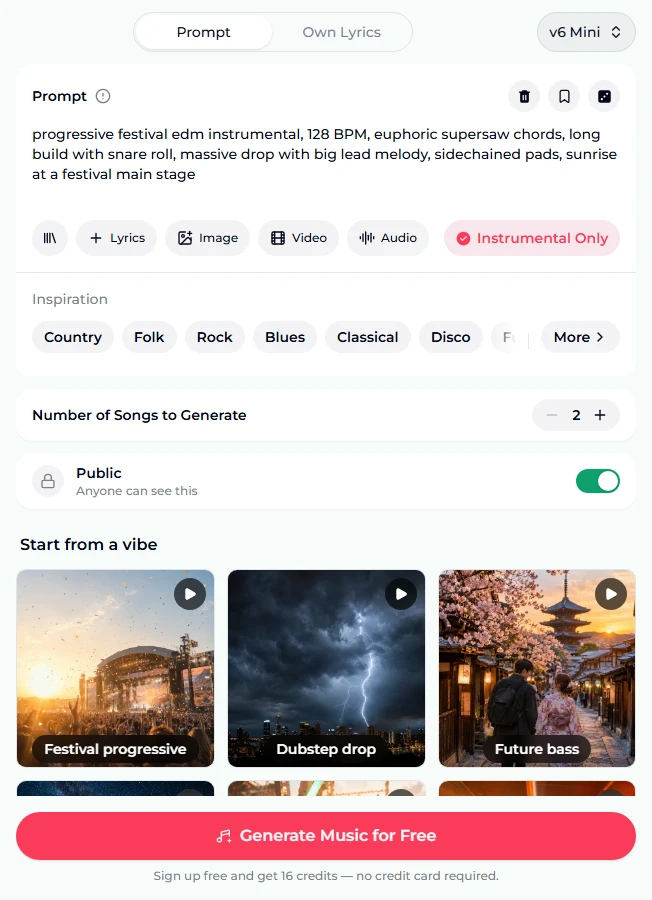
- Know what the chips do. Under the prompt: your prompt library, + Lyrics, Image, Video and Audio references, and the Instrumental Only toggle. Below: Inspiration genre chips with More, the Number of Songs to Generate stepper (it starts at 2, one run's worth), and the Public switch.
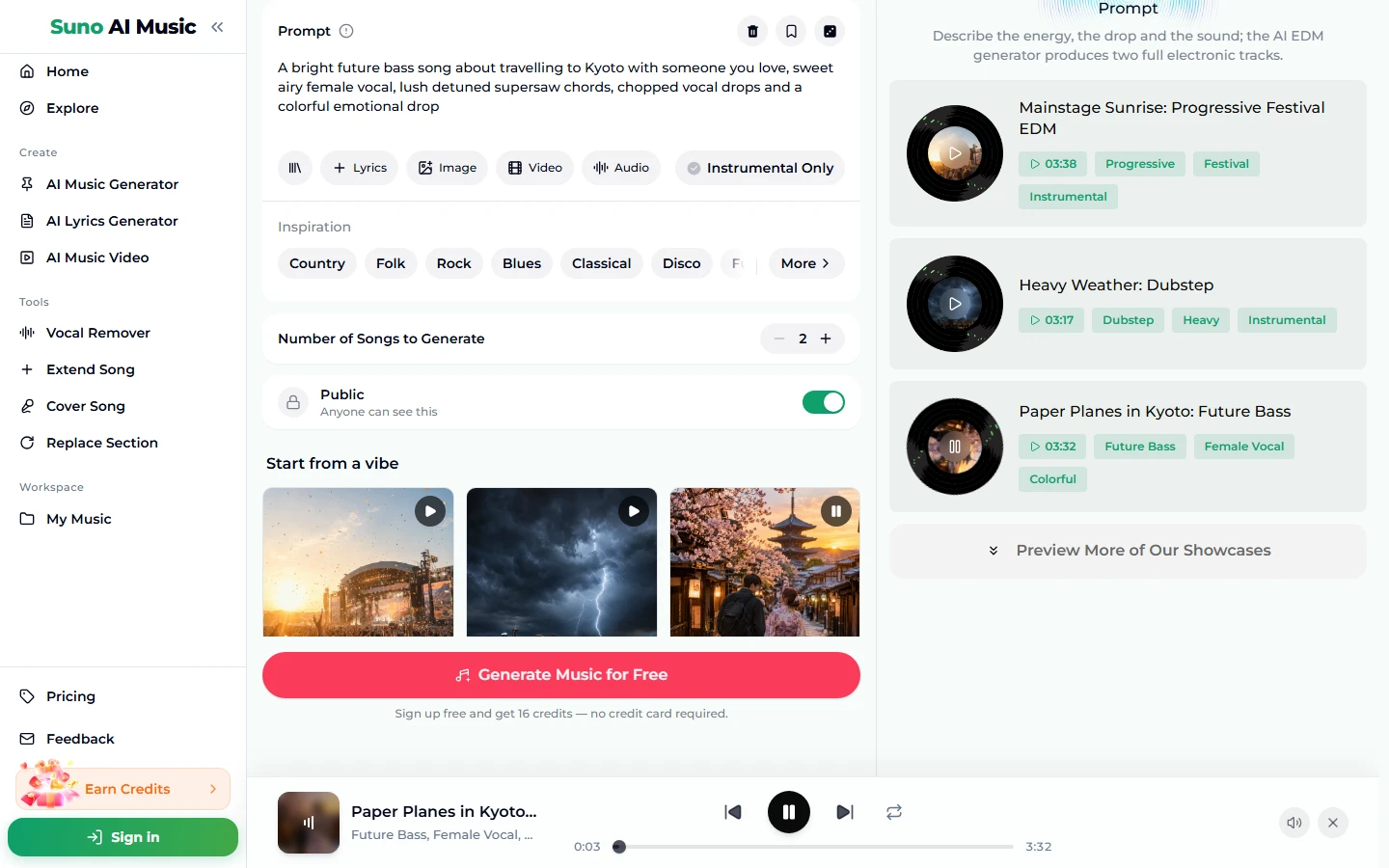
- Tap a vibe. A tile plays its example and copies its prompt into the box in one tap. Tap Future bass and the prompt becomes A bright future bass song about travelling to Kyoto with someone you love...; Instrumental Only switches off because this one has a vocal, and the player bar starts Paper Planes in Kyoto.
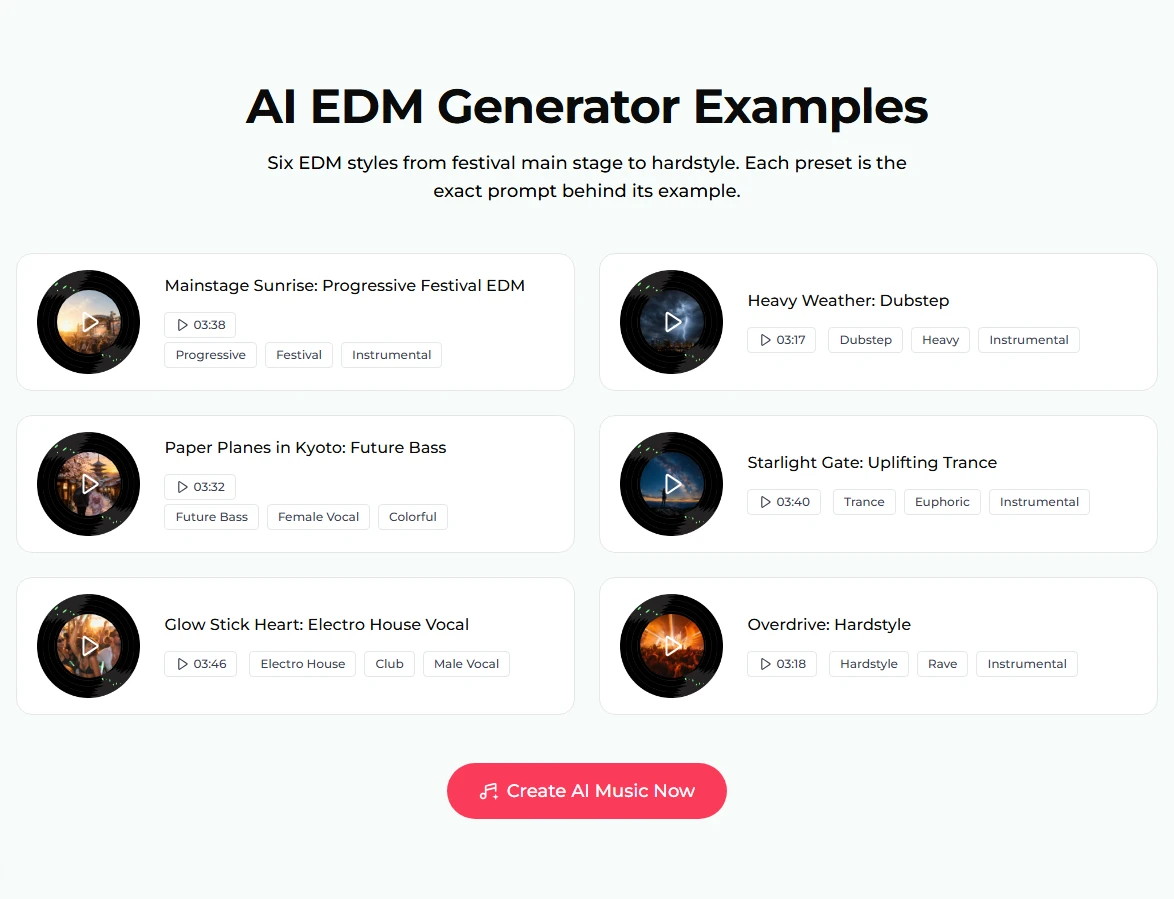
- Compare all six. The examples section lists every vibe with a disc, title, length and tags: Mainstage Sunrise (3:38), Heavy Weather: Dubstep (3:17), Paper Planes in Kyoto: Future Bass (3:32), Starlight Gate: Uplifting Trance (3:40), Glow Stick Heart: Electro House Vocal (3:46) and Overdrive: Hardstyle (3:18).
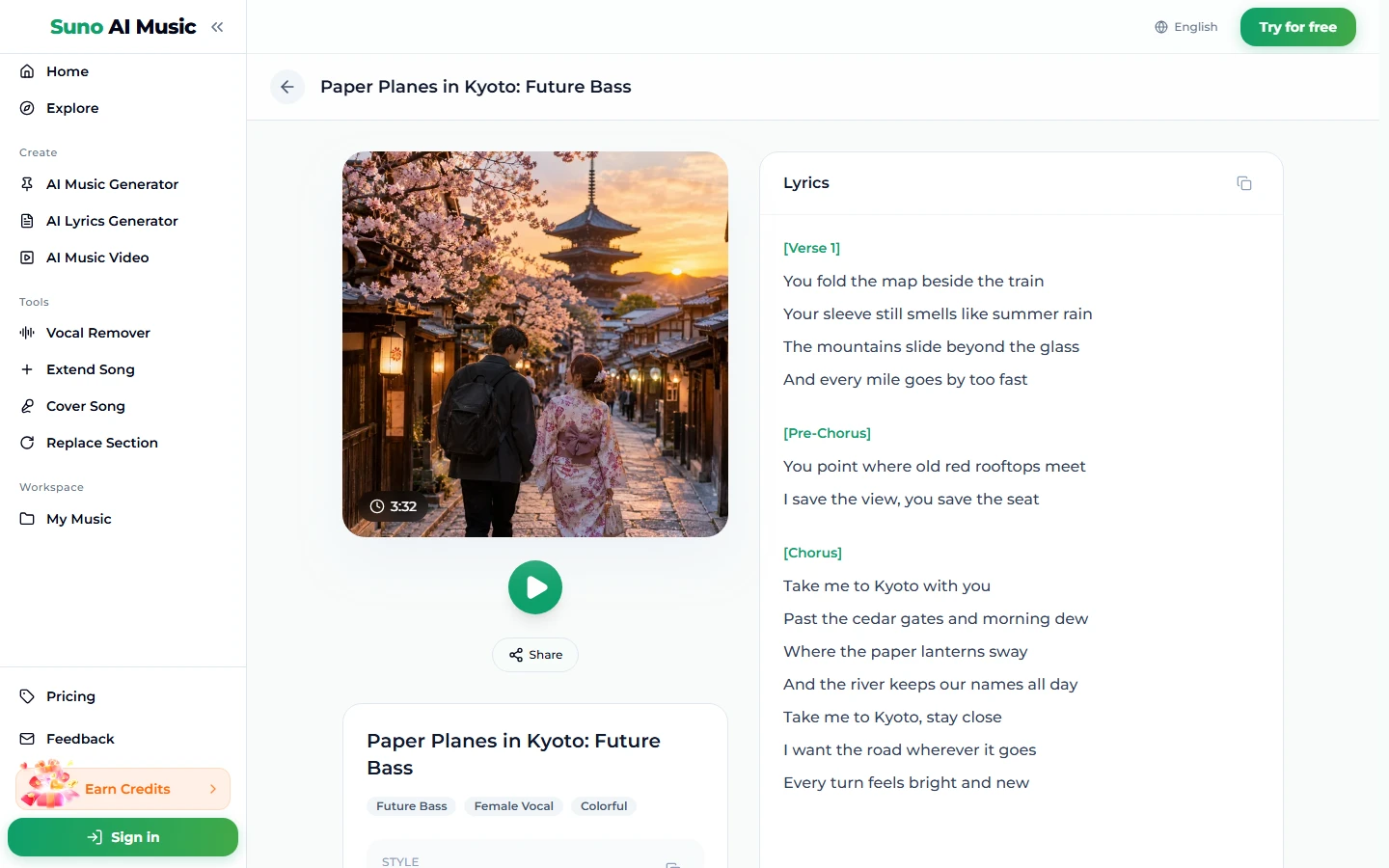
- Read the lyrics of a sung example. The future bass example's page shows the Kyoto cover, a play button, Share, the tags and the lyrics, which open with "You fold the map beside the train / Your sleeve still smells like summer rain".
- Press Generate Music for Free. Logged out, the note under the button says "Sign up free and get 16 credits — no credit card required". A run takes about a minute and returns two tracks in the same style. They are new tracks: the tile gives you the recipe, not the example back.
Writing an EDM prompt with a real drop
All six presets on the page follow one order: style and tempo, then the sound design, then the structure, then the scene. That order is the whole method for how to make EDM with a text prompt.
- Open with the sub-genre and tempo. uplifting trance instrumental, 138 BPM sets the kick pattern, the bass and the energy before anything else.
- Name the lead and the bass. soaring arpeggiated lead, rolling bass line. Two sounds described well beat a list of eight.
- Write the arc. long build with snare roll, massive drop, big emotional breakdown with piano, euphoric climax, cinematic intro, huge wobble bass drop. Without these, you are more likely to get a loop that never lifts.
- Finish with the scene. sunrise at a festival main stage, starry night sky, high energy rave.
- For a vocal, use a sentence and a hook. The two sung presets describe a subject and a voice: An energetic electro house club song about dancing until sunrise with your best friends, powerful male vocal hook... If you already have lyrics, put them on the Own Lyrics tab (up to 5,000 characters, plus a style box up to 1,000).
The Prompt box holds 500 characters, which is plenty. Suno usually honours a BPM figure roughly rather than exactly, so check with a BPM finder if you need a track to mix into a set. More reliable wording is collected in our Suno prompts guide.
Six EDM prompts that already work
These are the six vibes on the AI EDM generator, verbatim. Each made the example on its tile on v6.
| Vibe | What it is | Prompt |
|---|---|---|
| Festival progressive | Main-stage instrumental, 3:38 (the preset) | progressive festival edm instrumental, 128 BPM, euphoric supersaw chords, long build with snare roll, massive drop with big lead melody, sidechained pads, sunrise at a festival main stage |
| Dubstep drop | Heavy half-time instrumental, 3:17 | dubstep instrumental, 140 BPM half time, cinematic intro, huge wobble bass drop, growling mid bass, punchy snare, aggressive and heavy, stormy energy |
| Future bass | Sung, bright and colorful, 3:32 | A bright future bass song about travelling to Kyoto with someone you love, sweet airy female vocal, lush detuned supersaw chords, chopped vocal drops and a colorful emotional drop |
| Uplifting trance | Euphoric instrumental, 3:40 | uplifting trance instrumental, 138 BPM, rolling bass line, soaring arpeggiated lead, big emotional breakdown with piano, euphoric climax, starry night sky, classic trance energy |
| Electro house | Sung club track, 3:46 | An energetic electro house club song about dancing until sunrise with your best friends, powerful male vocal hook, buzzing electro bass, punchy kick and a big shout-along drop |
| Hardstyle | Rave instrumental, 3:18 | hardstyle instrumental, 150 BPM, distorted reverse bass kicks, epic screeching lead, dramatic orchestral breakdown, euphoric melody climax, high energy rave |
Two extra recipes of our own, untested:
- drum and bass instrumental, 174 BPM, fast breakbeat drums, deep rolling reese bass, atmospheric pads, liquid and uplifting, night drive through the city
- melodic techno instrumental, 124 BPM, hypnotic arpeggio, deep pulsing bass, long filtered build, dark and emotional, warehouse at 4 am
For styles that sit next to EDM, the AI house generator, AI techno generator, AI dance pop generator and AI trap generator each open with their own presets.
Common EDM mistakes
- No tempo. Without a number the model picks one, and a "trance" track at 125 BPM sounds like house. Write the BPM every time.
- Asking for a drop without a build. The drop only hits if something comes before it. Put long build or snare roll in the prompt.
- Mixing incompatible genres. Dubstep hardstyle trance gives the model three different kicks and three tempos to choose from. One sub-genre per prompt, plus an adjective if you want a twist.
- Stacking effects words. Sidechain, reverb, delay, distortion, bitcrush, filter reads like a plug-in list. Keep one or two that describe the sound you want to hear.
- Leaving Instrumental Only off by accident. The page opens with it on, but tapping a sung vibe (Future bass or Electro house) turns it off. Check the toggle if you want a clean instrumental.
- Judging a style from one run. Each run returns two tracks. If both miss the same way, change one word; if only one misses, keep the other.
Choosing a model
The picker at the top right of the form has three models:
- v6 Mini ("Fast drafts, high volume") is the free tier. Good for trying out prompts and finding the right sub-genre.
- v6 ("Most powerful, for any song") needs a paid plan. All six examples were made on v6, so it is the one to use for the fullest drops and cleanest mix.
- v6 Wild ("Best for experimental ideas") also needs a paid plan. It suits odd hybrids and weird sound design more than a straight festival anthem.
The price is the same on all three: 10 credits per run, two tracks back. After the 16 free credits, runs come from a plan or credit pack.
After the track is made
- Stretch it for a set. Extend Song continues a track from any point, useful for a longer intro to mix in. Our guide to extending a song explains where to cut.
- Redo a weak drop. Replace Section regenerates just the part you mark.
- Try it in another style. Cover Song re-performs a track, for example taking an electro house vocal into future bass.
- Pull out the vocal. The vocal remover splits a track into two stems, vocals and instrumental, handy for a remix or an acapella.
- Make a visual. The music video generator puts the track under a video.
- Download. Downloads come with a plan; see pricing.
FAQ
Can I make EDM without a DAW or any gear?
Yes. The AI EDM generator runs in the browser. You describe the style, tempo, lead sound and drop, and the model produces a finished, mixed track.
What BPM should EDM be?
It depends on the style: roughly 120–128 for house and progressive, 136–140 for trance, 140 half time for dubstep, around 150 for hardstyle. Put the number in the prompt; Suno usually honours it roughly.
Can I add vocals to EDM?
Yes. Switch Instrumental Only off and describe the voice and the subject, as the Future bass and Electro house presets do. The AI writes the lyrics, or you can paste your own on the Own Lyrics tab.
How much does one track cost?
One run is 10 credits and returns two tracks. New accounts get 16 free credits with no card required.
Can I use AI EDM commercially, on YouTube, Spotify or in a DJ set?
Commercial use is included on the Standard plan and above, 2,500+ credit packs, and Team plans. Tracks made with free credits, the Starter plan or the Mini credit pack are for personal use only. See the pricing page.
Can I get separate drum and bass stems?
No. The vocal remover gives two stems, vocals and instrumental. There is no separate drum or bass stem.
Can I use a reference track?
Yes. Tap Audio to add one track between 6 seconds and 30 minutes, and the song borrows its feel. You can also add up to 5 photos or one video clip. The cost does not change.
Final take
Learning how to make EDM with AI comes down to four words in the right order: sub-genre, tempo, lead sound, drop. Tap through the six vibes on the AI EDM generator to hear how each prompt shapes the build and the drop, then change one thing at a time: the BPM, the lead or the scene. Two tracks per run makes the comparison quick, and a prompt that works once will keep giving you EDM that sounds like the same artist.