

TL;DR
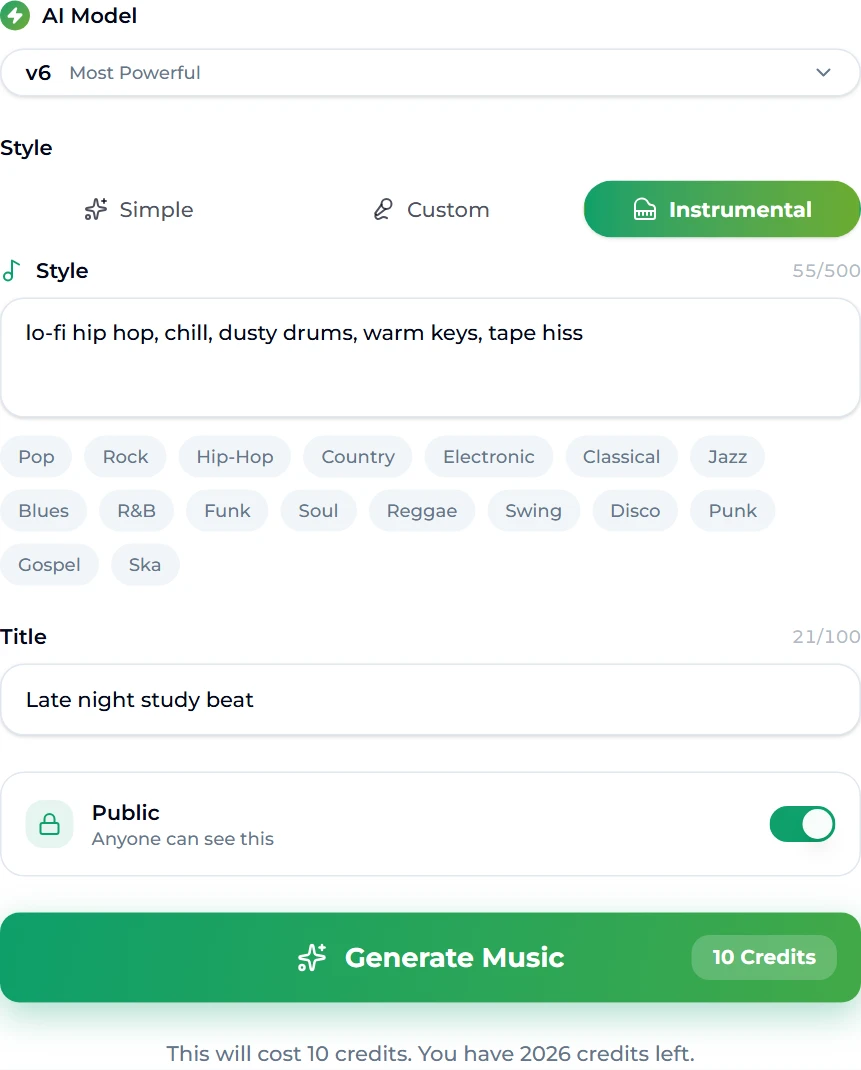
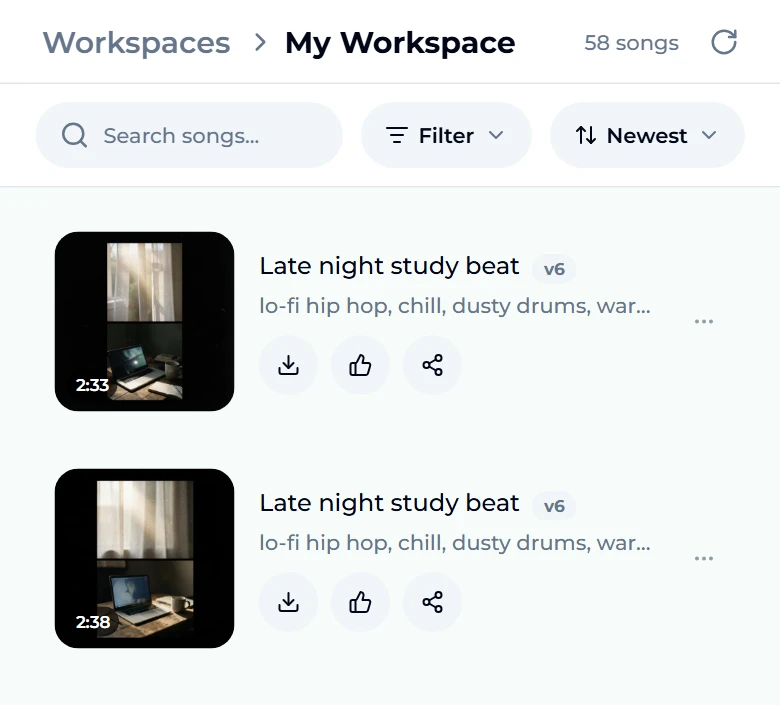
Lo-fi hip hop is a small set of ingredients: a slow, lazy hip hop groove around 70–90 BPM, jazzy seventh chords on warm keys, drums that sound a little dusty, and a layer of vinyl crackle or tape hiss. You can program that in a DAW over an evening — or describe it and let a generator play it. On Suno AI Music's lofi generator the form opens on the Instrumental tab with the style already filled in — lo-fi hip hop, chill, dusty drums, warm keys, tape hiss — and the title Late night study beat. We pressed Generate Music without changing a word and got two finished takes, 2:33 and 2:38, in about a minute. One run costs 10 credits and always returns two versions.
In this guide
- What makes lofi sound lofi
- Step by step with the lofi generator
- Writing a better lofi style prompt
- Five lofi recipes to copy
- Common lofi mistakes
- Choosing a model
- After the beat is made
- FAQ
What makes lofi sound lofi
"Lo-fi" means low fidelity, and the genre's charm is deliberate imperfection. Before you write a prompt it helps to know the parts, because each one is a word you can put in the style box:
- Tempo. Most lo-fi hip hop sits between 70 and 90 BPM. Slower feels sleepier; faster starts to sound like boom bap.
- Swing. The drums lag slightly behind the grid, the famous "drunk" feel. Words like lazy groove, laid-back or swung drums push the model there.
- Harmony. Seventh and ninth chords on a Rhodes, a felt piano or a nylon guitar. Jazzy chords, warm keys and mellow Rhodes all read well.
- Texture. Vinyl crackle, tape hiss, a slightly muffled top end, the occasional wobble of a warped record. Tape hiss, vinyl crackle, dusty and warm are the words.
- Ambience. Rain, a café murmur, city noise under the beat. Optional, but very lo-fi.
- No vocals — or at most a chopped, far-away sample. That is why lo-fi works under reading, coding and studying: nothing asks for your attention.
Step by step with the lofi generator
- Open the lofi generator. It is the same form as the main AI music generator, pre-set for lo-fi: the Instrumental tab is selected, so the result has no vocals.
- Look at the style box. It is already filled with lo-fi hip hop, chill, dusty drums, warm keys, tape hiss — a complete, working prompt. You can press generate straight away, or edit it (next section).
- Name it. The title field holds Late night study beat. The title is how you will find the track in your library later; it does not change the sound much.
- Leave Public on, or turn it off. Public songs can be seen by anyone; keeping a song private is an option on paid plans.
- Press Generate Music. The button shows the price: 10 credits for the run.
- Wait about a minute. The page moves you to the studio, where the new songs appear at the top of your workspace while they render. Two takes arrive from the same prompt.
- Listen to both. In our run the two takes came back at 2:33 and 2:38 — same style, different arrangements, different cover art. Keep the one you like, or both.
Writing a better lofi style prompt
The preset is a good default. To make your lo-fi rather than generic lo-fi, change one thing at a time and generate again — two takes per run makes comparing easy.
- Lead with the genre, then the feel. lo-fi hip hop first, then mood words. The model weights early words more heavily.
- Name one lead instrument. mellow Rhodes, felt piano, nylon guitar, muted trumpet. One clear lead beats a list of five.
- Put the tempo in numbers. 75 bpm is understood; slowish is not.
- Say what should not be there. no vocals is already implied by the Instrumental tab; no heavy bass or soft drums keeps it gentle for studying.
- Add one texture and one ambience at most. vinyl crackle, soft rain — more than that and the texture swallows the music.
- Keep it under a line or two. The style box takes up to 500 characters, but short prompts are more predictable. The genre tags under the box (Jazz, Hip-Hop, Soul…) add a word with one tap.
For more on phrasing prompts in general, the Suno prompts guide has a longer list of words that reliably change the sound.
Five lofi recipes to copy
Paste any of these into the style box on the lofi generator:
| Mood | Style prompt |
|---|---|
| Classic study beat | lo-fi hip hop, chill, dusty drums, warm keys, tape hiss |
| Rainy night | lo-fi hip hop, mellow Rhodes, soft rain, vinyl crackle, 72 bpm, melancholic |
| Sunday morning | lo-fi, nylon guitar, light brushed drums, warm, gentle, 80 bpm |
| Jazz café | jazzy lo-fi, upright bass, muted trumpet, swung drums, café ambience |
| Sleep | lo-fi ambient, felt piano, very soft drums, slow, 65 bpm, calm |
If you want the piano on its own with no beat at all, the piano music maker opens with a solo-piano preset instead. For instrumentals that are not lo-fi — cinematic, acoustic, electronic — the AI instrumental generator keeps vocals off with an empty style box for you to fill.
Common lofi mistakes
Most disappointing lo-fi generations come from the same handful of prompt habits. If a take sounds off, check these before you blame the model:
- Too many instruments. piano, guitar, saxophone, strings, flute reads as a busy jazz band, not a bedroom beat. Lo-fi is sparse: one lead, drums, bass, texture.
- No tempo. Without a number the model often drifts up into 95–100 BPM, where it starts to sound like upbeat hip hop. Write 75 bpm.
- "Relaxing" as the only mood word. Every lo-fi track is relaxing. Say which relaxing: melancholic, nostalgic, sleepy, sunny, rainy. That single word changes the chords more than anything else.
- Stacking textures. vinyl crackle, tape hiss, rain, fireplace, café noise buries the music. Pick one texture and, at most, one ambience.
- Vocals by accident. If you switch to the Simple tab to type a description, the result may be sung. For background lo-fi, stay on Instrumental.
- Judging from one take. Two takes per run exist so you can compare. If both miss in the same way, the prompt is the problem; if only one does, it is chance — keep the other.
A useful habit is to keep a note of prompts that worked. When you find a style line you love, reuse it with one word changed — rainy to snowy, Rhodes to felt piano — and you get a set of tracks that sound like they belong on the same playlist.
Choosing a model
The AI Model menu sits at the top of the form. Free accounts generate on v6 Mini, the fast tier built for drafts — it handles lo-fi well, because lo-fi is forgiving by design. v6 and v6 Wild are the PRO tiers on paid plans: v6 is the most polished, v6 Wild the most experimental. Our run used v6 because the account we tested with is on a paid plan; the same preset on v6 Mini gives you the same kind of track.
Every run, on any model, costs 10 credits and returns two takes. New accounts start with enough credits for a first run, and plans and credit packs cover the rest.
After the beat is made
- Make a longer mix. Lo-fi playlists live on long runtimes. Use Extend Song to continue a take from any point, and our guide to extending a song covers where to cut so the join is invisible.
- Pull the parts apart. The vocal remover separates a track into stems if you want the drums or keys on their own for a remix.
- Check the tempo before you mix two takes back to back: the song BPM finder reads it in the browser, and our BPM guide explains why lo-fi sometimes reads as double time.
- Put it under a video. Streams, study-with-me videos and reels are where lo-fi gets played; AI music for YouTube covers licensing for monetized channels.
FAQ
Is AI lofi music copyright free?
Tracks you generate are original — they are not copies of existing songs. What you may do with them depends on your plan: personal use on the free tier and Starter, and a commercial licence with a downloadable certificate on the Standard plan and above. Check the pricing page before putting a track in a monetized video.
How long is a generated lofi track?
Usually two to three minutes. Our two takes were 2:33 and 2:38. For an hour-long mix, extend a take or string several together.
Can I add vocals to a lofi beat?
Yes — switch to the Simple or Custom tab instead of Instrumental and describe or write the vocal. For classic lo-fi, though, keep it instrumental; a chopped vocal texture can be asked for in the style box.
Why do my two takes sound different?
That is the point of getting two: the same prompt, two interpretations. Keep the better one, or change one word in the style and run again.
What tempo should lofi be?
Between 70 and 90 BPM for lo-fi hip hop. Put the number in the prompt — 75 bpm — rather than relying on words like "slow".
Can I use lofi music for studying or streaming?
Studying, yes, on any plan. Streaming with monetization or ads counts as commercial use, which needs the Standard plan or above.
Final take
Lo-fi is one of the easiest genres to make with AI because its ingredients are so well defined: a lazy groove at 70–90 BPM, jazzy keys, dusty drums and a bit of tape hiss. Start with the preset on the lofi generator — it produced two usable study beats in a minute for us — then change one ingredient at a time until the track sounds like your room at 2 a.m. rather than everyone else's.