

TL;DR
A slowed + reverb edit is a song played back at about 80–90% speed — tape-style, so the pitch drops along with the tempo — with a long, fairly wet reverb on top. Start at 0.85× speed, 35% reverb and a 2.5-second room; go to 0.80× for a heavier, sleepier feel, and stop before 0.75×, where vocals start to sound underwater rather than dreamy. The free slowed + reverb generator does it in the browser: load an MP3, WAV or M4A, set Speed, Reverb and Room size, press Slow it down, listen, and download an MP3 or WAV. Nothing is uploaded. To time the reverb to the new tempo, the reverb calculator gives pre-delay and decay in milliseconds for any BPM.
In this guide
- What slowed and reverb actually does
- Step by step with the generator
- The settings that work
- Time the reverb to the new tempo
- Fixing a muddy result
- Which songs work best
- Posting it
- FAQ
What slowed and reverb actually does
The style took off on YouTube and TikTok as a way to turn a familiar song into late-night, headphones-on listening. It is simple under the hood — two effects, applied in a specific way.
1. A tape-style slowdown. The song is played back more slowly, like a turntable at the wrong speed. That means tempo and pitch drop together. At 0.85× a 120 BPM song becomes 102 BPM and sinks by almost three semitones (about 2.8); at 0.80× it becomes 96 BPM and drops close to four. This is deliberately not a "time stretch" that keeps the pitch; the lower, heavier voice is what gives the genre its sound. A pitch-locked stretch sounds thinner and more artificial.
2. A big, washy reverb. Reverb is the sound of a room. Slowed + reverb uses a large one, loud in the mix, so every note leaves a trail that blurs into the next. The slower tempo leaves more space between notes for that trail to fill.
Get the balance wrong and you end up with either a song that is just slow, or a smear where the beat disappears. The rest of this guide is about hitting the middle.
Step by step with the generator
The slowed + reverb generator is free, needs no account and works entirely in your browser: the file is decoded, processed and encoded on your device and never uploaded. Here is a real run on a lo-fi track we generated ourselves, 182 seconds long.
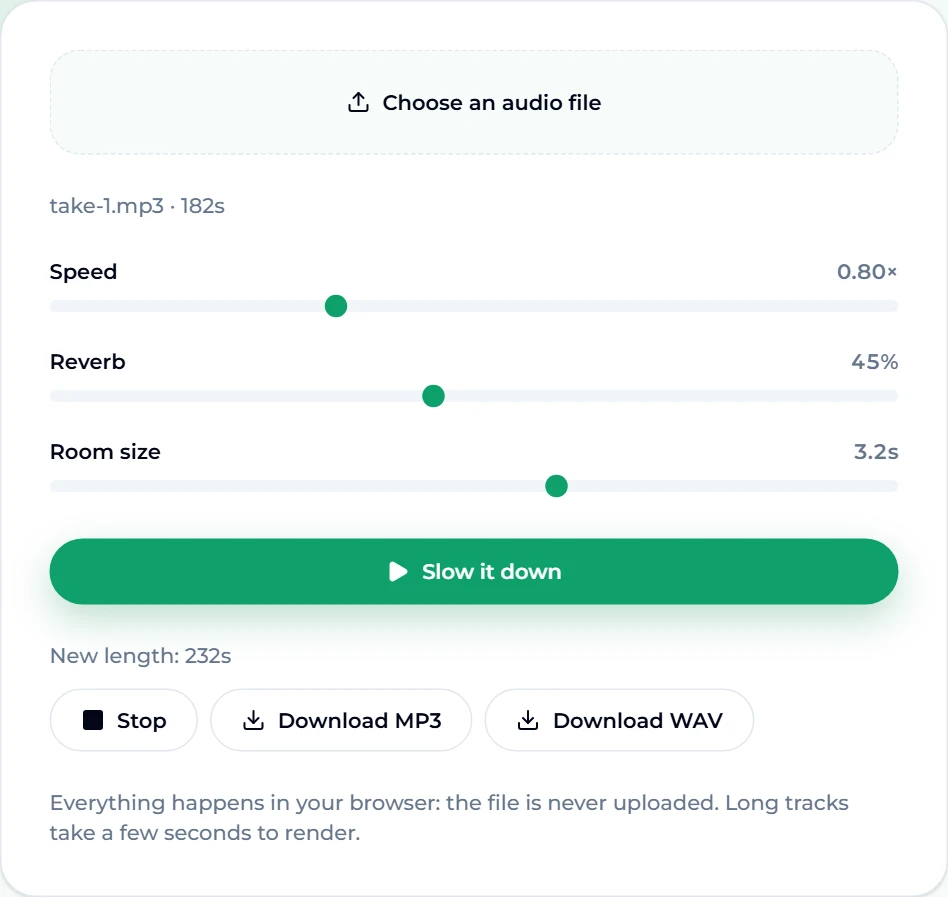
- Choose an audio file. Press Choose an audio file and pick an MP3, WAV or M4A. Anything up to 12 minutes long is accepted. Once decoded, the page shows the name and length:
take-1.mp3 · 182s. - Set Speed. The slider runs from 0.70× to 1.00× in steps of 0.01 and starts at 0.85×. We chose 0.80× for a heavier feel.
- Set Reverb. This is how much of the reverb you hear, from 0 to 100%; the default is 35%. We went to 45%.
- Set Room size. This is how long the reverb tail rings, from 0.5 to 5 seconds; the default is 2.5 s. We used 3.2 s.
- Press Slow it down. The edit is rendered offline — the page does not play through the song in real time to record it — so even a full track takes only a few seconds. Our 182-second track came back as New length: 232s: 182 ÷ 0.80 is 227.5 seconds, plus the reverb tail at the end.
- Press Play to listen, and adjust if needed. Each change needs another Slow it down to re-render.
- Download. Download MP3 or Download WAV. Our MP3 was saved as
take-1-slowed-reverb.mp3, about 3.7 MB.
One detail worth knowing: the generator cuts the low end out of the reverb (below about 180 Hz) before mixing it back in. Reverb on bass and kick drum is what turns a slowed edit into mud; keeping the low end dry lets you push the reverb much further before the groove disappears.
The settings that work
| Goal | Speed | Reverb | Room size |
|---|---|---|---|
| Subtle, still danceable | 0.90× | 20–30% | 1.5–2 s |
| The classic slowed + reverb | 0.85× | 35% | 2.5 s |
| Heavy, late-night | 0.80× | 40–50% | 3–3.5 s |
| Ambient wash | 0.75× | 55–70% | 4–5 s |
Rules of thumb:
- Change one thing at a time. Speed changes the song's character most, so set it first, then reverb, then room.
- Busy songs need less reverb. A dense EDM drop at 50% becomes noise; a sparse piano ballad at 50% sounds beautiful.
- Slower speeds need less room size. At 0.75× the notes are already long; a 5-second tail on top blurs everything.
- Check the vocal. Female vocals usually survive 0.80× well. Deep male vocals can start to sound unnatural sooner — try 0.88× instead.
- Listen on headphones and on a phone speaker. Reverb that sounds lush on headphones can vanish on a phone, and vice versa.
Time the reverb to the new tempo
Engineers often set reverb so it breathes with the beat: a short pre-delay (the gap before the reverb starts) keeps each hit clear, and a decay timed to a note value lets the tail fade just before the next beat lands. Slowing a song changes its tempo, so the timing that fit the original no longer fits.
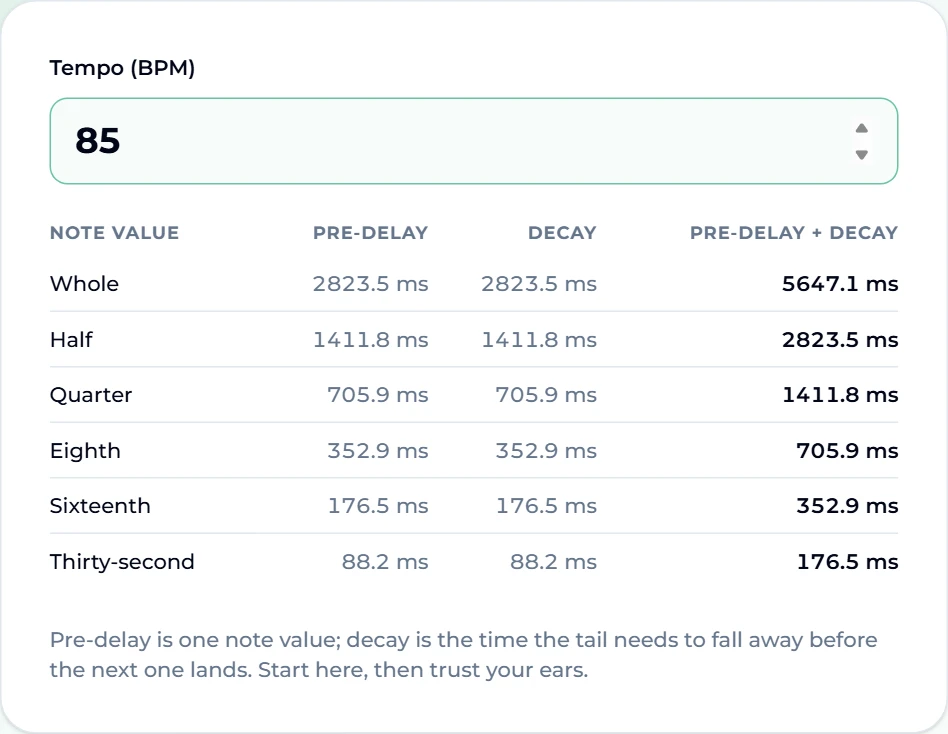
The reverb calculator does the arithmetic. Type the tempo and it lists pre-delay, decay and their total for every note value from a whole note down to a thirty-second. For a track at 85 BPM:
- a quarter-note pre-delay is 705.9 ms, with 705.9 ms of decay, 1411.8 ms in total;
- a half-note total is 2823.5 ms — about 2.8 seconds;
- a sixteenth-note pre-delay is 176.5 ms, a common, subtle choice.
How to use that with the slowed + reverb generator:
- Find the original tempo with the song BPM finder, or tap along with tap tempo.
- Multiply by your speed. A 100 BPM song at 0.85× plays at 85 BPM.
- Enter the new tempo in the reverb calculator.
- Set Room size near a note-value total. At 85 BPM, the half-note total is about 2.8 s, so a room size of 2.8 s lets the tail die away right as the next half-note begins — near the 2.5-second default, and tight to the beat.
If you are finishing the edit in a DAW with a full reverb plug-in, you can enter the pre-delay directly as well.
Fixing a muddy result
- The beat disappears. Lower Reverb first, then shorten Room size. The kick should still punch through.
- It sounds dull or dark. A lower pitch plus reverb soaks up the high end. Load the downloaded file into the free audio equalizer and try the Bright preset, or lift the 4 kHz and 8 kHz bands by 2–3 dB. Its ten bands run from 31 Hz to 16 kHz, ±12 dB each, and it exports MP3 or WAV.
- The bass booms. In the equalizer, cut the 62 Hz and 125 Hz bands a few decibels rather than boosting everything else.
- The vocal sounds robotic or underwater. You went too slow. Go back up to 0.85×.
- It is too long. Slowing always lengthens a song — 0.80× adds a quarter. Trim it afterwards; the ringtone maker will cut any stretch of up to 40 seconds, which also makes it a quick way to cut a short clip for a video.
Which songs work best
- Mid-tempo pop and R&B with a strong vocal. The classic source material. The melody carries through the wash.
- Lo-fi, chill and piano pieces. Already spacious; they turn cinematic.
- Songs with a memorable chorus. Slowed + reverb works on recognition — a hook that listeners know, made to feel new.
- Harder to pull off: fast drum-and-bass, dense metal, and anything with heavy sub-bass. Try less reverb and a gentler 0.90×.
If you would rather make an edit of something that is yours, generate an original first. Describe the song in the AI music generator — "dreamy bedroom pop, soft female vocal, Rhodes piano, 100 BPM" — and you get two full tracks with vocals from each generation (the free tier runs on v6 Mini). Download your favourite and run it through the generator. For a chill starting point, the lo-fi generator is tuned for exactly that sound.
Posting it
Slowed + reverb edits of other people's songs are still versions of those songs: platforms treat them like covers, and the rights stay with whoever wrote and recorded the original. If you are posting to YouTube or TikTok, check how the platform handles music in uploads before you rely on the edit. For something you can post freely, slow down a track you generated yourself; our guides to AI music for TikTok and AI music for YouTube cover making and using your own tracks.
FAQ
What speed is best for slowed and reverb?
Most edits sit between 0.80× and 0.90×. The generator starts at 0.85×. Go below 0.75× and vocals tend to sound underwater rather than dreamy.
Does slowing a song down change the pitch?
Yes — on purpose. This is a tape-style slowdown, so pitch falls with tempo. At 0.85× a song drops almost three semitones; at 0.80×, about four. That lower, heavier sound is the genre.
Is the slowed and reverb generator free?
Yes. It is free, needs no account, and adds no watermark. Everything runs in your browser.
Is my song uploaded?
No. The file is decoded and rendered with the browser's own audio engine and encoded on your device. It never leaves it.
What formats can I download?
MP3 or WAV. Choose MP3 for sharing and WAV if you plan to edit the result further.
How long a song can I use?
Up to 12 minutes. Remember the result will be longer than the original — at 0.80× it is 25% longer, plus the reverb tail.
Final take
Slowed + reverb is not a mystery effect; it is speed and space, balanced. Start at 0.85× with 35% reverb and a 2.5-second room in the slowed + reverb generator, render, listen on headphones and a phone, and change one slider at a time. Use the reverb calculator to time the tail to the new tempo, brighten a dull result in the audio equalizer, and if you want an edit that is entirely yours to post, start from a song you made in the AI music generator.