
TL;DR
A Content ID claim on background music does not delete your video; it redirects the money. The way to never see one is to use music that is not in anyone's catalogue — which is what a track you generate yourself is. YouTube allows AI music and monetizes channels that use it; the rules that bite are the AI disclosure toggle (for realistic synthetic content, not for a music bed), and the inauthentic content policy (for mass-produced, repetitive uploads, not for a vlog with a custom soundtrack). Make the track on the create page with the Instrumental switch on, extend it to the length of the video, keep the licence certificate from the Standard plan up, and the claim problem is gone for that channel.
In this guide
- Why background music gets claimed
- YouTube's AI rules in 2026
- What "no copyright claims" really requires
- Which kind of track for which video
- How to make it
- Eight prompt recipes for YouTube formats
- Mixing it under your voice
- Licensing for a monetized channel
- FAQ
Why background music gets claimed
Content ID is a fingerprint database. Rights holders register recordings; every upload is scanned against them; a match produces a claim, and the claimant decides what happens — usually that ads run and the revenue goes to them, sometimes that the video is blocked in some countries. It is automatic, it is not a strike, and it is very good at its job: a "royalty-free" track from a library that also registered its catalogue with Content ID will be claimed on your video just as reliably as a chart hit.
That is the trap with stock music. "Royalty-free" describes the licence, not the fingerprint. Plenty of licensed tracks are in Content ID, and you then spend an afternoon disputing a claim with a licence PDF. The two ways out are YouTube's own Audio Library — free, but used by a million other channels — or music that has never been registered by anyone, because it did not exist until you made it.
YouTube's AI rules in 2026
Verified against YouTube's current policies rather than forum lore:
- AI music is allowed and monetizable. Channels using AI tools stay eligible for the Partner Program, provided the rest of the policies are met. YouTube treats AI-generated audio as high-risk content for review purposes, which means it looks harder, not that it says no.
- The disclosure toggle is for realistic synthetic content. YouTube Studio's "Altered or synthetic content" setting is for material a viewer could mistake for real — a generated person, a real voice saying something they did not, a realistic event. Original AI music with a made-up voice and your own creative direction does not require the label. If you clone a real singer, it does — and the clone itself is the bigger problem.
- "Inauthentic content" is the policy that ends AI channels. In July 2025 YouTube renamed its "repetitious content" rule to inauthentic content: mass-produced, templated, low-effort uploads are not monetizable. A channel of a hundred near-identical AI tracks with a static image is the target. A vlog, a tutorial or an essay with a custom soundtrack is not.
- Content ID now uses pattern recognition, not only waveform matching. Tracks generated by tools that reproduce copyrighted songs can trigger claims. Use a generator that gives you clear written commercial rights and describes sound rather than copying records.
Five overlapping policies decide whether an AI-assisted channel earns: inauthentic content, reused content, AI disclosure, advertiser-friendly guidelines and Content ID. For a creator using AI for the music under their own videos, only the last two need thought — and both are solved by owning the track.
What "no copyright claims" really requires
Three conditions, and the third is the one people miss:
- The track is not in Content ID. A track you generated has never been registered by a label or a library. Nobody can claim it because nobody else has it.
- The track does not reproduce something that is. Prompts that name an artist or a song invite the model toward a record that is registered. Describe the sound instead —
80s synthpop, gated drums, big chorus— and the output is new. The prompts guide has thirty examples of the habit. - You do not register it against yourself. If you also release the track through a distributor with Content ID switched on, your own channel can get claimed by your own release. Either keep background tracks out of distribution, or whitelist your channel with the distributor first.
Meet all three and the claim rate for that music is zero, which is the honest meaning of "royalty-free tracks without copyright claims".
Which kind of track for which video
| Video type | What the music must do | Track type |
|---|---|---|
| Talking head, essay, review | Sit under a voice for 10–20 minutes without pulling attention | Instrumental bed, low dynamics, no lead melody |
| Tutorial, screen recording | Fill silence, mark section changes | Instrumental bed, light, steady |
| Vlog, day-in-the-life | Set a mood, carry montages, duck under speech | Instrumental with a gentle build; a vocal hook for the montage only |
| Gaming, commentary | Energy without competing with game audio | Driving instrumental, mid-tempo |
| Cinematic b-roll, travel | Be the emotion of the sequence | Instrumental with a clear arc — build, peak, resolve |
| Intro / outro sting | Be recognizable in 5 seconds | A vocal hook or a signature riff, covered into variations |
| Lyric video, visualizer, music channel | Be the content | Full song, rendered with the music video generator |
The pattern: almost everything on YouTube wants an instrumental, and the one thing you never want under speech is a lead vocal.
How to make it
Step 1: Describe the bed
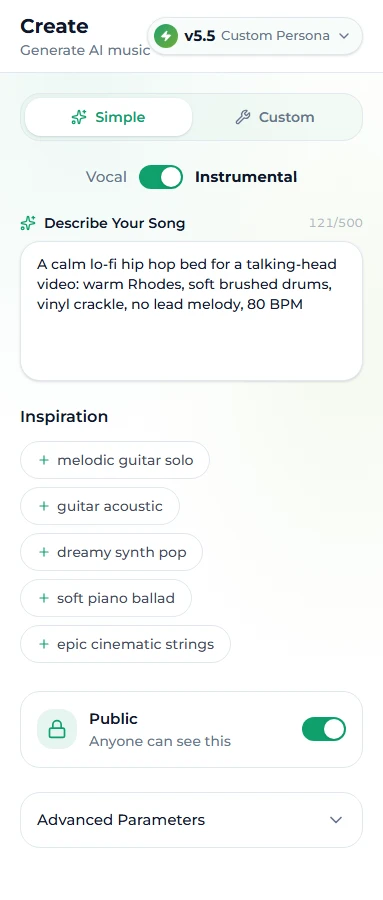
Open the create page, stay in Simple mode, and flip the Vocal / Instrumental switch above the description box to Instrumental. Describe the bed as genre, mood, instruments, tempo — and say what to leave out: no lead melody, no drums for a very quiet talking-head track. With the switch on there are no lyrics to write; the model produces the arrangement only.
Step 2: Generate two takes
10 credits, two versions, a minute or two. Listen at the volume you will actually use — quietly, under your own voice. A bed that sounds great loud is often too busy quiet. Keep the calmer take.
Step 3: Make it long enough
A generated track is a few minutes; a video is often ten or twenty. Rather than looping (the seam is audible, and the loudness never varies), extend the song from the last bar before a phrase ends. Each extension continues the same arrangement, so a two-minute bed becomes eight minutes in three passes, each 10 credits, each one returning two takes so you can choose the smoother join. The extend guide covers where to cut.
For a talking-head channel, make one long bed per mood — calm, upbeat, tense — and reuse them; three or four beds cover a year of uploads, and the repetition becomes part of the channel's sound.
Step 4: Export and mix
Download the track (WAV on the Standard plan and above; MP3 everywhere), drop it into your editor, and mix it under the voice — the next section has numbers. Save the licence certificate next to the audio file.
Step 5: Music channels only — render the video
If the music is the video, the music video generator turns any finished track into an MP4 with visuals matched to the music: 10 credits, usually two to five minutes, with an optional author name on the cover frame and a watermark along the bottom, downloadable for 14 days. For a lyric or visualizer channel, that is the whole pipeline — remembering that the inauthentic-content rule means the channel needs a point of view, not just a feed.
Eight prompt recipes for YouTube formats
All instrumental unless stated. Simple mode, Instrumental switch on, paste the description, generate.
| Format | Style prompt |
|---|---|
| Talking head / essay | ambient, calm, soft piano, warm pads, no drums, no lead melody, 70 BPM |
| Tutorial / screencast | lo-fi hip hop, calm, warm Rhodes, soft brushed drums, vinyl crackle, no melody lead, 80 BPM |
| Vlog | indie folk, bright, acoustic guitar, light shaker, hopeful, 105 BPM |
| Gaming / commentary | synthwave, driving, arpeggiated synths, punchy drums, 120 BPM |
| Cinematic b-roll / travel | cinematic, emotional, strings, slow build, piano motif, big swell at the end, 75 BPM |
| Cooking / crafts | bossa nova, warm, nylon guitar, brushed drums, playful, 95 BPM |
| Study / ambient stream | ambient, weightless, soft synth pads, rain texture, no drums, no melody, 60 BPM |
| Intro sting (vocal) | Custom mode (Style + Lyrics fields): pop punk, energetic, power chords, gang vocals, 160 BPM with a two-line hook that names the channel |
For the sting, write the hook as a [Chorus] on its own and nothing else — the tags guide explains why that reliably gives you a short, punchy take — then trim to five seconds.
Mixing it under your voice
Numbers that work for most talking content:
- Voice peaks around -6 dB, music sitting -18 to -22 dB under it — quieter than feels right in headphones.
- Use your editor's ducking (auto-lower when the voice is present) so the bed rises in gaps and drops under speech.
- Cut the bed's lows (a high-pass around 120 Hz) so it does not muddy the voice, which lives in the same range as bass and kick.
- Let the music breathe at section changes: a two-second swell between chapters does more than a constant level.
- For a long video, change the bed at the halfway point. Same mood, different track; viewers notice the freshness without noticing why.
Licensing for a monetized channel
A monetized channel is a commercial use. On Suno AI Music every generated track is copyright-free, and on the Standard plan and above (and the larger credit packs) it carries a commercial licence with a downloadable certificate — for ads, sponsors and monetized video, no royalties, no attribution. Extensions, covers and stems of the song sit under the same licence, and so does a video rendered from it. The free tier and the Starter plan are for personal use; a hobby channel with monetization off is fine there, a channel earning is not. Plans are on the pricing page.
Keep the certificate. If a claim ever does appear — a false positive, or a library that registered something similar — the dispute is a one-line reply with a PDF attached, and the claim is released.
FAQ
Is AI-generated music allowed on YouTube?
Yes. YouTube permits AI music and channels using it can be monetized, subject to the same policies as everyone else — inauthentic content, advertiser-friendly guidelines and Content ID in particular.
Do I have to turn on the "altered or synthetic content" label for AI background music?
No. The disclosure is for realistic synthetic content a viewer could mistake for real. A generated instrumental under your own video is not that. You do need it if the visuals are realistic and synthetic, or if a voice imitates a real person.
Will an AI track get a Content ID claim?
Not if it is original: a generated track is not registered by anyone. Claims come from prompts that reproduce real records, or from registering your own track with a distributor and then using it on your channel without whitelisting.
How do I get a ten-minute background track?
Generate a two- or three-minute bed and extend it in passes with the extend tool, cutting at the end of a phrase each time. Three passes gets you eight to ten minutes with no loop seam.
Can I use one track on every video?
Yes, and for a talking-head channel that consistency is an asset. Make a few beds in different moods and rotate them.
What licence do I need for a monetized channel?
A commercial licence — on Suno AI Music that is the Standard plan and above, with a certificate you can download and keep for disputes.
Final take
Nobody can claim a track that did not exist until you made it. Describe the bed, generate two takes, extend it to length, mix it 20 dB under your voice, keep the certificate. Start on the create page — the first generation is free, and the claim problem for that channel ends with it.