
TL;DR
A cover keeps the song — melody, lyrics, structure — and changes the performance: arrangement, tempo, key, voice. That is true whether you record it in a bedroom or generate it. The traditional route is pick a key you can sing, strip the arrangement to its bones, rebuild it in your own style, record, then license it (a mechanical licence for a release; YouTube handles covers through Content ID). The AI route works on a song you already made: open the cover song tool, pick the track, describe the new style — soft acoustic, female vocal — and the model re-performs the same melody and words in that arrangement, two takes for 10 credits. The two routes share the same craft, and the second is the fastest way to hear an arrangement idea before you commit a weekend to it.
In this guide
- What a cover actually changes
- Choosing the arrangement
- Route 1: Record your own version
- Route 2: Cover a song with AI
- Style ideas that work as covers
- Licensing: two different questions
- A workflow that uses both
- FAQ
What a cover actually changes
Strip the word of its associations and a cover is a simple thing: the same composition, performed differently. The composition is the melody, the lyrics and the chord movement — what a songwriter owns. The performance is everything else: the tempo, the key, the instruments, the groove, the voice, the production. A good cover keeps the first untouched and rethinks the second so thoroughly that the song sounds like it was written for the new performer.
The covers people remember do one of three things:
- Change the energy. A ballad becomes a dance record, or a stadium anthem becomes a whisper over a piano.
- Change the genre. A pop song as bluegrass, a punk song as bossa nova. The contrast makes the melody audible again.
- Change the voice. The same arrangement, a different singer, a different register — the smallest change and, done well, the most affecting.
Bad covers change nothing except the singer, and the listener's only question is why.
Choosing the arrangement
Before recording anything, decide what the cover is for: an acoustic version for a live set, a genre flip for a video, a reinterpretation for a release. Then work backwards.
- Find the song's skeleton. Play the melody over the bare chords, no groove, no production. Whatever survives that is the song; everything else is the original arrangement's choices, and yours to replace.
- Pick a key for the new voice. Move the song so the chorus sits in the strongest part of the singer's range. A whole tone up or down changes a cover more than any instrument choice.
- Choose one contrast. Tempo, genre, or dynamics — pick the one that serves the purpose and let it drive the rest. Half-time with a big low end; double-time with a shuffle; the same tempo stripped to voice and one instrument.
- Decide what to keep. One recognisable hook from the original — a riff, a drum pattern, a vocal ad-lib — tells the listener you know the record. Keep one; rebuild the rest.
Route 1: Record your own version
The traditional route, condensed to the steps that matter:
- Chart it. Lyrics with chords above them in the new key. Mark the sections.
- Build the bed first. Record the rhythm instrument — guitar, piano, a programmed beat — to a click at the new tempo, full length. Everything else is layered on this.
- Vocal next, early. Sing it before the arrangement is finished; the vocal tells you where the arrangement is too busy.
- Then colour. Bass, drums or percussion, one texture instrument. Stop before it sounds like the original.
- Mix for the contrast you chose. A whisper cover needs the vocal close and dry; a dance cover needs the low end and the drums to lead.
What to have when you finish: the mixed cover, a chart, and a note of the key and tempo — you will want them if the cover works and you need a second version.
Route 2: Cover a song with AI
The AI route does not replace a singer with a robot; it replaces the arrangement work — the part that takes a weekend — with a description. It applies to a song you already made on Suno AI Music, which is also what keeps the result cleanly licensed: you own the source.
- Open the cover song tool and pick the track from your library — a generated song, an extended one, an earlier cover.
- Describe the new performance. The description box takes plain language —
A soft acoustic version with female vocals— or a style line in the four-part shape the prompts guide uses:bossa nova, warm, nylon guitar, brushed drums, breathy female vocal, 95 BPM. - Lyrics carry over by default; leave the field alone for the same words, or write new ones if the cover is also a rewrite. For an instrumental cover, add
instrumentalto the style and leave the lyrics empty. - Press Create Cover (10 credits). One to three minutes later two takes land in your library, each the same melody and words performed in the new arrangement.
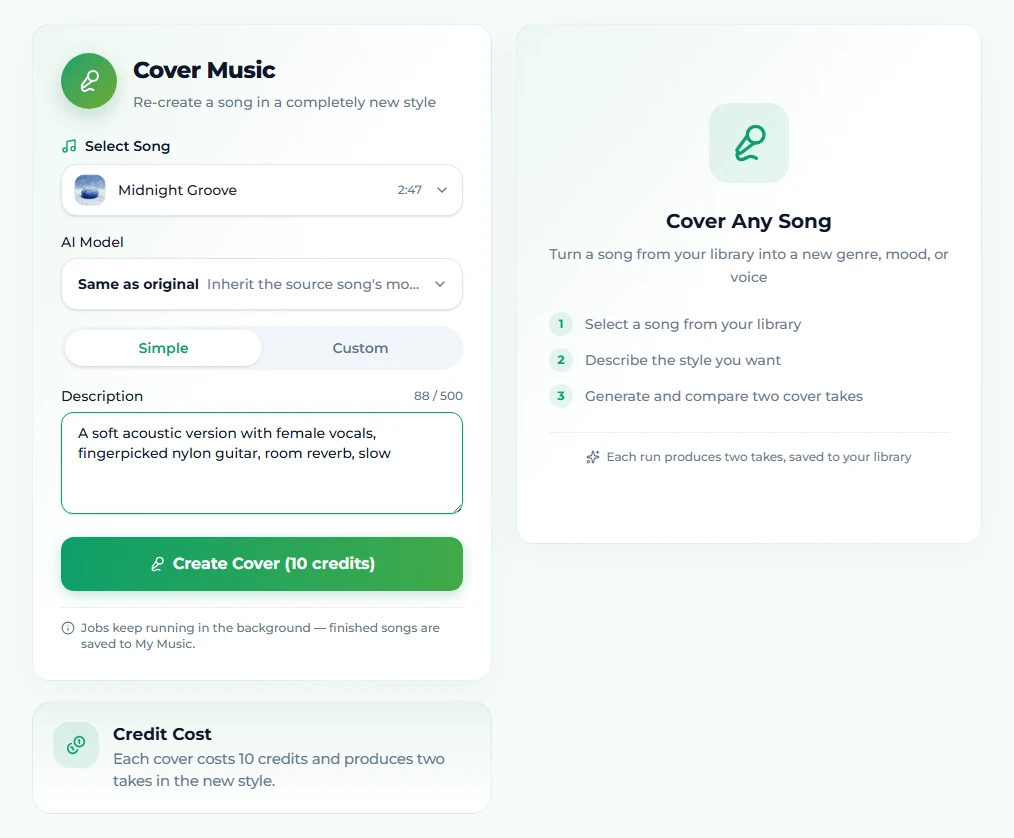
What changes and what does not: the melody and lyrics stay; the arrangement, tempo feel, instruments and vocal performance change. The model reads the style the way the generator does, so everything in the tags guide about voice and production words applies. And because the cover is its own song in the library, you can extend it, replace a section of it, or cover it again.
Two takes differ more than you expect. Listen to both before deciding the description needs work.
Style ideas that work as covers
Contrast is the point, so pick the opposite of the source:
| Source sounds like | Cover it as | Style line |
|---|---|---|
| Upbeat pop | A late-night piano ballad | piano ballad, intimate, solo piano, hushed female vocal, slow |
| Synth-heavy electronic | Acoustic folk | indie folk, tender, fingerpicked guitar, soft harmonies, 85 BPM |
| Acoustic singer-songwriter | Synthwave | synthwave, nostalgic, analog synths, gated reverb drums, 1985, 100 BPM |
| Rock | Bossa nova | bossa nova, warm, nylon guitar, brushed drums, breathy vocal, 95 BPM |
| Hip hop | Orchestral | cinematic orchestral, strings, brass swells, choir, dramatic, 80 BPM |
| Ballad | Club record | deep house, hypnotic, four-on-the-floor, sidechained pads, 124 BPM |
| Anything | Its instrumental | instrumental, same arrangement with the lyrics left empty |
The any-genre recipes give fourteen more style lines, each usable as a cover description.
Licensing: two different questions
The routes answer different legal questions, and mixing them up is the most common mistake.
Covering someone else's song. The composition belongs to its writers. Performing it live is covered by the venue's blanket licences. Releasing a recording needs a mechanical licence — in the US it is compulsory, meaning the writer cannot refuse, and distributors handle it for a fee per release. Posting on YouTube is handled by Content ID: the publisher claims the video and takes the revenue, and the cover stays up. What none of this covers is a sync — using the cover in a video, an ad, a film — which needs the publisher's direct permission. And note that the AI cover tool cannot help here: it works on your own library, not on uploads of other people's records.
Covering your own song. A track you generated on Suno AI Music is copyright-free, and on the Standard plan and above it carries a commercial licence with a downloadable certificate. A cover inherits that licence, so a cover of your own song is yours to release, sync and monetise. Plans are on the pricing page.
A workflow that uses both
The routes are not rivals. The most practical use of the AI cover is as an arrangement sketchbook for a song you wrote:
- Generate the song once, or cover a track you already have in the style you think you want.
- Cover it three or four more ways — acoustic, half-time, a genre flip. 10 credits each, a few minutes each.
- Pick the arrangement that makes the melody sound new. That is the version worth a weekend.
- Record it yourself if you want your own performance; or keep the generated cover if it already is the record — pull the vocal off for a backing track, extend it for the live set.
An afternoon of covers tells you more about a song than a month of thinking about it.
FAQ
What counts as a cover?
A new performance of an existing composition — same melody and lyrics, different arrangement or voice. Change the words and melody substantially and it is a new song; keep them and change the performance and it is a cover.
Do I need permission to cover a song?
To release a recording of someone else's song you need a mechanical licence, which distributors arrange; on YouTube the publisher claims the revenue through Content ID. Using the cover in a video or ad needs a sync licence. Covering your own generated song needs nothing beyond your plan's licence.
Can the AI cover tool cover a famous song?
No. It works on tracks in your own library, which is what keeps the output cleanly licensed.
Does an AI cover keep the lyrics?
Yes. The melody and words carry over; the arrangement and vocal performance change. You can supply new lyrics if the cover is also a rewrite.
What does an AI cover cost?
10 credits, the same as a fresh generation, and it returns two takes in the new style.
Can I cover a cover?
Yes. Each cover is its own song in the library, so it can be covered again, extended or edited.
Final take
A cover is the song with a new performance. Choose one contrast, keep one hook from the original, and rebuild the rest. If the song is yours, hear the arrangement first — a description and 10 credits get you two versions in minutes — and spend the weekend on the one that works.