
TL;DR
A metronome only helps if you use it deliberately. Open the free online metronome, set the tempo with the slider (40 to 300 BPM), choose the beats per bar (2 to 12 — the first beat of each bar gets a higher, louder click), and press Start. Pick a tempo slow enough that you can play the passage perfectly, play it three times clean, then raise the tempo by about 5 BPM. When a click feels too sterile, switch Sound to Drums for a kick, snare and hi-hat groove, or use the drum metronome. For odd or compound meters, the preset pages — 6/8, 7/8, 12/8 — open with the accents already in the right places. And when you need to know the tempo of a song you are hearing, tap tempo turns your taps into a BPM. Everything is free and runs in the browser tab.
In this guide
- What a metronome is for
- How to use the online metronome step by step
- Choosing a tempo
- Beats per bar and accents
- Five ways to practise with a metronome
- Clicks or drums
- Finding the tempo of a song
- Note lengths at any tempo
- FAQ
- Final take
What a metronome is for
A metronome is a clock you can hear. It does three jobs, and knowing which one you are using it for changes how you set it up:
- Exposing timing problems. Most people rush the easy bits and drag the hard bits without noticing. A click does not move, so you hear exactly where you pull away from it.
- Building speed safely. Playing a passage slowly and correctly, then nudging the tempo up, is the most reliable way to get fast without getting sloppy.
- Internalising a groove. Over time the goal is to feel the pulse so well that you need the click less. The practice methods below are designed to get you there.
Online metronomes used to be unreliable because they fired clicks from a page timer, which stutters whenever the browser gets busy. The one on this site schedules every click ahead of time on your device's audio clock, so it holds time even while other tabs are working, and the flashing dots follow what was actually scheduled.
How to use the online metronome step by step
- Open the metronome. It starts at 100 BPM, four beats per bar, with a click sound.
- Set the tempo. Drag the Tempo slider. The big number shows the BPM — beats per minute — from 40 to 300.
- Pick the beats per bar. Tap 2, 3, 4, 5, 6, 7, 9 or 12. Beat one of each bar is accented.
- Choose the sound. Click is a clean tick with a higher, louder tick on the accents. Drums plays a kick, snare and hi-hat pattern instead.
- Press Start. The row of dots lights up beat by beat; the larger dot is the accented one. On a phone, press Start after the page has loaded — mobile browsers only let a page make sound after a tap.
- Adjust on the fly. You can move the slider or change the beats while it is running. Press Stop when you are done — or just close the tab.
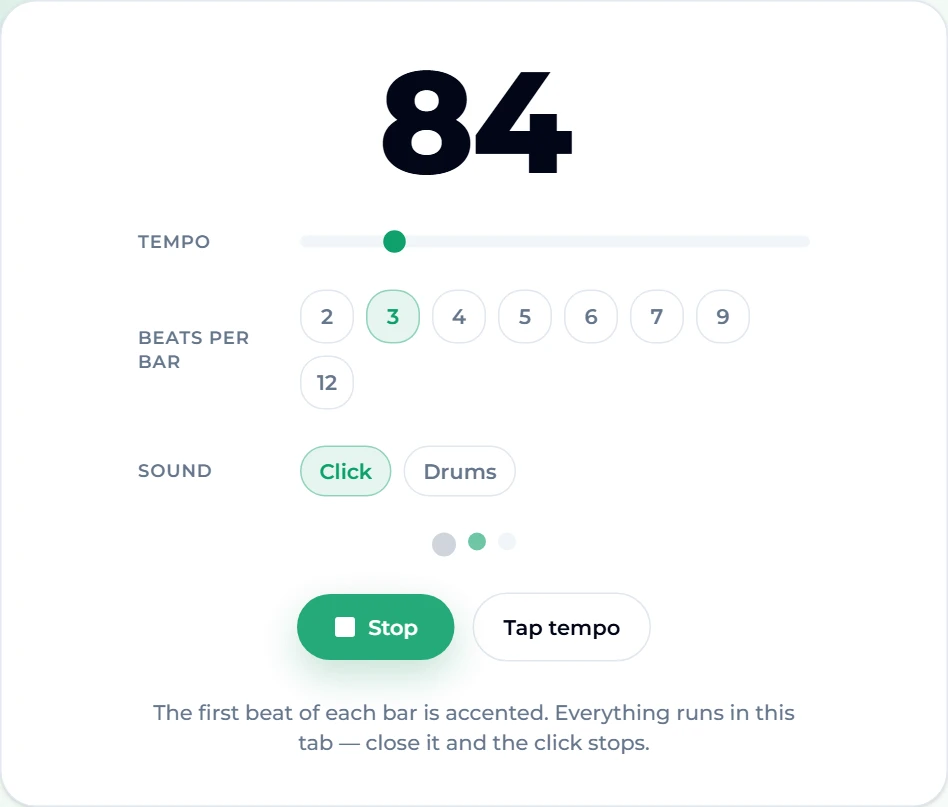
Here it is set to a waltz: 84 BPM, three beats per bar, running. The big dot on the left marks beat one of each bar.
Choosing a tempo
The right tempo is the fastest one at which you can play the passage perfectly — not the tempo on the sheet music, and not the tempo you wish you could play at. Usually it is slower than feels satisfying.
Rough landmarks help you pick a starting number:
| BPM | Tempo marking | Feels like |
|---|---|---|
| 60 | Largo | One beat per second; slow ballads, practising something brand new |
| 76 | Adagio | Relaxed; slow soul, early practice of a hard passage |
| 100 | Andante | Walking pace; a comfortable default |
| 120 | Moderato | House, pop and disco territory |
| 140 | Allegro | Dubstep, trap and techno |
| 170 | Vivace | Drum and bass, punk |
| 200+ | Presto / Prestissimo | Punk, fast bebop — and a real test of your hands |
If you already know the number you want, the preset pages open the metronome at it — for example 60 BPM, 80 BPM, 100 BPM, 120 BPM or 160 BPM. Each one also shows the tempo marking, how long each note lasts at that speed, and the styles that tend to live there.
Beats per bar and accents
The accent tells you where the bar starts, which is what keeps you from losing your place. Match the beats per bar to the time signature of the music:
- 4/4 — ONE two three four. Almost all pop, rock and hip hop. Set 4.
- 3/4 — ONE two three. Waltzes, many folk songs and ballads. Set 3.
- 2/4 — ONE two. Marches, polkas. Set 2 — or use it as a trick, below.
- 6/8 — ONE two three FOUR five six. Six quick beats felt as two big ones. Jigs, sea shanties, slow rock ballads.
- 7/8 — ONE two THREE four FIVE six seven, grouped 2+2+3. Balkan dances, prog rock.
- 9/8 and 12/8 — three or four groups of three. Slip jigs; the swung shuffle of blues and soul ballads.
When you pick a number on the main metronome, only beat one is accented. For compound and odd meters that is not quite enough — you want to hear one and four in 6/8, or the 2+2+3 shape of 7/8. The time-signature pages handle that: 3/4, 4/4, 6/8, 7/8, 9/8 and 12/8 each open with the accents already placed and a counting guide under the tool. Here is 6/8 with the drum sound, beats one and four accented:
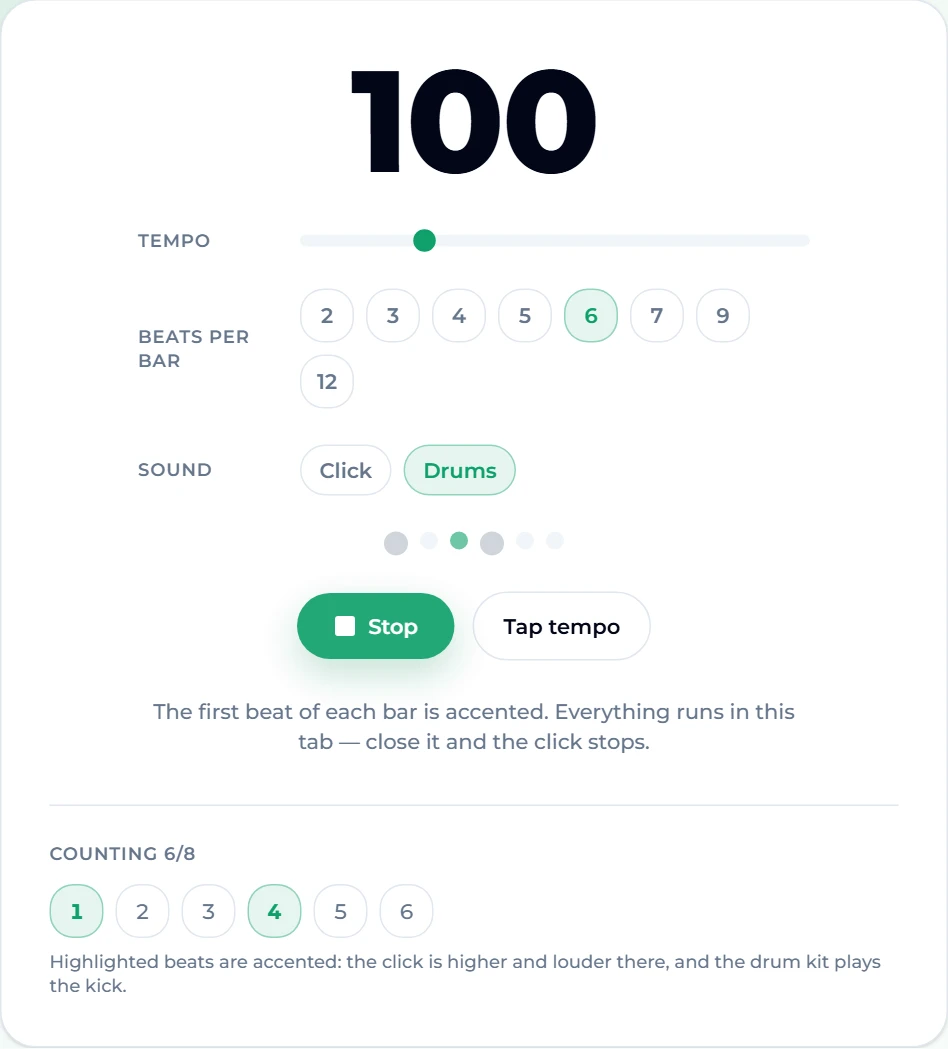
One detail matters for compound meters: the BPM counts every click. So 6/8 at 120 means 120 eighth notes a minute — two big beats per bar at 40 dotted-quarters a minute, not 120.
Five ways to practise with a metronome
1. Slow, clean, then faster. Set a tempo where you can play the passage perfectly. Play it three times in a row without a mistake. Raise the tempo by 5 BPM and repeat. When you start making mistakes, drop back 10 BPM and finish on a clean run. Write down the tempo you reached — tomorrow you will start a little below it.
2. Click on two and four. Set the beats per bar to 2 and play a 4/4 groove at half the BPM, hearing each click as beats two and four. It is exactly how a drummer's backbeat feels, and it makes swing and funk sit much better than a click on every beat.
3. Take the click away. Set the tempo, play along for a bar, then feel beats three and four without leaning on the click, and check that you land together on the next beat one. At a more advanced stage, set 2 beats per bar on a 4/4 piece so the click only marks one and three and you keep the rest in your head.
4. Burst practice. For a fast run, play just the first four notes at full tempo and stop. Then the next four. Then join them. Short, fast, correct bursts at the target tempo, stitched together, often get there sooner than creeping up 5 BPM at a time.
5. Record yourself with the click. Your phone's voice recorder is enough. Listening back without playing is when you hear the rushing and dragging you missed while concentrating on your hands.
Clicks or drums
A click marks the beat. A drum groove also tells you where in the bar you are — the kick says downbeat, the snare says backbeat — which makes it easier to lock in, easier to keep your place in long phrases, and far more pleasant for a half-hour session.
Switch Sound to Drums on any metronome page, or go straight to the drum metronome. The pattern follows the meter: in simple meters the kick plays beat one (and beat three from 4/4 upwards), the snare plays the other beats and the hi-hat plays every beat; on the 6/8, 9/8 and 12/8 pages the kick lands on each accent and the snare on the last beat of each group of three. The drums are synthesised in the browser, so they sound the same on every device and there is nothing to download.
If you would rather practise against a real song in a particular style and tempo, you can also generate a backing track — describe the genre and speed you want and play along.
Finding the tempo of a song
Sometimes you need to know how fast something is — to practise along to a recording, set a delay pedal, or tell your bandmates the count-in.
The quickest way is tap tempo. Tap the big button, or any key on your keyboard (the space bar is the natural one), in time with the music. The BPM is the average of your last eight taps, so it settles within a couple of bars and still follows you if the song drifts. Stop for more than two seconds and it starts a new measurement; Esc resets. Here it is after nine taps along to a track at around 120:
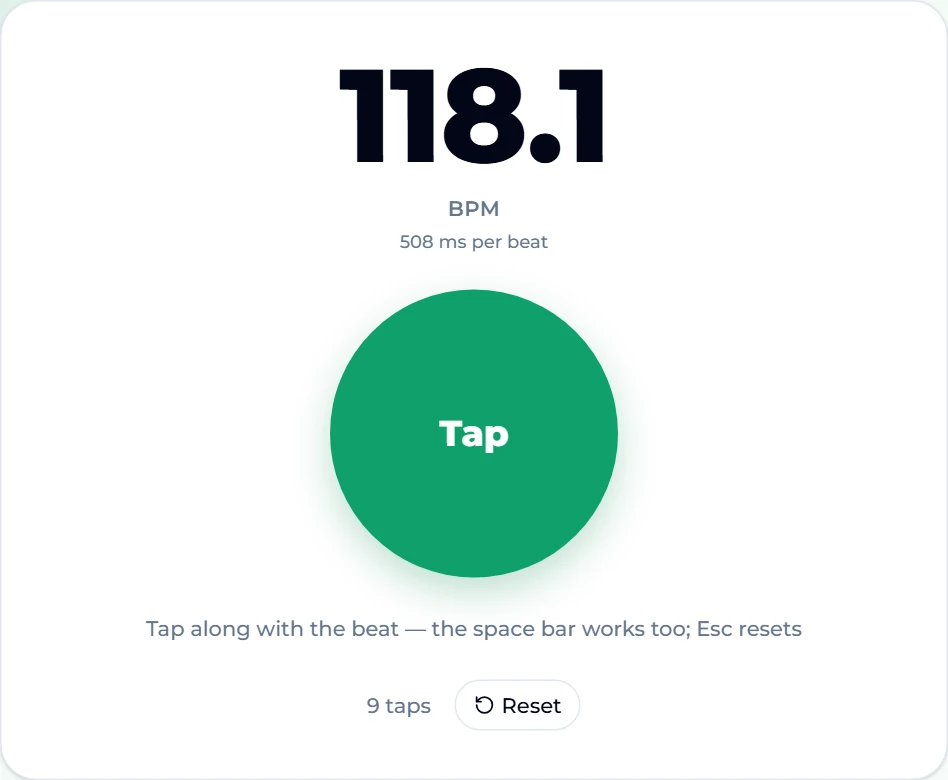
Human taps wobble by a few milliseconds, so expect a reading within a couple of BPM of the true tempo and round to the nearest sensible number. The metronome also has a Tap tempo button of its own, so you can tap a tempo straight into it and then press Start. If you have the audio file and want the exact number without tapping, Song BPM analyses the file for you.
Note lengths at any tempo
Each tempo preset page lists how long every common note value lasts at that tempo. At 120 BPM, for example, a quarter note is 500 ms, an eighth is 250 ms and a dotted eighth is 375 ms:
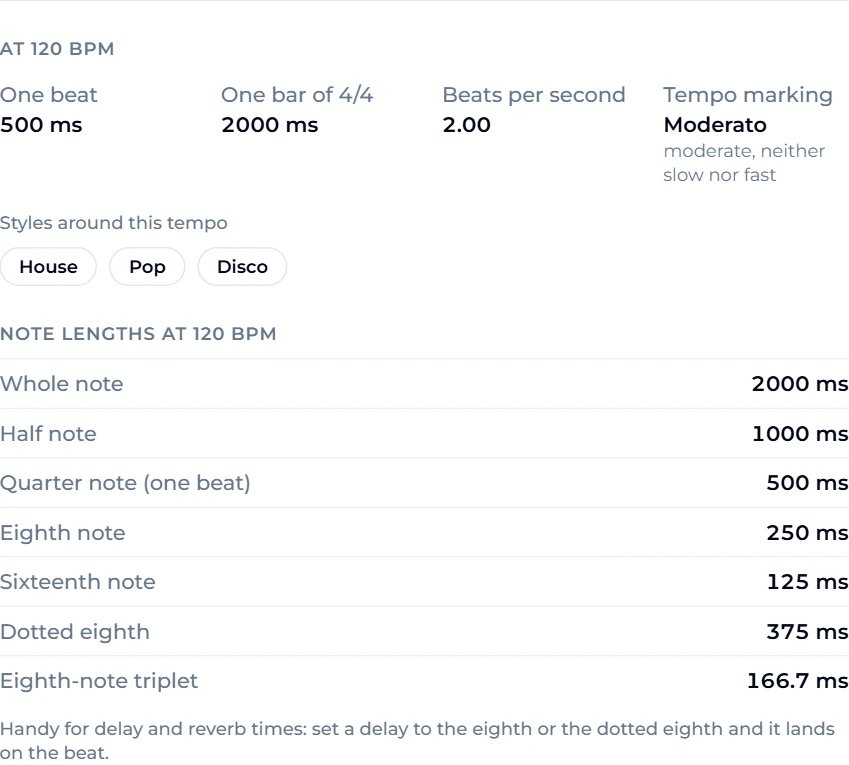
That is not just theory. Producers and guitarists use it to set delay and reverb times so the echoes land on the beat — set a delay to the eighth note or the dotted eighth at your song's tempo and it locks to the groove. The formula, if you need a tempo that has no page: one beat in milliseconds = 60,000 ÷ BPM.
FAQ
What BPM should a beginner practise at?
Whatever lets you play the passage cleanly — often 60 to 80 BPM for new material. The number matters less than the method: clean three times, then add 5 BPM.
Is the online metronome accurate?
Yes. Each click is scheduled ahead of time on the audio clock rather than fired by a page timer, which is what makes a browser metronome drift. It keeps time while other tabs are busy. Some browsers throttle hidden tabs, so keep it visible while you practise.
Is it free, and do I need an account?
The metronome, online metronome, drum metronome, every tempo and time-signature page, and tap tempo are free with no sign-up. Everything runs in your browser.
Does it work on a phone or offline?
It works in any modern mobile browser; press Start after the page loads, because phones only allow sound after a tap. Once the page is open it keeps clicking without a connection.
How do I count 6/8 on a metronome?
Set 6 beats per bar and count ONE two three FOUR five six, with the weight on one and four — or open the 6/8 metronome, which accents both. The BPM counts eighth notes.
What is the difference between a click and a drum metronome?
Only the sound. The timing engine is the same; the drum version plays kick, snare and hi-hat so you hear where the bar starts and where the backbeat falls.
Final take
Open the metronome, set a tempo slow enough to play perfectly, choose the right beats per bar, and raise the speed 5 BPM at a time. Use the time-signature pages when the accents need to fall somewhere other than beat one, switch to drums when a click feels lifeless, and reach for tap tempo whenever you need to know how fast a song is. If your instrument is not in tune yet, start with our guides to tuning a guitar, ukulele or violin — timing and tuning are the two habits everything else is built on.