
TL;DR
Making AI music is four moves: describe the song, generate two versions, keep the one you like, and refine it with the editing tools. On Suno AI Music, start at the AI music generator: the Prompt box opens with a complete synth-pop description, and six "Start from a vibe" tiles let you hear a finished song and load its prompt with one tap. One run costs 10 credits, takes about a minute and returns two complete songs; new accounts get 16 free credits. This guide shows how to make AI music on that page from the first click, and how to write prompts that get the song in your head rather than a generic one.
In this guide
- What makes AI music sound like real music
- Step by step with the AI music generator
- How to write a prompt for AI music
- Six prompts from the page
- Common beginner mistakes
- Choosing a model
- After the song is made
- FAQ
- Final take
What makes AI music sound like real music
A music model is trained on a very large amount of audio paired with descriptions. Given a new description, it composes and performs a complete recording in one pass: melody, arrangement, production and, if you want them, lyrics and singing. It is not stitching loops, and it is not pulling an existing song from a database; each run is new audio.
Three things follow from that, and they shape everything below:
- The description is the instrument. You do not play notes; you describe a record. Learning to describe precisely is the whole skill.
- Every run is a draw. The same prompt gives different songs each time. That is why each run returns two, and why trying again is cheaper than perfecting a prompt in advance.
- You get a finished recording, not a project file. To change it you generate again or use the tools built for editing generated songs: extend, cover, replace a section, split the vocals.
What makes the result sound like a real song in a real genre is the same set of ingredients a producer would name, and each one is a phrase you can type:
- Genre and era: 80s-style synth-pop, 90s boom bap hip hop, liquid drum and bass.
- Voice: bright confident female vocal, tender male vocal, or no voice at all with Instrumental Only.
- Two or three signature instruments: shimmering synth arpeggios, gated drums; fingerpicked acoustic guitar, brushed drums, a little harmonica.
- Tempo: 174 BPM for drum and bass, 90 BPM for boom bap. Suno usually honours it roughly, not exactly.
- A subject, if the song has words: two childhood friends who send wishes to the stars from a city rooftop. The AI writes lyrics about it.
Step by step with the AI music generator
- Open the AI music generator. The Prompt tab is selected and the box already holds a full description: An uplifting synth-pop song about chasing a dream in a big city, bright female vocal, shimmering 80s synths, punchy drums and a chorus you can sing along to. Instrumental Only is off, so the song will have a vocal.
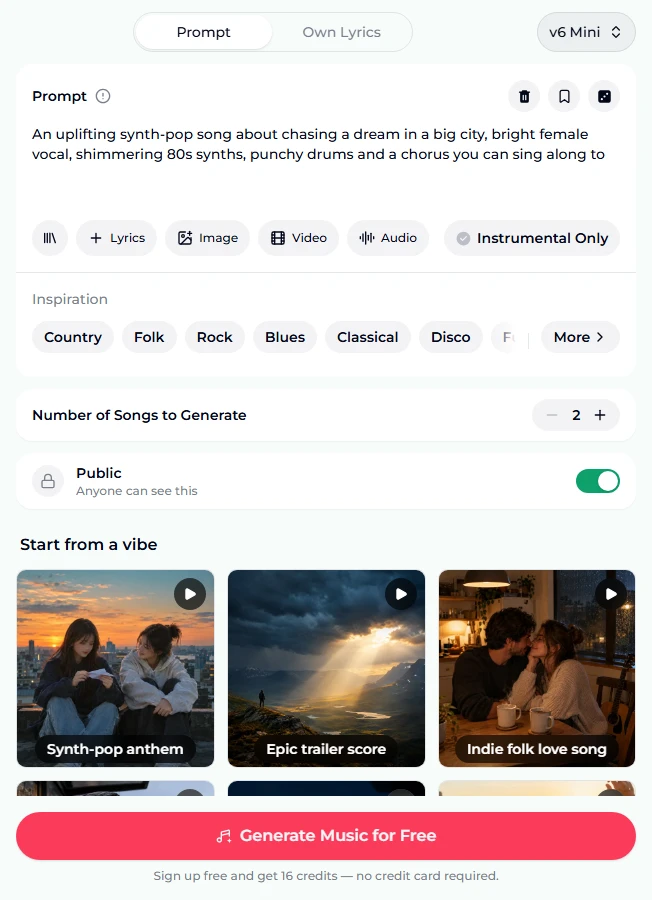
- Get to know the form. Under the Prompt box (up to 500 characters) are a library button, + Lyrics (writes a lyric sheet for you), Image, Video and Audio for reference media, and the Instrumental Only toggle. Then the Inspiration row of genre chips, the Number of Songs to Generate stepper (2 means one run), and the Public switch. Logged out, the button says Generate Music for Free, and the note under it says you get 16 credits on sign-up with no card.
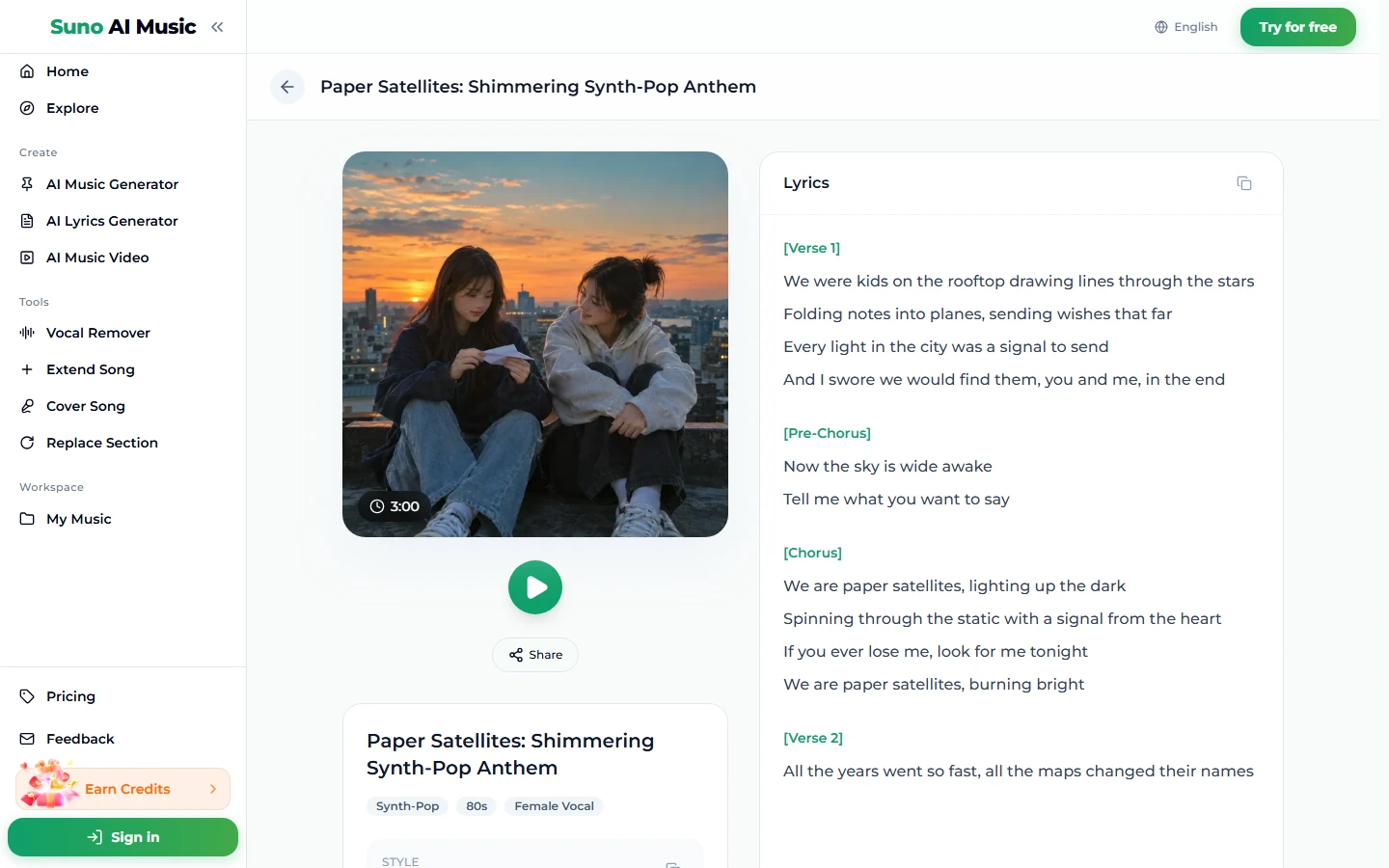
- Tap a vibe. A tile plays its example song and copies its prompt into the box, setting Instrumental Only to match. Tapping Synth-pop anthem loads An uplifting 80s-style synth-pop anthem about two childhood friends who send wishes to the stars from a city rooftop… and starts Paper Satellites, a 3:00 song.
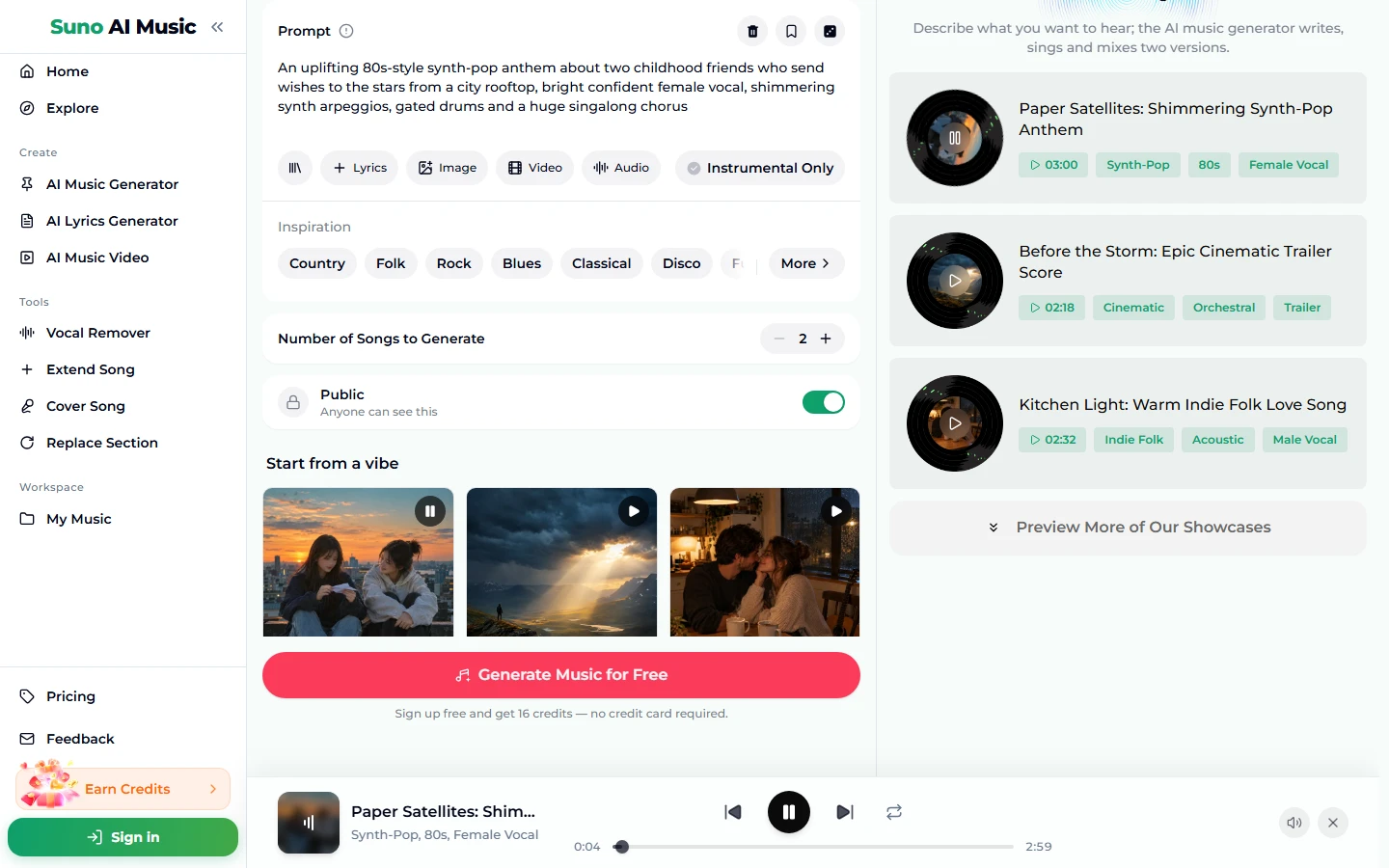
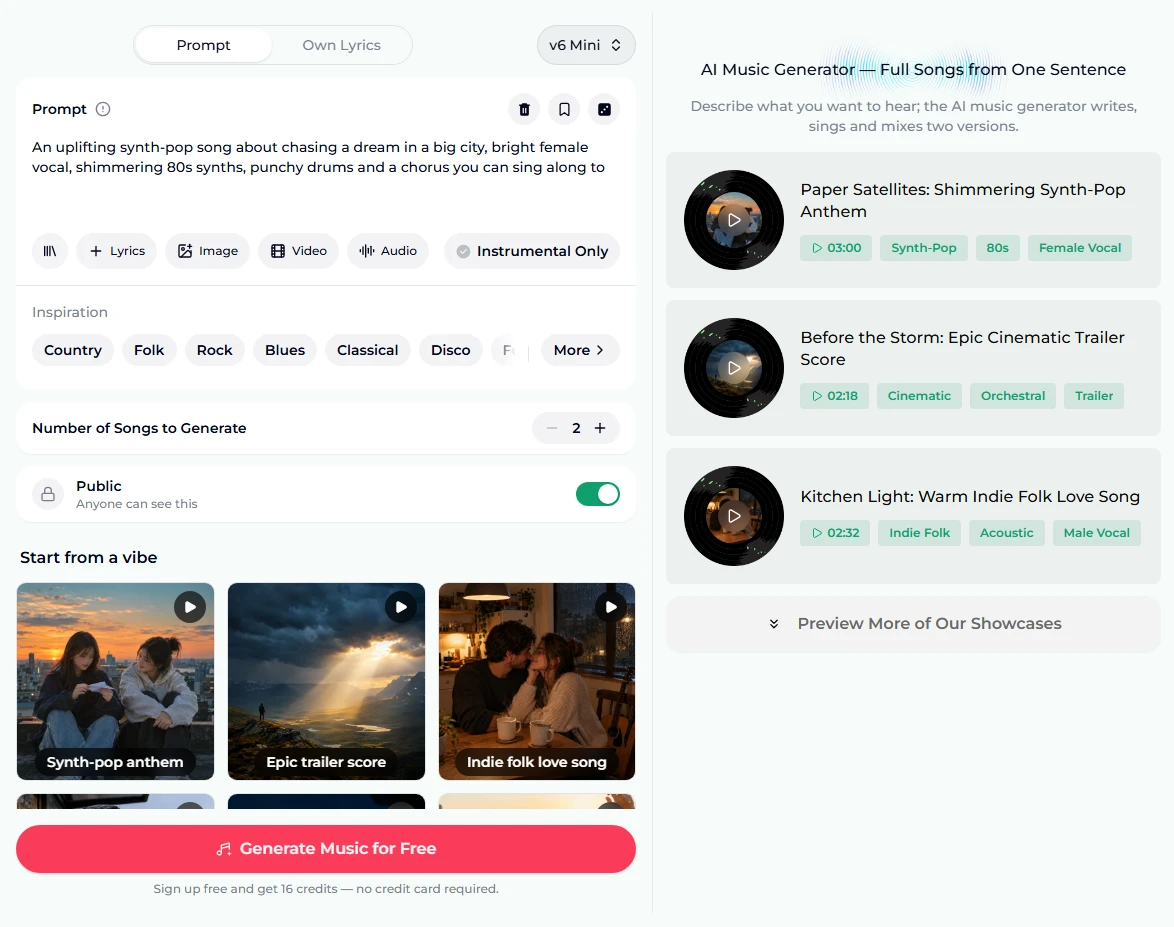
- Browse the examples. The right column lists the showcase songs with their durations and tags, with "Preview More of Our Showcases" underneath. The instrumental examples were made on v6 from exactly their tile's prompt. For the sung ones, we wrote the lyrics and gave v6 a style line in the same direction; the tile's prompt is the one-sentence version of that song, and from it the AI writes new lyrics of its own.
- Open a song page. Each example has its own page, like Paper Satellites, with the cover, play and Share buttons, the tags and the full lyrics. It is a good look at what a finished AI song is: verses, pre-chorus and chorus, labelled.
- Press Generate. Sign up if asked. A run costs 10 credits and returns two songs in about a minute. They land in My Music, your library, where the editing tools can pick them up. They are new songs in the style you described, not copies of the example.
How to write a prompt for AI music
The preset is a working prompt. To make AI music that is yours, write your own. A reliable order:
- Mood and genre: An uplifting 80s-style synth-pop anthem.
- Subject (skip for instrumentals): about two childhood friends who send wishes to the stars.
- Voice: bright confident female vocal.
- Instruments and production: shimmering synth arpeggios, gated drums.
- One structural wish: a huge singalong chorus, building to a full band, huge final hit then silence.
That is the exact shape of the six page prompts below, and it fits comfortably in 500 characters. Some habits that help:
- Describe the sound, not an artist. Artist names are unreliable and you do not want a soundalike anyway. Say what they sound like.
- Put a number on the tempo for instrumentals and dance music.
- Change one thing at a time. If a run is close, swap the genre or the voice or the tempo, not all three. Two versions per run make comparing easy.
- Use Own Lyrics when the words matter. The Own Lyrics tab takes your lyrics (up to 5,000 characters), a style (up to 1,000) and a title (up to 80), and sings your words as written. The lyrics to song page is built around it.
- Try a reference. Image (up to 5 photos) gives the song their mood; Audio (one track, 6 seconds to 30 minutes) lends its feel; Video takes one clip up to about 4 minutes. Same 10 credits either way.
The Suno prompts guide lists more words that reliably change the sound.
Six prompts from the page
These are the six vibes on the AI music generator, with each tile's prompt verbatim:
| Vibe | What it is | Prompt |
|---|---|---|
| Synth-pop anthem | Bright 80s pop with a big chorus, 3:00 example | An uplifting 80s-style synth-pop anthem about two childhood friends who send wishes to the stars from a city rooftop, bright confident female vocal, shimmering synth arpeggios, gated drums and a huge singalong chorus |
| Epic trailer score | Orchestral build, instrumental, 2:18 example | epic cinematic orchestral trailer music, 90 BPM building to 140, low string ostinato, pounding taiko and braams, soaring french horns, choir swelling in the climax, rising tension, huge final hit then silence, hollywood blockbuster sound, wide and powerful mix |
| Indie folk love song | Intimate acoustic song, 2:32 example | A warm, intimate indie folk love song about a couple sharing a late night in a small kitchen while it rains outside, tender male vocal, fingerpicked acoustic guitar, brushed drums and a little harmonica |
| Boom bap hip hop | 90s rap with a sung hook, 2:10 example | A motivational 90s boom bap hip hop track about getting up before dawn to work toward a dream, confident male rap verses, a soulful female hook, dusty soul sample chops and hard knocking drums |
| Liquid drum & bass | Fast, smooth night-drive instrumental, 3:54 example | liquid drum and bass, 174 BPM, rolling breakbeats, deep warm reese bass, lush atmospheric pads, airy piano chords, vocal-like synth leads without words, smooth energetic flow, late-night highway feeling, clean modern mix |
| Afrobeats summer | Sunny party song, 2:31 example | A joyful afrobeats summer party song about dancing with friends at golden hour, smooth sunny female vocal, call-and-response backing vocals, bouncy log drum, shakers and a warm plucked guitar riff |
Notice the two shapes: sung songs read like a sentence (mood, genre, subject, voice, instruments), instrumentals read like a producer's list (genre, BPM, parts, feel, mix). Both work; use the one that matches what you want.
Two untested ideas of our own in the same shapes:
- A tender acoustic lullaby about a grandfather teaching his grandson to fish, soft warm male vocal, fingerpicked guitar and gentle cello
- chillhop instrumental, 85 BPM, mellow jazz guitar, soft boom bap drums, warm upright bass, rainy afternoon feeling
Common beginner mistakes
- Story in place of sound. "A song about my grandmother" has no genre, voice or instruments. Add them, or the model picks for you.
- Stacking genres. jazz, metal, reggaeton is not fusion; it is an average. Pick one and use a second only as a flavour.
- Contradictory moods. calm, aggressive gets averaged into nothing.
- Pasting finished lyrics into the Prompt box. You get a song about your lyrics. Use the Own Lyrics tab.
- Rewriting everything after one miss. Listen to both versions first; often one of them is the song.
- Forgetting the switch. For background music, turn Instrumental Only on, or you may get a vocal.
Choosing a model
The model picker is at the top right of the form. Free accounts generate on v6 Mini ("Fast drafts, high volume"), which is the right place to learn how to make AI music: fast, and good enough to hear whether a prompt works. v6 ("Most powerful, for any song") and v6 Wild ("Best for experimental ideas") need a paid plan. v6 is the most polished and is what the six examples were made on; v6 Wild takes more risks.
Every model costs the same 10 credits a run for two songs. The stepper counts songs in steps of 2, up to 10 (five runs at once). See plans and credit packs for what each tier includes.
After the song is made
Every result is saved to My Music, and each tool below works on songs in your library:
- Too short, or a weak ending? Extend Song continues from any point. Guide: how to extend a song.
- Right song, wrong style? Cover Song re-performs it in another style. Guide: how to make an AI cover.
- One bad section? Replace Section rewrites only that stretch.
- Need the backing or the voice alone? The vocal remover splits a song into two stems: vocals and instrumental.
- Want a video? The music video generator turns a song into one.
- Want to download it? Downloads come with a plan; see pricing.
- Private songs. Switching Public off keeps a song private, which is a paid-plan option.
FAQ
Do I need to know music theory to make AI music?
No. The model handles key, harmony and arrangement. What you need is the vocabulary to describe a sound (genre names, moods, instruments) and the patience to try twice.
How long does it take?
About a minute per run, and each run returns two songs.
Is making AI music free?
You can start free: new accounts get 16 credits with no card, and a run costs 10 credits for two songs on v6 Mini. After that, credits come from a plan or a credit pack.
Can I use AI music commercially, on YouTube or Spotify?
Commercial use, including monetised YouTube videos and Spotify releases, is covered only on the Standard plan and above, 2,500+ credit packs, and Team plans. Songs made with free credits, the Starter plan or the Mini credit pack are for personal use only. Details are on the pricing page.
Can I use my own lyrics?
Yes. The Own Lyrics tab sings your words as written, with a separate style box. No lyrics yet? + Lyrics writes a tagged sheet for 1 credit.
Will my song sound like the example on the tile?
It will be in the same style but it will be a different song. Every run is new, and for the sung examples the AI writes fresh lyrics from the tile's description.
Which generator page should I start on?
They all open the same generator with different presets. The AI music generator covers everything; the AI song maker and song maker focus on sung songs, the music maker on any genre, and the AI instrumental generator on music without vocals.
Final take
How to make AI music, in one line: describe a record, not a feeling. Name the genre, the voice, two or three instruments and a subject, generate two versions, keep the better one, and fix the rest with the tool built for it. Start with a vibe tile on the AI music generator so you hear what a good prompt produces, then change one phrase and make it yours.