
TL;DR
Making AI music for a video is a four-step job: describe the track for the format (a bed for talking, a hook for short-form, an arc for cinematic), generate two takes on the create page for 10 credits, fit it — extend for a long video, trim to the hook for a short one — and deliver: drop the audio into your editor, or, when the music is the video, render it with the music video generator into an MP4 with your name on the cover frame and a watermark along the bottom, in two to five minutes, for another 10 credits. The same track and the same licence work on YouTube, TikTok and Reels; what changes per platform is length, loudness and where the hook sits.
In this guide
- One track, three platforms
- Step 1: Describe the track for the format
- Step 2: Generate two takes
- Step 3: Fit it to the video
- Step 4: Deliver it
- Rendering an MP4 with the music video generator
- Prompt recipes by video type
- Platform rules that matter
- FAQ
One track, three platforms
The platforms want different things from the same piece of music:
| YouTube | TikTok | Instagram Reels | |
|---|---|---|---|
| Typical length | 8–20 min long-form; Shorts under 60 s | 15–60 s | 15–90 s |
| Where the hook goes | Intro sting, then a bed | First 3 seconds | First 3 seconds |
| Music's job | Sit under a voice | Be the sound | Be the sound |
| Loops? | No | Yes | Yes |
| Rights question | Content ID claims | Commercial Music Library limits | Same as TikTok for brand accounts |
The trick is that one generation can serve all three. A full song has a hook, a verse and an instrumental section; the hook becomes the short-form sound, the instrumental section becomes the YouTube bed, and the whole thing becomes the music video. The platform-specific detail lives in the YouTube guide and the TikTok guide; this article is the workflow that connects them.
Step 1: Describe the track for the format
Three kinds of description, depending on what the music has to do:
A bed (talking head, tutorial, vlog voiceover). Simple mode, the Vocal / Instrumental switch set to Instrumental, and a description that says what to leave out: ambient, calm, soft piano, warm pads, no drums, no lead melody, 70 BPM. Under a voice, less is more.
A hook (short-form, transitions, trends). Custom mode. Style as genre, mood, instruments, vocal, tempo; lyrics that start on the [Chorus] so the hook lands in the first three seconds. Two lines that name the format — "get ready with me", "wait for it" — are the lines people lip-sync.
An arc (cinematic b-roll, travel, montage). Simple mode, Instrumental on, and a description with a shape in it: cinematic, emotional, strings, slow build, piano motif, big swell at the end, 75 BPM. The model follows "slow build" and "swell at the end" more reliably than most people expect.
The four-part formula behind all three is in the prompts guide; the bracket tags for the hook version are in the tags guide.
Step 2: Generate two takes
Every run costs 10 credits and returns two complete songs. They differ more than you would guess — a different tempo feel, a different hook melody — and the second is the keeper about half the time. Listen to both on the device the audience will use: a phone speaker for short-form, laptop speakers for YouTube. Sub-bass and delicate reverb do not survive a phone; a hook that lives in the mids does.
If neither take is right, change one thing in the prompt and run again rather than rewriting it. A new account has 16 free credits, so the first generation costs nothing; after that, plans and one-time packs are on the pricing page.
Step 3: Fit it to the video
Too short (a 12-minute video, a 3-minute track): extend rather than loop. Pick the song, set the extension point at the end of a phrase — the [Instrumental] section is the cleanest cut — and the model continues the arrangement; three passes take a bed to nine or ten minutes with no audible seam. The extend guide has the details on where to cut.
Too long (a 20-second Reel, a 3-minute track): trim in the editor to the hook you chose, and make the cut land on a beat. Fade the last half-second so the loop point is clean.
Right sound, wrong section: replace the section that fights the edit — a bridge that drops the energy where the montage peaks — and keep everything else.
You need the instrumental of a vocal take: run the vocal remover on it and you have the bed and the acapella, both usable — the bed under your voice, the acapella for a sting.
Step 4: Deliver it
Two routes, and most creators use both:
- Audio into your editor. Download the track, drop it into CapCut, Premiere, DaVinci or the platform's own editor, cut the footage to the music, duck it under speech (music 18–22 dB below the voice for talking content), export. This is the route for anything with your own footage.
- Render the video on the site. When the music is the content — a lyric video, a visualizer, a sound you are launching, a track for a music channel — the music video generator makes the MP4 without an editor. Next section.
Rendering an MP4 with the music video generator
Open the AI music video generator. The form has three fields:
- Select Song — any finished track in your library, including extensions, covers and section-replaced versions.
- Author Name (optional) — printed on the video's cover frame, up to 50 characters. Use your channel or artist name.
- Watermark (optional) — your website, along the bottom of the video, for the version that will get reposted.
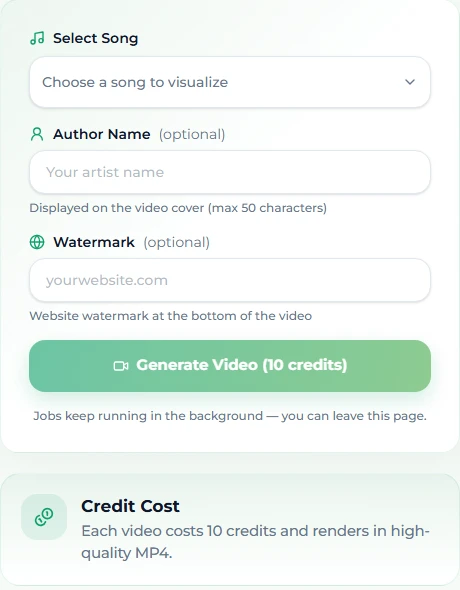
Press Generate Video (10 credits). The job composes visuals matched to the music and usually takes two to five minutes; it runs in the background, so you can leave the page and collect the result from your library. The output is an MP4 sized for social platforms — YouTube, TikTok, Instagram — and it is available to download for 14 days, so grab it when it is ready. The commercial licence on the song covers the video as well; there is no separate export fee.
What it is good for: the video that introduces a sound before you have footage; lyric videos and visualizers; a music channel's uploads; a sound-only post on TikTok where the visuals just need to move. What it is not: an editor for your own footage — that is route one.
Prompt recipes by video type
| Video type | Mode | Description / style |
|---|---|---|
| Talking head, essay | Simple, Instrumental | ambient, calm, soft piano, warm pads, no drums, no lead melody, 70 BPM |
| Tutorial, screencast | Simple, Instrumental | lo-fi hip hop, calm, warm Rhodes, soft brushed drums, vinyl crackle, 80 BPM |
| Vlog | Simple, Instrumental | indie folk, bright, acoustic guitar, light shaker, hopeful, 105 BPM |
| Short-form hook | Custom | indie pop, sunny, handclaps, female vocal, 110 BPM + a [Chorus]-first sheet |
| Transition / trend | Custom | hyperpop, explosive, glitchy synths, pitched-up vocal, hard drop, 150 BPM |
| Cinematic b-roll | Simple, Instrumental | cinematic, emotional, strings, slow build, piano motif, big swell at the end, 75 BPM |
| Gaming | Simple, Instrumental | synthwave, driving, arpeggiated synths, punchy drums, 120 BPM |
| Intro sting | Custom | pop punk, energetic, power chords, gang vocals, 160 BPM + a two-line [Chorus] naming the channel |
| Lyric video / visualizer | Custom, then render | Any full song — the video generator does the visuals |
Generate two or three per category once and keep them in your library. The beds get reused for months; the hooks get covered into new genres when a format changes.
Platform rules that matter
Short version; the platform guides go deeper.
- YouTube allows AI music and monetizes channels that use it. The "altered or synthetic content" disclosure is for realistic synthetic material — a generated person, a cloned voice — not for an instrumental bed. Content ID cannot claim a track nobody has registered; do not register it against yourself through a distributor without whitelisting your channel.
- TikTok limits business accounts to its Commercial Music Library for licensed songs, which is exactly why an owned track is the easy answer. The AI label applies to realistic synthetic visuals and to audio imitating real people; original music does not need it. Anything that imitates a real artist's voice is being removed under the platform's label agreements.
- Instagram / Reels follows the same logic as TikTok for brand accounts: licensed catalogue music is restricted for commercial use, owned music is not.
On every platform: describe a sound, never name a singer. A prompt built on a real artist's name is the one thing a licence cannot protect.
FAQ
Can I use the same AI track on YouTube, TikTok and Reels?
Yes. Make one full track; the hook serves short-form, the instrumental section serves long-form, and the licence is the same everywhere.
How do I make an AI music video without editing software?
Pick a finished song in the music video generator, add an optional author name and watermark, and generate. The MP4 renders in two to five minutes for 10 credits.
How long is the rendered video?
It follows the track. For a shorter video, trim the song first — or generate a shorter section and render that.
Does the licence cover the video?
Yes. On the Standard plan and above the commercial licence covers the song and the video rendered from it, with a certificate you can download.
How do I get a ten-minute background track?
Extend a two- or three-minute bed in passes, cutting at the end of a phrase each time; three passes reach nine or ten minutes without a loop seam.
Do I have to label the video as AI?
Only if the visuals are realistic synthetic content, or a voice imitates a real person. An original AI track under your own footage does not require a label on YouTube or TikTok.
Final take
Describe it for the format, generate two takes, fit it with extend or a trim, and deliver it — into your editor, or straight to an MP4 with your name on it. Start with one full song on the create page; it will be the sound of three platforms by the end of the afternoon, and when it needs to be a video, the music video generator is one form away.